OnlyScans: PDF & Doc Scanner is made and published by
Gretchen Alaras.
AppBrain is an independent app data site and isn't affiliated with Gretchen Alaras.
The app name, icon, screenshots and description belong to Gretchen Alaras and are shown as
published on the App Store.
About OnlyScans: PDF & Doc Scanner
OnlyScans: PDF & Doc Scanner is a productivity app developed by Gretchen Alaras.
What is the rating of OnlyScans: PDF & Doc Scanner?
OnlyScans: PDF & Doc Scanner has no ratings yet.
Is OnlyScans: PDF & Doc Scanner free?
OnlyScans: PDF & Doc Scanner is free. The app size is 22.16 MB. The latest version available is 1.0.12. The last update was on September 28, 2026.
What are the requirements for OnlyScans: PDF & Doc Scanner?
The app has a content rating of Everyone. The app has been available on the App Store since July 2026.
Description by Gretchen Alaras(from the App Store)
Turn receipts, forms and everyday paperwork into clean PDFs on your iPhone. Scan a single page and export it free, without a watermark or an account.
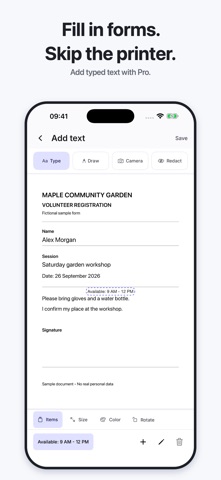
Keep your paperwork organized with folders, pinning and search. Upgrade to Pro to scan multiple pages in a batch, create searchable PDFs with OCR, and add a signature or typed text before sharing.
Scanning, enhancement, OCR and export run on your device. Optional OCR language packs may need a download first. Choose when and where to save or share your files.
Start free. Pro is available monthly, yearly or with a one-time Lifetime purchase.
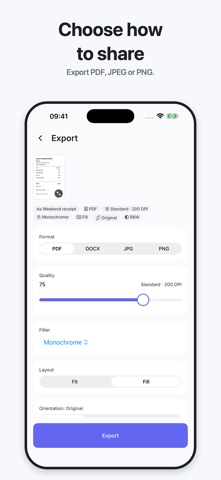
START FREE • Single-page scanning with automatic edge detection and perspective correction • Crop, rotate, adjust brightness and contrast, and choose a filter for each page • Export PDF, JPEG or PNG without watermarks • Organize documents with folders, pinning and search • Merge, split and reorder pages • Keep your original scan so you can change edits later
DO MORE WITH PRO • Batch scanning for multi-page paperwork • OCR text recognition and searchable PDF output • Signatures and typed text on your documents • ID-card and passport scanning • PDF import and password-protected PDF export • Optional automatic saving to Files or iCloud Drive • App Lock with Face ID or Touch ID
CHOOSE HOW TO UPGRADE Use the free tools for single-page scans. Choose Pro monthly or yearly, or get Pro with a one-time Lifetime purchase.
Subscriptions renew automatically unless cancelled at least 24 hours before the end of the current period. Payment is charged to your Apple Account at confirmation. Manage or cancel subscriptions in your App Store account settings. Terms of Use: https://www.apple.com/legal/internet-services/itunes/dev/stdeula/ Privacy Policy: https://onlyscans.app/en/privacy-policy-ios Support: https://onlyscans.app/en/support
Each subscription will automatically renew 3 days before the expiration date for
the same time period. Subscriptions can be cancelled at any time before the renewal.