

OnsiteBIM is made and published by Mihir Patel. AppBrain is an independent app data site and isn't affiliated with Mihir Patel. The app name, icon, screenshots and description belong to Mihir Patel and are shown as published on the App Store.
AppBrain's verdict
- Last updated
- September 30, 2026
- Size
- 22.4 MB
User feedback
Ratings and reviews on the App StoreComments on OnsiteBIM for iOS
We don't have enough comments to show example comments. Please check back later.
Store listing
By Mihir Patel, from the App Store


Description by Mihir Patel Written by the developer, not by AppBrain. Click to read.
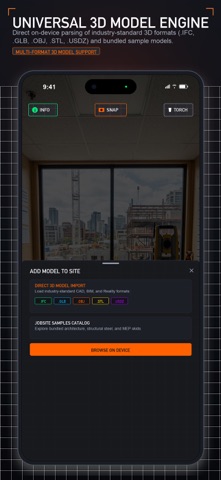
OnsiteBIM brings BIM and construction together by placing 3D building models directly into the real world using your iPhone or iPad.
Inspect, navigate, measure, and compare digital building models against physical construction—from active floor plates and mechanical rooms to basements and remote jobsites.
HOW IT WORKS — FROM OFFICE TO JOBSITE
Open Your 3D Model
Open BIM and CAD models directly from your device, Apple Files, iCloud Drive, Google Drive, OneDrive, Dropbox, Egnyte, or other supported storage.
Place Your Alignment Target
Tape a printed Alignment Target to a known column, wall, or floor benchmark. Free print-ready targets and Revit families can be generated by your office or VDC team using the tools at www.onsitebim.app.
Aim Your Camera & Inspect at 1:1 Scale
Point your camera at the target, and your 3D model locks into place at 1:1 scale for real-world inspection.
Alignment Targets are physical positioning anchors for your models—not QR codes or download links.
POSITION YOUR MODEL YOUR WAY
Use Alignment Targets for automatic positioning or place models manually when targets aren't available.
• Auto Target Alignment — Position models in real-world space using a printed Alignment Target, including position, elevation, and orientation.
• Manual Surface Placement — Place models on floor surfaces using joystick navigation, rotation controls, and elevation nudging.
SEE EXACTLY WHAT MATTERS
Filter individual BIM and CAD layers or use MEP ONLY to instantly hide architectural elements and isolate the systems you need.
• HVAC ductwork
• Plumbing pipes
• Fire suppression
• Electrical conduits and cable trays
• Structural elements and rebar sleeves
WORK WITH MAJOR BIM & 3D FORMATS
Open models without requiring cloud conversion:
• IFC — OpenBIM models, including IFC 2x3 and IFC4
• GLB & glTF — 3D models with PBR materials
• USDZ — Apple spatial 3D models
• OBJ & STL — 3D geometry with selectable measurement units
Compatible with models exported from Autodesk Revit, Navisworks, SolidWorks, Archicad, Rhino, and SketchUp.
MIX DIGITAL MODELS WITH THE REAL WORLD
Use supported LiDAR-equipped devices to improve spatial understanding between your digital model and physical surroundings.
• Real-Time LiDAR Occlusion — Physical walls, slabs, columns, and other surfaces can hide virtual geometry positioned behind them.
• Interactive Transparency — Inspect digital building systems behind physical surfaces or inside concrete forms.
CONTROL MODEL VISIBILITY
Adjust model opacity from 0% to 100% to cross-reference virtual MEP runs, conduit racks, equipment, and other building elements against physical jobsite conditions.
MEASURE IN 3D
Use the surface-aligned 3D tape measure to verify clearances, slab elevations, and spatial relationships between physical surfaces and virtual model elements.
Measurements are displayed in metric and imperial units.
WORK WITHOUT THE CLOUD
OnsiteBIM is designed for jobsites where network connectivity isn't always available.
• On-Device Processing — 3D model parsing, spatial tracking, and rendering run directly on your device.
• Work Offline — Inspect models in basements, mechanical rooms, tunnels, and remote jobsites without Wi-Fi or cellular connectivity.
• Private by Design — Your 3D model geometry remains on your device during model processing and inspection.
BUILT FOR THE JOBSITE
A field-focused interface designed for active construction environments:
• High-contrast HUD for bright outdoor environments
• Large, glove-friendly touch targets
• 2D directional joystick navigation
• Precision elevation nudging
• Thermal and battery optimization for extended inspection sessions
COMPANION WEB TOOLS
Free tools for offices and VDC teams, including Revit families, IFC export profiles, and Alignment Target generation, are available at www.onsitebim.app.
Bring your BIM model to the jobsite.
Safety and technology
Found in the app by AppBrain- Price
- Free
- App size
- 22.4 MB
- Content rating
- Everyone
Technologies used by OnsiteBIM
Releases
Updates seen on the App Store- Version
- 2.0.0
- Launched
- August 2026
No changelog data
Alternatives
Similar apps and more from Mihir PatelAlternatives to OnsiteBIM







Rankings
App Store top chartsApp Store Rankings for OnsiteBIM
About the app and developer
About OnsiteBIM
OnsiteBIM is an utilities app developed by Mihir Patel.
User Ratings
The app has no ratings yet.
App Information
OnsiteBIM is freely available from the App Store. The app size is 22.41 MB. The latest version available is 2.0.0. The last update was on September 30, 2026.
Technical Requirements
The app has a content rating of Everyone. The app has been available on the App Store since August 2026.
Developer information for Mihir Patel
Address: