AppBrain
AppBrain
  • Apps
  • Apps being viewed right now Trending apps today Most popular apps All-time most installed apps Top rated apps iPhone and iPad apps
  • Intelligence ▾
    Intelligence overview → Track any Android app or your whole market
    Track & analyze
    Keyword Tracker & OptimizerTrack & improve Play rankings App Performance ReportOne-off PDF for any app StatisticsFree Android & Play market stats
    Promote your app
    Featured Apps App Links
  • Intelligence
  • Pricing
  • Dashboard
  • Sign up
  • Log in
App Store Apps > Productivity > OnTimer: Calendar Alarm
App profile & analytics · Productivity · Data updated 2026-10-20
OnTimer: Calendar Alarm icon

OnTimer: Calendar Alarm

by Ethan Garr · Free · Version 1.2.23
Availability On the App Store since March 2026 ↗
Rating on App Store
4.65/5
23 ratings
Rating
4.65
23 reviews
Best rank
–
not in the top lists
Last updated
October 16, 2026
1.2.23
AppBrain's verdict

It doesn't have enough ratings yet to judge what users think.

OnTimer: Calendar Alarm is made and published by Ethan Garr. AppBrain is an independent app data site and isn't affiliated with Ethan Garr. The app name, icon, screenshots and description belong to Ethan Garr and are shown as published on the App Store.

About OnTimer: Calendar Alarm

OnTimer: Calendar Alarm is a productivity app developed by Ethan Garr.

User Ratings

OnTimer: Calendar Alarm is rated 4.65 out of 5 stars. The rating is based on 23 ratings.

App Information

OnTimer: Calendar Alarm is freely available from the App Store. The app size is 33.44 MB. The latest version available is 1.2.23. The last update was on October 16, 2026.

Technical Requirements

The app has a content rating of Everyone. The app has been available on the App Store since March 2026.

Description by Ethan Garr (from the App Store)
“Are you joining the meeting?”

If you've ever gotten that message while you were sidetracked by an email, a task, or one more thing, OnTimer is for you. Calendar notifications are easy to swipe away. OnTimer turns your calendar into real alarms, so a missed notification doesn't become a missed meeting, or a missed flight.

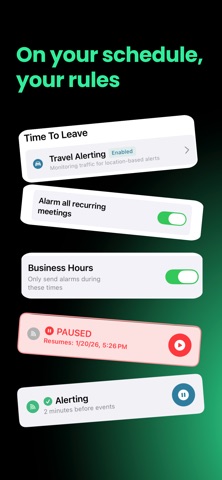
Connect your Google, Outlook, or Apple Calendar once, and OnTimer does the rest: a persistent alarm when it's time to act, a Time to Leave alert when it's time to head out, and now Time to Fly for every flight on your calendar.

NEW: TIME TO FLY

Every flight on your calendar gets an alarm when it's time to leave for the airport. OnTimer recognizes flights your email and travel apps add to your calendar, or just put the airport code, like JFK, in an event's location.

Your leave time combines airline-recommended arrival times (2 hours domestic, 3 hours international) with your drive, parking, and whether you're checking a bag. Connecting flights don't get a second alarm, and you can adjust any flight from its card.

CUSTOM ALARM SOUNDS

Make your alarms your own. Choose a sound for your main alarm and another for Time to Leave alerts, or give one event its own sound. Preview every sound for free. More sounds are coming soon.

HOW IT WORKS

OnTimer uses your calendar as the source of truth. When your schedule changes, your alarms stay in sync, so you never create or maintain alarms by hand.

Unlike notifications that disappear after a swipe, OnTimer's alarms keep reminding you until you dismiss them. High Alert can ring through Silent mode and Focus on iOS 26.1 and later. Prefer quieter alerts? Medium Alert respects Focus.

TIME TO LEAVE ALERTS

For events with a location, OnTimer watches traffic and tells you exactly when to head out. Choose your travel mode and add a departure buffer.

ESPECIALLY HELPFUL IF YOU

• See calendar reminders and still leave late
• Get focused and lose the last few minutes before a call
• Need alarms that keep going until you act
• Use more than one calendar
• Experience time blindness or notification overload

FREE

• Connect one Google, Outlook, or Apple Calendar
• Automatic alarms for every calendar event
• Persistent alarms with High and Medium Alert
• Time to Fly airport alarms
• Recurring event controls
• Focus & Silent Mode settings

PREMIUM

• Connect multiple calendars across work and personal life
• Time to Fly live traffic updates and a night-before heads-up
• Time to Leave alerts with live traffic
• Early Warning alerts before your main alarm
• Custom alarm timing for individual events
• Custom alarm sounds
• Business Hours
• 7-day free trial on the annual plan

OnTimer works quietly in the background, so you never have to think about setting alarms again.

Download OnTimer today and never be late again.

Some features require a paid subscription. Monthly and annual subscription options are available in the app. Pricing varies by region and is shown before purchase.

Terms of Use:
https://www.apple.com/legal/internet-services/itunes/dev/stdeula/
Show more Show less

Screenshots

OnTimer: Calendar Alarm Screenshot 1 of 10
OnTimer: Calendar Alarm Screenshot 2 of 10
OnTimer: Calendar Alarm Screenshot 3 of 10
OnTimer: Calendar Alarm Screenshot 4 of 10
OnTimer: Calendar Alarm Screenshot 5 of 10
OnTimer: Calendar Alarm Screenshot 6 of 10
OnTimer: Calendar Alarm Screenshot 7 of 10
OnTimer: Calendar Alarm Screenshot 8 of 10
OnTimer: Calendar Alarm Screenshot 9 of 10
OnTimer: Calendar Alarm Screenshot 10 of 10
Screenshots by Ethan Garr, from the the App Store listing
Official page on the App Store

Alternatives to OnTimer: Calendar Alarm

Meeting Alarm: Calendar Alerts icon Meeting Alarm: Calendar Alerts
Vaibhav Parashar
1.0
Free
2 ratings
Unmissable: Calendar Alarm icon Unmissable: Calendar Alarm
Remi Herbiet
3.0
Free
1 ratings
Lighting Gel Combiner icon Lighting Gel Combiner
Luce Benediet estek
0.0
$3.99
Cal2Alarm: Alarm from Calendar icon Cal2Alarm: Alarm from Calendar
Leo Apps LLC
5.0
Free
3 ratings
ToDo Alarm: Reminder via Alarm icon ToDo Alarm: Reminder via Alarm
Latch Creative Studios, LLC
0.0
Free
Spicy Focus: ADHD Timer icon Spicy Focus: ADHD Timer
Sina Sima
5.0
Free
1 ratings
Call to Meet: Meeting Alarm icon Call to Meet: Meeting Alarm
Ismael Florit
0.0
Free
the BARTR icon the BARTR
Nader M Shehadeh
5.0
Free
1 ratings

Changelog of OnTimer: Calendar Alarm

No changelog data

Developer information for Ethan Garr

Ethan Garr

Address:

Share OnTimer: Calendar Alarm

Comments on OnTimer: Calendar Alarm for iOS

We don't have enough comments to show example comments. Please check back later.

App Store Rankings for OnTimer: Calendar Alarm

This app is not ranked

Technologies used by OnTimer: Calendar Alarm

Frequently asked questions about OnTimer: Calendar Alarm

Is OnTimer: Calendar Alarm free?

Yes. OnTimer: Calendar Alarm is free on the App Store.

Is OnTimer: Calendar Alarm still available?

Yes. OnTimer: Calendar Alarm is on the App Store, and the last update we saw was on October 16, 2026.

How large is OnTimer: Calendar Alarm?

OnTimer: Calendar Alarm is 33.44 MB.

Is OnTimer: Calendar Alarm suitable for children?

App Store rates the content of OnTimer: Calendar Alarm as suitable for everyone.

How do people rate OnTimer: Calendar Alarm?

OnTimer: Calendar Alarm scores 4.65 out of 5 stars, from 23 ratings on the App Store.

Who made OnTimer: Calendar Alarm?

OnTimer: Calendar Alarm was developed by Ethan Garr. It is listed in the productivity category on the App Store.

What are the best alternatives to OnTimer: Calendar Alarm?

People looking at OnTimer: Calendar Alarm also look at these productivity apps: Meeting Alarm: Calendar Alerts, Unmissable: Calendar Alarm, Lighting Gel Combiner, Cal2Alarm: Alarm from Calendar, ToDo Alarm: Reminder via Alarm.

Today's trending apps Popular Productivity Apps Price drops on Google Play Top new apps Apps other people are watching
Meeting Alarm: Calendar Alerts icon Meeting Alarm: Calendar Alerts
Unmissable: Calendar Alarm icon Unmissable: Calendar Alarm
Lighting Gel Combiner icon Lighting Gel Combiner
Cal2Alarm: Alarm from Calendar icon Cal2Alarm: Alarm from Calendar
ToDo Alarm: Reminder via Alarm icon ToDo Alarm: Reminder via Alarm
Spicy Focus: ADHD Timer icon Spicy Focus: ADHD Timer
Call to Meet: Meeting Alarm icon Call to Meet: Meeting Alarm
the BARTR icon the BARTR
Overview Alternatives Reviews Rankings Technology
AppBrain Intelligence premium content

Subscribe now to get full and unlimited access to AppBrain Intelligence. You'll have access to:

  • App Intelligence dashboard (performance timeline, competitor comparison, country rankings, insight cards)
  • Detailed ranking data per app
  • Full timeline per developer
  • Device market shares data per country
  • Unlimited keyword tracking
1 Month

$75/mo
(billed every month)

SAVE 0%
Subscribe
3 Months

$65/mo
($195 billed every 3 months)

SAVE 13%
Subscribe
1 Year

$57.50/mo
($690 billed every year)

SAVE 23%
Subscribe
Each subscription will automatically renew 3 days before the expiration date for the same time period. Subscriptions can be cancelled at any time before the renewal.

AppBrain is an app data site, we track rankings, ratings, installs for all apps and games on Google Play and the App Store. AppBrain doesn't host app files or APKs, all install links go directly to the official store. All trademarks are owned by their respective owners. As an Amazon Associate AppBrain earns from qualifying purchases.

More apps

  • Top Android apps being viewed
  • Learn to Draw Anime by Steps
  • A9 Mini Camera Wifi App Guide
  • War Drone: 3D Shooting Games

App statistics

  • Android statistics
  • Google Play Developer stats
  • Trending Android Apps
  • Trending iOS apps
  • Top popular Apps
  • Buy the best Android phone
  • Buy & sell app businesses

About AppBrain

  • Contact
  • Privacy
  • Documentation
  • DMCA takedowns
  • Articles
  • Blog
  • Free webpage for your Android app
© 2010-2026 - AppBrain