

Oopi - image to AI note
Oopi - image to AI note is made and published by Marat Safutdinov. AppBrain is an independent app data site and isn't affiliated with Marat Safutdinov. The app name, icon, screenshots and description belong to Marat Safutdinov and are shown as published on the App Store.
AppBrain's verdict
- Last updated
- February 22, 2026
- Size
- 53.9 MB
User feedback
Ratings and reviews on the App StoreComments on Oopi - image to AI note for iOS
We don't have enough comments to show example comments. Please check back later.
Store listing
By Marat Safutdinov, from the App Store





Description by Marat Safutdinov Written by the developer, not by AppBrain. Click to read.
Tired of the tedious process of retyping text from screenshots? You capture screenshots of YouTube lectures, presentations, or handwritten notes, then spend hours on manual typing. Constantly switching between apps and online OCR services breaks my flow and kills productivity.
INSTANT SCREENSHOT TO TEXT CONVERSION
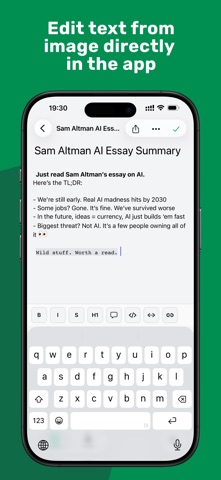
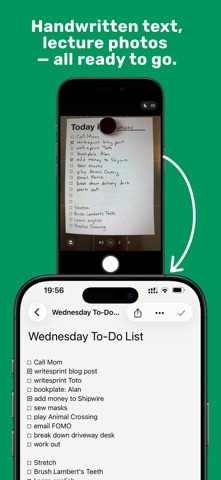
Forget about multi-step hassle and cumbersome copying. Oopi uses advanced OCR technology to extract text from screenshots of any type — from presentation slides to handwritten notes. One tap and your screenshot becomes a fully editable note with preserved structure.
SOLUTION FOR STUDENTS AND PROFESSIONALS
Recording video lectures? Oopi is perfect for taking notes from online courses and webinars. Capture important moments, and the app automatically creates editable notes you can enhance with your own thoughts. No more pausing videos to manually typing information.
Working with presentation slides? Save key slides from meetings and conferences as text notes with one touch. Our image to text feature works even with complex layouts and diagrams.
Digitizing handwritten notes? Oopi recognizes handwritten text, helping you transfer years of paper records into digital format without retyping every page.
BENEFITS THAT SAVE HOURS OF YOUR TIME
Offline OCR — extract text from images without internet connection. Your data remains confidential and isn't sent to external servers. Especially important when working with internal company documents.
Automated process — no need to manually create notes, copy text, or switch between apps. Oopi does everything automatically: from text extraction to organizing convenient screenshot notes.
Streamline workflow — one app instead of multiple tools. Screenshot, recognition, editing, and storage all in one place. This is a truly quick and straightforward solution for those who value their time.
Smart notes with AI features — the app doesn't just convert screenshots, but helps structure information by highlighting key points and creating convenient navigation.
REAL TIME SAVINGS
Users report that the ability to extract text from screenshots saves them 15-20 copy-paste operations daily. Instead of the tedious 6-step ordeal of uploading each photo, prompting, copying results, and editing, Oopi offers an instant solution.
No more cumbersome multi-step manipulations with lasso tool, selection, Share, and Copy. The process of digitizing notes becomes as fast as taking the screenshot itself.
FOR ANY USE CASE
Meeting notes — quickly capture information from whiteboards and flipcharts during meetings
Scanned PDF — extract text from scanned documents for further editing
Study materials — create summaries from textbooks with one tap
Research — collect quotes and excerpts from articles without manually retyping
PRODUCTIVITY WITHOUT COMPROMISE
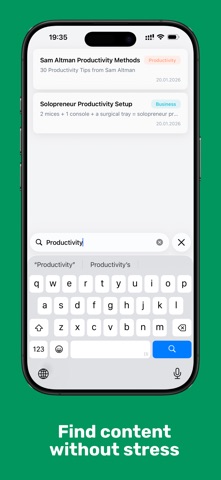
Oopi is more than just an OCR scanner. It's a comprehensive note taking solution that understands your workflow and adapts to it. Intelligent note organization, quick text search, tags, and categories — everything for maximum productivity.
No waiting for server uploads or downloading results — everything happens instantly, ensuring maximum processing speed and data protection.
SIMPLICITY AND POWER
Intuitive interface requires no training. Took a screenshot? Oopi automatically suggests to convert screenshot to editable text. One tap and you're done. This is truly a one-step solution that was so missing.
START SAVING TIME TODAY
Stop wasting precious minutes on manually typing text. Let Oopi automate the routine and focus on what really matters — working with information, not transferring it.
Download Oopi and feel the difference between a tedious multi-step process and instant conversion. Your productivity deserves better tools.
Oopi — turning screenshots into knowledge, not routine.
Safety and technology
Found in the app by AppBrain- Price
- Free
- App size
- 53.9 MB
- Content rating
- Low
Technologies used by Oopi - image to AI note
Releases
Updates seen on the App Store- Version
- 1.7.0
- Launched
- February 2026
No changelog data
Alternatives
Similar apps and more from Marat SafutdinovAlternatives to Oopi - image to AI note


More from Marat Safutdinov


Rankings
App Store top chartsApp Store Rankings for Oopi - image to AI note
About the app and developer
About Oopi - image to AI note
Oopi - image to AI note is a productivity app developed by Marat Safutdinov.
User Ratings
The app has no ratings yet.
App Information
Oopi - image to AI note is freely available from the App Store. The app size is 53.94 MB. The latest version available is 1.7.0. The last update was on February 22, 2026.
Technical Requirements
The app has a content rating of Low Maturity. The app has been available on the App Store since February 2026.
Developer information for Marat Safutdinov
Address: