

OOTD: Closet & Outfit Planner
OOTD: Closet & Outfit Planner is made and published by 佳文 陈. AppBrain is an independent app data site and isn't affiliated with 佳文 陈. The app name, icon, screenshots and description belong to 佳文 陈 and are shown as published on the App Store.
AppBrain's verdict
- Last updated
- September 14, 2026
Rankings
App Store top chartsApp Store Rankings for OOTD: Closet & Outfit Planner
Competitors
Similar apps and more from 佳文 陈Alternatives to OOTD: Closet & Outfit Planner


More from 佳文 陈


Releases
Updates seen on the App Store- Version
- 1.0
- Launched
- September 2026
No changelog data
User feedback
Ratings and reviews on the App StoreComments on OOTD: Closet & Outfit Planner for iOS
We don't have enough comments to show example comments. Please check back later.
Technology
Found in the app by AppBrain- Price
- Free
- App size
- 3.99 MB
- Content rating
- Everyone
Technologies used by OOTD: Closet & Outfit Planner
About the app and developer
About OOTD: Closet & Outfit Planner
OOTD: Closet & Outfit Planner is a lifestyle app developed by 佳文 陈.
User Ratings
The app has no ratings yet.
App Information
OOTD: Closet & Outfit Planner is freely available from the App Store. The app size is 3.99 MB. The latest version available is 1.0. The last update was on September 14, 2026.
Technical Requirements
The app has a content rating of Everyone. The app has been available on the App Store since September 2026.
Developer information for 佳文 陈
Address:
Frequently asked questions about OOTD: Closet & Outfit Planner
Is OOTD: Closet & Outfit Planner free?
Yes. OOTD: Closet & Outfit Planner is free on the App Store.
Is OOTD: Closet & Outfit Planner still available?
Yes. OOTD: Closet & Outfit Planner is on the App Store, and the last update we saw was on September 14, 2026.
How large is OOTD: Closet & Outfit Planner?
OOTD: Closet & Outfit Planner is 3.99 MB.
Is OOTD: Closet & Outfit Planner suitable for children?
App Store rates the content of OOTD: Closet & Outfit Planner as suitable for everyone.
Who made OOTD: Closet & Outfit Planner?
OOTD: Closet & Outfit Planner was developed by 佳文 陈. It is listed in the lifestyle category on the App Store.
What are the best alternatives to OOTD: Closet & Outfit Planner?
People looking at OOTD: Closet & Outfit Planner also look at these lifestyle apps: Adou - Anxiety & Stress Relief, PlanMyPet — Pet Care Planner, Tennis Day: AI Tennis Coach, TimeJar - Expiry Date Tracker, MOOTD.
Store listing
By 佳文 陈, from the App Store



Description by 佳文 陈 Written by the developer, not by AppBrain. Click to read.
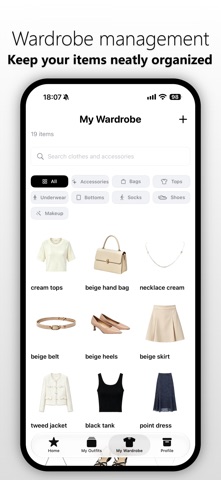
OOTD turns the clothes you already own into a visual digital closet. Add clothing, accessories, underwear, shoes, makeup, or outfit photos from your camera or photo library. On-device Vision processing removes backgrounds and saves clean stickers you can mix and match.
FEATURES
• On-device cutouts: Turn clothing, accessories, shoes, and makeup photos into transparent stickers. Image processing happens on your device.
• Digital closet: Organize items by category, search your collection, and add tags.
• Outfit building: Combine individual pieces, add outfit photos, and set names, seasons, and display dates.
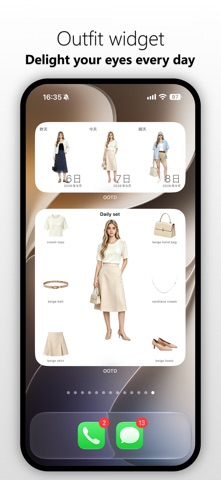
• Today’s outfit: Open the Home screen to see the outfit scheduled for today.
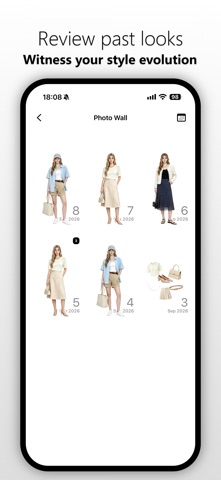
• Calendar and photo wall: Review your outfit plans and past looks by date.
• Outfit anatomy boards: Arrange people, clothing items, arrows, and frames on one canvas to create shareable outfit boards.
• Random outfit ideas: Pick items from your closet at random when you need fresh inspiration.
• Home Screen widget: See today’s outfit without opening the app.
The free version includes up to 30 wardrobe items, 5 saved outfits, and 1 outfit anatomy export per day.
OOTD Pro unlocks:
• Unlimited wardrobe items and outfits
• Outfit anatomy frames
• Custom anatomy-board watermark settings
• Data export and restore
• Home Screen widgets
• Random outfit generation
Camera and photo permissions are used only to add, process, and save outfit images. Your photos, closet items, and outfit records are stored on your device by default. When you use the system sharing feature, only the content you choose is sent to the destination app.
Some features require OOTD Pro. Subscriptions are charged to your Apple Account and renew automatically unless canceled. You can manage or cancel subscriptions in your Apple Account settings.
----Terms of Service:https://pollen-mochi-360.notion.site/OOTD-3d2e7d9dabe9814a9586df12b120b2db
----Privacy Policy:https://pollen-mochi-360.notion.site/OOTD-3d2e7d9dabe981218911f2bcd186c71d
----Terms for User Renewal:https://www.apple.com/legal/internet-services/itunes/dev/stdeula/