

OpenDeck is made and published by Sinisha Djukic. AppBrain is an independent app data site and isn't affiliated with Sinisha Djukic. The app name, icon, screenshots and description belong to Sinisha Djukic and are shown as published on the App Store.
AppBrain's verdict
- Last updated
- June 30, 2026
- Size
- 10.0 MB
User feedback
Ratings and reviews on the App StoreComments on OpenDeck for iOS
We don't have enough comments to show example comments. Please check back later.
Store listing
By Sinisha Djukic, from the App Store


Description by Sinisha Djukic Written by the developer, not by AppBrain. Click to read.
Each deck renders inside a sandboxed, cross-origin iframe served from an isolated origin (a custom deck:// scheme on iOS/macOS). The sandbox withholds top-level navigation, so a deck can never replace or reach the app shell or the native bridge. The app's functionality is fixed; decks cannot alter it. (Ref: Guideline 2.5.2.)
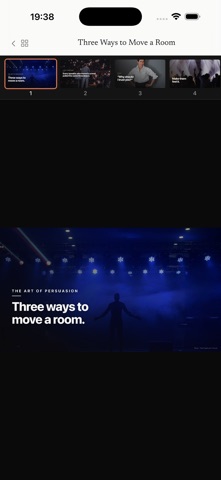
To test presenting: on first launch the app preloads a short "Welcome" deck plus three example decks (illustrative HTML presentations) — open any of them from the library and move through the slides by tapping the screen (iPhone/iPad), using the on-screen arrow controls or the thumbnail rail, or pressing the left/right arrow keys.
To test import: ready-made .deck files are downloadable from the "Examples" section of the home page at https://open-deck.org (smallest is "What Compounding Actually Does", 0.3 MB — direct link: https://open-deck.org/downloads/compounding.deck). Download one on the device, then open it via the system Share sheet → OpenDeck, or from the Files app — it is added to the library. Note: those three decks are also preloaded, and decks are content-addressed, so re-importing one simply refreshes it rather than duplicating; to watch a brand-new deck appear, first delete it from the library (••• → Delete) and then import the downloaded file. (AirDrop'ing any .deck to the device and choosing OpenDeck works too.)
The bundled example decks are first-party sample content; any photographs in them are licensed stock imagery (Pexels License, which permits commercial and in-app use).
The app collects no data and makes no network requests; everything is stored on-device.
Safety and technology
Found in the app by AppBrain- Price
- Free
- App size
- 10.0 MB
- Content rating
- Everyone
Technologies used by OpenDeck
Releases
Updates seen on the App Store- Version
- 1.0.0
- Launched
- June 2026
No changelog data
Alternatives
Similar apps and more from Sinisha DjukicAlternatives to OpenDeck


Rankings
App Store top chartsApp Store Rankings for OpenDeck
About the app and developer
About OpenDeck
OpenDeck is a productivity app developed by Sinisha Djukic.
User Ratings
The app has no ratings yet.
App Information
OpenDeck is freely available from the App Store. The app size is 10.01 MB. The latest version available is 1.0.0. The last update was on June 30, 2026.
Technical Requirements
The app has a content rating of Everyone. The app has been available on the App Store since June 2026.
Developer information for Sinisha Djukic
Address:
Frequently asked questions about OpenDeck
Is OpenDeck free?
Yes. OpenDeck is free on the App Store.
Is OpenDeck still available?
Yes. OpenDeck is on the App Store, and the last update we saw was on June 30, 2026.
How large is OpenDeck?
OpenDeck is 10.01 MB.
Is OpenDeck suitable for children?
App Store rates the content of OpenDeck as suitable for everyone.
Who made OpenDeck?
OpenDeck was developed by Sinisha Djukic. It is listed in the productivity category on the App Store.
What are the best alternatives to OpenDeck?
People looking at OpenDeck also look at these productivity apps: Minivo, Webly : HTML Viewer, HLL Pdf Reader, AI Artifact Reader, Socratus.