

OpenHTML: HTML, PDF & Markdown
OpenHTML: HTML, PDF & Markdown is made and published by 吉帅 仇. AppBrain is an independent app data site and isn't affiliated with 吉帅 仇. The app name, icon, screenshots and description belong to 吉帅 仇 and are shown as published on the App Store.
AppBrain's verdict
- Rating on App Store
- 5.00
- 4 ratings
- Last updated
- October 16, 2026
It doesn't have enough ratings yet to judge what users think.
Rankings
App Store top chartsApp Store Rankings for OpenHTML: HTML, PDF & Markdown
Competitors
Similar apps and more from 吉帅 仇Alternatives to OpenHTML: HTML, PDF & Markdown


More from 吉帅 仇


Releases
Updates seen on the App Store- Version
- 1.8.0
- Launched
- June 2026
No changelog data
User feedback
Ratings and reviews on the App StoreComments on OpenHTML: HTML, PDF & Markdown for iOS
We don't have enough comments to show example comments. Please check back later.
Technology
Found in the app by AppBrain- Price
- Free
- App size
- 19.5 MB
- Content rating
- Everyone
Technologies used by OpenHTML: HTML, PDF & Markdown
About the app and developer
About OpenHTML: HTML, PDF & Markdown
OpenHTML: HTML, PDF & Markdown is an utilities app developed by 吉帅 仇.
What is the rating of OpenHTML: HTML, PDF & Markdown?
OpenHTML: HTML, PDF & Markdown is rated 5.00 out of 5 stars, based on 4 ratings.
Is OpenHTML: HTML, PDF & Markdown free?
OpenHTML: HTML, PDF & Markdown is free. The app size is 19.55 MB. The latest version available is 1.8.0. The last update was on October 16, 2026.
What are the requirements for OpenHTML: HTML, PDF & Markdown?
The app has a content rating of Everyone. The app has been available on the App Store since June 2026.
Developer information for 吉帅 仇
Address:
Frequently asked questions about OpenHTML: HTML, PDF & Markdown
Is OpenHTML: HTML, PDF & Markdown free?
Yes. OpenHTML: HTML, PDF & Markdown is free on the App Store.
Is OpenHTML: HTML, PDF & Markdown still available?
Yes. OpenHTML: HTML, PDF & Markdown is on the App Store, and the last update we saw was on October 16, 2026.
How large is OpenHTML: HTML, PDF & Markdown?
OpenHTML: HTML, PDF & Markdown is 19.55 MB.
Is OpenHTML: HTML, PDF & Markdown suitable for children?
App Store rates the content of OpenHTML: HTML, PDF & Markdown as suitable for everyone.
How do people rate OpenHTML: HTML, PDF & Markdown?
OpenHTML: HTML, PDF & Markdown scores 5.00 out of 5 stars, from 4 ratings on the App Store.
Who made OpenHTML: HTML, PDF & Markdown?
OpenHTML: HTML, PDF & Markdown was developed by 吉帅 仇. It is listed in the utilities category on the App Store.
What are the best alternatives to OpenHTML: HTML, PDF & Markdown?
People looking at OpenHTML: HTML, PDF & Markdown also look at these utilities apps: HTML Viewer - Htmly, PeekMD: Markdown HTML Viewer, Proviewer, AI+ Translator-YOKIE, Decibel Kit: Noise Dosimeter.
Store listing
By 吉帅 仇, from the App Store


Description by 吉帅 仇 Written by the developer, not by AppBrain. Click to read.
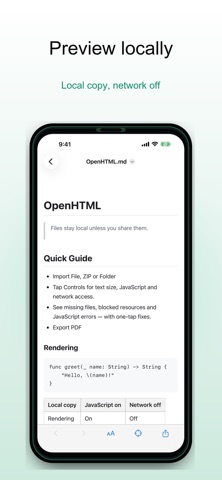
Open files from Files, Mail, chat apps, AI tools or Safari. Preview pages offline, inspect what went wrong when a file does not render, and export finished pages when you need a clean copy.
What you can do:
- Open .html, .htm, .xhtml and Markdown files
- Import ZIP archives and multi-file web projects
- Render LaTeX math in Markdown offline, with no scripts
- Preview local pages with network access off by default
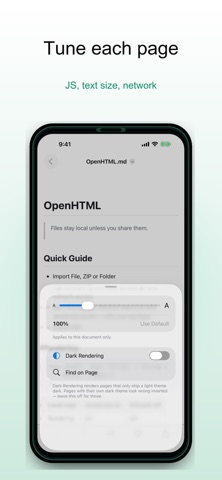
- Diagnose missing files, blocked resources and JavaScript issues
- View JSON, XML and source files with a code-friendly reader
- Export full pages to PDF or long images with OpenHTML Pro
- Keep selected files in your OpenHTML folder in iCloud Drive and open them on your other devices with OpenHTML Pro
Private by default:
OpenHTML has no accounts, no analytics and no ads. Files are copied into the app's private storage and stay on your device unless you add them to your own OpenHTML folder in iCloud Drive. Remote resources stay blocked unless you choose to allow them for a trusted document.
OpenHTML is designed for developers, students, researchers, writers and anyone who receives HTML reports, AI-generated pages, saved webpages or packaged web projects and wants to inspect them safely on iOS.