

Operations Center PRO Run
Operations Center PRO Run is made and published by John Deere. AppBrain is an independent app data site and isn't affiliated with John Deere. The app name, icon, screenshots and description belong to John Deere and are shown as published on the App Store.
AppBrain's verdict
Established- Rating on App Store
- 5.00
- 3 ratings
- Last updated
- October 13, 2026
It doesn't have enough ratings yet to judge what users think.
Rankings
App Store top chartsApp Store Rankings for Operations Center PRO Run
Competitors
Similar apps and more from John DeereAlternatives to Operations Center PRO Run





More from John Deere





Releases
Updates seen on the App Store- Version
- 8.3.0
- Launched
- April 2017
No changelog data
User feedback
Ratings and reviews on the App StoreComments on Operations Center PRO Run for iOS
We don't have enough comments to show example comments. Please check back later.
Technology
Found in the app by AppBrain- Price
- Free
- App size
- 86.9 MB
- Content rating
- Everyone
Technologies used by Operations Center PRO Run
About the app and developer
About Operations Center PRO Run
Operations Center PRO Run is a business app developed by John Deere.
User Ratings
Operations Center PRO Run is rated 5.00 out of 5 stars. The rating is based on 3 ratings.
App Information
Operations Center PRO Run is freely available from the App Store. The app size is 86.86 MB. The latest version available is 8.3.0. The last update was on October 13, 2026.
Technical Requirements
The app has a content rating of Everyone. The app has been available on the App Store since April 2017.
Developer information for John Deere
Address:
Store listing
By John Deere, from the App Store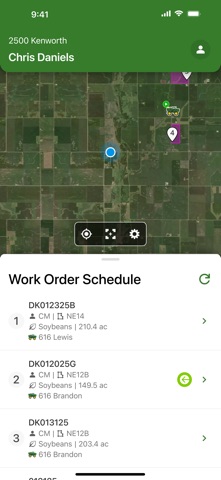

Description by John Deere Written by the developer, not by AppBrain. Click to read.
The tablet version of Operations Center PRO Run mobile app provides applicators with all the tools to:
- View work orders in priority order to be completed
- Get driving directions directly to the field eliminating wasted time
- View field boundary and field location
- View DriftWatch® Sensitive crop locations and detailed information
- Wirelessly transfer prescription files to/from the operator
- Document field and weather conditions and machine settings
- Electronically complete a work order and capture the operator signature
- Add/Edit products and quantities
After completing the order, all completed details are wirelessly sent to the Operations Center PRO Dispatch web application where they are populated into a printable field ticket.
The smartphone version of Operations Center PRO Run mobile app provides tender drivers with all the tools to:
- View work orders in priority order to be delivered
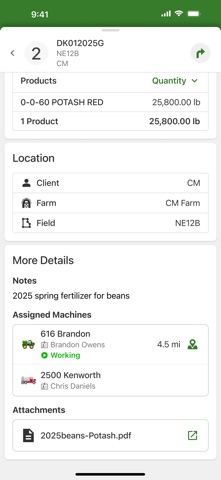
- View work order details including products, rates, quantities
- Get driving directions directly to the field location eliminating wasted time
- View field boundary and field location
- View applicator location
- Automatically report current locations back to dispatch
Note: Continued use of GPS running in the background can significantly decrease battery life.