

Orbit Down is made and published by Joaquin Zelnick. AppBrain is an independent app data site and isn't affiliated with Joaquin Zelnick. The app name, icon, screenshots and description belong to Joaquin Zelnick and are shown as published on the App Store.
AppBrain's verdict
- Last updated
- October 3, 2026
Rankings
App Store top chartsApp Store Rankings for Orbit Down
Competitors
Similar apps and more from Joaquin ZelnickAlternatives to Orbit Down


Releases
Updates seen on the App Store- Version
- 1.2.2
- Launched
- July 2026
No changelog data
User feedback
Ratings and reviews on the App StoreComments on Orbit Down for iOS
We don't have enough comments to show example comments. Please check back later.
Technology
Found in the app by AppBrain- Price
- Free
- App size
- 38.0 MB
- Content rating
- Everyone
Technologies used by Orbit Down
About the app and developer
About Orbit Down
Orbit Down is a productivity app developed by Joaquin Zelnick.
User Ratings
The app has no ratings yet.
App Information
Orbit Down is freely available from the App Store. The app size is 37.96 MB. The latest version available is 1.2.2. The last update was on October 3, 2026.
Technical Requirements
The app has a content rating of Everyone. The app has been available on the App Store since July 2026.
Developer information for Joaquin Zelnick
Address:
Frequently asked questions about Orbit Down
Is Orbit Down free?
Yes. Orbit Down is free on the App Store.
Is Orbit Down still available?
Yes. Orbit Down is on the App Store, and the last update we saw was on October 3, 2026.
How large is Orbit Down?
Orbit Down is 37.96 MB.
Is Orbit Down suitable for children?
App Store rates the content of Orbit Down as suitable for everyone.
Who made Orbit Down?
Orbit Down was developed by Joaquin Zelnick. It is listed in the productivity category on the App Store.
What are the best alternatives to Orbit Down?
People looking at Orbit Down also look at these productivity apps: CountedDays: Countdown Widget, Countdown Widget: Days Until, SCRIBZEE®, Google Drive.
Store listing
By Joaquin Zelnick, from the App Store



Description by Joaquin Zelnick Written by the developer, not by AppBrain. Click to read.
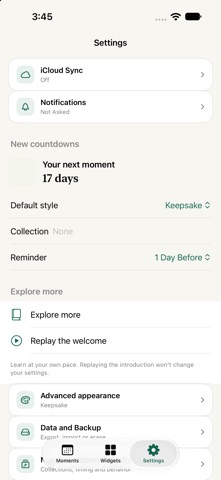
Make each countdown feel right. Choose collections, tags, notes, locations, links, searchable custom SF Symbols, typed hex color palettes, typography, photos, progress starts, milestones, urgency badges, repeat rules, completion behavior, reminder presets, actionable reminder notifications: Snooze 1 Hour, Snooze 1 Day, Snooze Tomorrow Morning, time zones, business-day units, total time units, and standard, short, or digital labels. Use 10 curated one-tap style presets. Start from built-in templates for travel, project deadlines, tax deadlines, visa renewals, concerts, dinner reservations, subscription renewals, paydays, baby due dates, retirement, moving day, birthdays, holidays, exams, and goals; then save your own templates and palettes.
Widgets are central. Add small, medium, large, extra-large, and accessory widgets where supported. A single widget asks for Countdown and optional Layout; Upcoming asks for Source, optional Collection, and Rows; Collection Dashboard asks only for Collection. Widgets inherit saved countdown appearances and open matching app detail when tapped. Mutation controls stay in Live Activities, Control Center, Shortcuts, notifications, and the app.
Create countdowns quickly from natural language. Quick Add, Siri, Shortcuts, Share Extension, and macOS Services all use the same parser for phrases such as "Dinner tomorrow at noon", "Launch brief by EOD", "Payday every other Friday", "Trip in 5 business days", "Countdown to Thanksgiving", "7/10/26 at 6pm", "#Launch #VIP", or multi-line pasted lists. You can include reminders, links, locations, collections, tags, favorite status, time zones, style presets, symbols, typography, units, milestones, and visual settings in the text before saving; New Countdown and Quick Add also respect the current collection or tag context unless explicit collection or tag details are supplied. Default creation collection, default creation tags, default creation style, default creation appearance, default creation progress details, default creation reminders, default creation completion behavior, default creation favorite, default creation repeat, default creation progress start, default creation units, default creation time labels, default creation typography, and default creation time zone settings keep blank, Quick Add, and Siri-created countdowns organized. Shortcuts can also duplicate countdowns, reschedule dates, rename or remove tags, set typography, copy visual styles between countdowns, use clipboard text, create countdowns from link page text, and create or review countdowns from text-bearing files.
Bring Apple apps into the flow. Import upcoming Calendar events, dated Reminders, and Contacts birthdays or anniversaries with review screens and Shortcuts actions. Add countdown targets back to Calendar or Reminders, refresh imported countdowns from their source, open calendar invite files, and share countdowns as text or Markdown with progress percentage and elapsed/remaining context, a visual card, a calendar invite, a QR code, or a portable Countdown File.
Live Activities and Dynamic Island keep important countdowns visible with Skip, Postpone, and Done / Next controls. Native system entry points include iOS quick actions, Control Center controls, file opening, macOS Services, the command menu, and the menu bar glance. The menu bar supports New Countdown, Quick Add, clickable Next rows, Skip, Postpone 1 Day, Done / Next, Undo Completion, and Clear History.
Data stays local by default. Optional iCloud sync uses your Apple ID; backups with import summary, portable files, and Erase Local Data keep you in control.