

Orbit - Silent Study Room
Orbit - Silent Study Room is made and published by Taichi Miyazaki. AppBrain is an independent app data site and isn't affiliated with Taichi Miyazaki. The app name, icon, screenshots and description belong to Taichi Miyazaki and are shown as published on the App Store.
AppBrain's verdict
- Last updated
- October 20, 2026
Rankings
App Store top chartsApp Store Rankings for Orbit - Silent Study Room
Competitors
Similar apps and more from Taichi MiyazakiAlternatives to Orbit - Silent Study Room


Releases
Updates seen on the App Store- Version
- 7.0.0
- Launched
- January 2026
No changelog data
User feedback
Ratings and reviews on the App StoreComments on Orbit - Silent Study Room for iOS
We don't have enough comments to show example comments. Please check back later.
Technology
Found in the app by AppBrain- Price
- Free
- App size
- 33.1 MB
- Content rating
- Everyone
Technologies used by Orbit - Silent Study Room
About the app and developer
About Orbit - Silent Study Room
Orbit - Silent Study Room is a productivity app developed by Taichi Miyazaki.
What is the rating of Orbit - Silent Study Room?
Orbit - Silent Study Room has no ratings yet.
Is Orbit - Silent Study Room free?
Orbit - Silent Study Room is free. The app size is 33.08 MB. The latest version available is 7.0.0. The last update was on October 20, 2026.
What are the requirements for Orbit - Silent Study Room?
The app has a content rating of Everyone. The app has been available on the App Store since January 2026.
Developer information for Taichi Miyazaki
Address:
Store listing
By Taichi Miyazaki, from the App Store


Description by Taichi Miyazaki Written by the developer, not by AppBrain. Click to read.
Orbit is an online study room where up to three people share one space. There's no chat and no following. You simply see on your screen that someone else is still focusing. It's made for people who find it hard to keep going alone, but don't want the connections of social media.
■ Focus quietly, together
• Choose "With others" and start. You'll be matched automatically with people around the world
• See in real time whether the people in your space are focusing or on a break
• No chat, no friends, no likes. Stay anonymous and simply share the time
• On days you'd rather work alone, you can choose "Solo" mode
■ What you're doing, in one line
• Pick a subject and your current activity switches along with it
• Write down what you plan to do, and your recent entries will show up as suggestions next time
• You decide what others can see, such as your country, celestial badge and current activity
■ Timers and presets
• Choose from Pomodoro, Countdown or Count Up
• Save a subject, duration, mode and color as a preset, then start from the same setup with one tap
• If you turn it on, the timer keeps running even after you close the app
■ Track and look back
• See your weekly and monthly study time, stacked by subject
• Add a goal such as an exam date to see how many days are left and how many hours you'll reach at your current pace
• See which times of day you focus best and how long your sessions tend to be
■ Orbit is for you if
• You want to focus at home, whether for exams, certifications, self-study or remote work
• You focus better with people around you, like in a cafe or library
• You like working with a sense of someone nearby, like with study with me videos
• You're tired of social media notifications and comparing yourself to others
Somewhere, someone is sitting down at their desk today too. Join them on Orbit.
■ Orbit Plus
All the core features are free. Orbit Plus adds:
• No ads
• Focus rhythm insights (compare periods and subjects, and see trends by time of day and session length)
• Unlimited presets
• Up to 10 goals
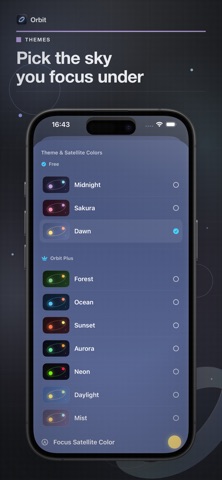
• All color themes and Orbit patterns
Subscription Information
Orbit Plus is an auto-renewable subscription that provides an ad-free experience and unlocks advanced features.
• Title: Orbit Plus
• Length of Subscription: 1 Month, 3 Months, or 1 Year
• Prices may vary by region. The current price is shown before purchase.
Payment will be charged to your Apple ID account at confirmation of purchase. The subscription automatically renews unless auto-renew is turned off at least 24 hours before the end of the current period. Your account will be charged for renewal within 24 hours prior to the end of the current period at the rate of your selected plan.
You can manage or cancel your subscription anytime in your App Store account settings after purchase.
Privacy Policy: https://miya-ux.github.io/orbit-privacy-policy/
Terms of Use (EULA): https://www.apple.com/legal/internet-services/itunes/dev/stdeula/