Bring order to the everyday work of your business.
Orders, customers, inventory and metrics for shops, stalls, studios, services and independent projects.
WORKSPACES AND FIELDS
• Create workspaces with business templates, currencies and optional modules.
• Add number, text, date/time, choice, multiple-choice, note and linked-object fields.
• Calculate with order/custom values: add, subtract, multiply, divide and round.
ORDERS AND HISTORY
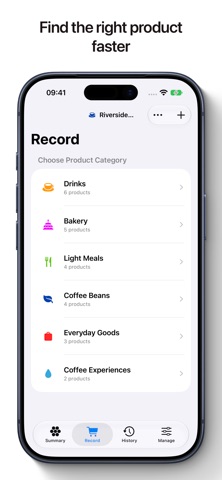
• Record products/services, prices, quantities, discounts, customers, channels, locations, activities and staff.
• Type whole-number quantities or use +/-. Keep order drafts.
• Edit, search, filter, sort and group history. Save smart lists; use Recently Deleted and recovery for supported records.
METRICS, TRENDS AND GOALS
• Track revenue, orders, items sold and average order value; build custom metrics.
• Explore day/week/month charts and other ranges, related records, trends and takeaways.
• Set goals and follow progress. Pin, hide and reorder summary cards; adjust chart colors and display settings.
PRODUCTS AND INVENTORY
• Manage names, categories, prices, costs and icons.
• Track stock by product, SKU and location: opening stock, restocking, stocktakes, adjustments, movements and differences.
CUSTOMERS AND CHANNELS
• Keep contacts, sources, membership levels, notes and linked orders. Plan customer follow-ups and record their outcomes.
• Manage channels, stores, stalls and activities linked to records.
STAFF AND APPOINTMENTS
• Manage staff details, roles and shifts. Link appointments to customers, staff and products/services; reschedule or mark completed, cancelled or no-show.
RECEIVABLES, PAYMENTS AND AFTER-SALES
• Track amounts due and received, including partial payments. Export PDF/CSV customer statements by date.
• Confirm payments in batches, choose methods/dates, adjust individual amounts or allocate one customer's payment across orders.
• Record refunds and manual reconciliation. Payment corrections keep a history; reasons are optional and additional authentication can be enabled.
• Create after-sales cases for orders/items, append actions, resolve, cancel or reopen them.
CSV IMPORT AND BATCH ACTIONS
• Import 12 data types: products/services, opening inventory, customers, business records, restocks, stocktakes, past orders, payments, categories, locations, channels and staff.
• Match columns, preview, check errors and possible duplicates, edit supported fields or skip rows. Set product categories, prices and icons. If a required module is off, choose whether to enable it.
• Multi-select supported lists to edit, update status, deactivate, restore or export. Review before/after values; undo eligible edits with a new history entry.
PERSONALIZATION AND DEVICES
• Use SF Symbols, emoji or images for supported objects. Customize metric/goal icons or restore the workspace icon.
• 50 interface locales; date, time, number, week-start and haptic settings.
• iPhone/iPad, Dark Mode and adaptable layouts; updated for iOS 27, iPadOS 27 and watchOS 27. Enable iCloud for the same Apple Account; use an existing local copy offline.
• View metrics/trends on a paired Apple Watch and widgets. App Shortcuts open workspaces/metrics or start orders. On iOS 26+, the tab bar can minimize while scrolling.
• Set recording reminders and trend/takeaway notifications. Read business articles in Chinese, English or Japanese.
• No Orbit account required. Export business data as JSON; it is not a restorable database backup.
ORBIT PRO
Free to download. New users need Pro to create, edit or import: monthly/annual auto-renewing subscription or lifetime purchase. App Store shows trial eligibility, duration, prices and renewal terms. Restore purchases or manage subscriptions in-app. After expiry, view, search and export existing data. Eligible early users retain their Free allowance.
EULA: https://www.apple.com/legal/internet-services/itunes/dev/stdeula/
Show more
Show less