

Orchestrator.Inc
Orchestrator.Inc is made and published by Prateek Karnal. AppBrain is an independent app data site and isn't affiliated with Prateek Karnal. The app name, icon, screenshots and description belong to Prateek Karnal and are shown as published on the App Store.
AppBrain's verdict
New- Rating on App Store
- 5.00
- 1 ratings
- Last updated
- October 15, 2026
Orchestrator.Inc came out 61 days ago. It doesn't have enough ratings yet to judge what users think.
Rankings
App Store top chartsApp Store Rankings for Orchestrator.Inc
Competitors
Similar apps and more from Prateek KarnalAlternatives to Orchestrator.Inc


More from Prateek Karnal

Releases
Updates seen on the App Store- Version
- 2.1.0
- Launched
- August 2026
No changelog data
User feedback
Ratings and reviews on the App StoreComments on Orchestrator.Inc for iOS
We don't have enough comments to show example comments. Please check back later.
Technology
Found in the app by AppBrain- Price
- Free
- App size
- 54.1 MB
- Content rating
- Everyone
Technologies used by Orchestrator.Inc
About the app and developer
About Orchestrator.Inc
Orchestrator.Inc is an overall app developed by Prateek Karnal.
User Ratings
Orchestrator.Inc is rated 5.00 out of 5 stars. The rating is based on one rating ratings.
App Information
Orchestrator.Inc is freely available from the App Store. The app size is 54.05 MB. The latest version available is 2.1.0. The last update was on October 15, 2026.
Technical Requirements
The app has a content rating of Everyone. The app has been available on the App Store since August 2026.
Developer information for Prateek Karnal
Address:
Frequently asked questions about Orchestrator.Inc
Is Orchestrator.Inc free?
Yes. Orchestrator.Inc is free on the App Store.
Is Orchestrator.Inc still available?
Yes. Orchestrator.Inc is on the App Store, and the last update we saw was on October 15, 2026.
How large is Orchestrator.Inc?
Orchestrator.Inc is 54.05 MB.
Is Orchestrator.Inc suitable for children?
App Store rates the content of Orchestrator.Inc as suitable for everyone.
How do people rate Orchestrator.Inc?
Orchestrator.Inc has one rating of 5.00 stars on the App Store.
Who made Orchestrator.Inc?
Orchestrator.Inc was developed by Prateek Karnal. It is listed in the overall category on the App Store.
What are the best alternatives to Orchestrator.Inc?
People looking at Orchestrator.Inc also look at these overall apps: Flonno, Hermes Conduit, Orca IDE, T3 Code - Remote Claude & more, Hermex.
Store listing
By Prateek Karnal, from the App Store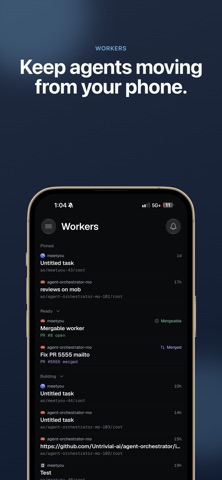



Description by Prateek Karnal Written by the developer, not by AppBrain. Click to read.
Your agents keep working while you step away from your desk. AO Mobile keeps you in the loop see what every worker is doing, answer the ones that are blocked, and keep work moving from your phone.
REQUIRES THE Orchestrator DESKTOP APP
AO Mobile is a thin client. It connects directly to Agent Orchestrator running on your own computer, over your local network or your Tailscale network. There is no cloud service and no account to create. Your code, conversations, and repositories never leave your machine.
WHAT YOU CAN DO
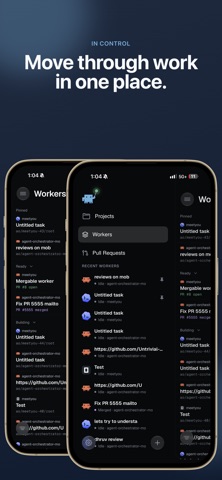
• Live Kanban — every worker session on one board, grouped by what needs your attention: working, needs you, in review, ready to merge.
• Get notified when an agent stops — a push notification arrives the moment a session needs your input, and tapping it opens that exact conversation.
• Chat with any agent — full conversation history, streaming responses, approvals, model and provider switching, file attachments, and voice input for when typing is impractical.
• Follow pull requests — open and draft PRs with their checks, CI status, and review state.
• Talk to the orchestrator — your project-level planning agent, for thinking through direction and delegating new work.
• Drop into the terminal — attach to a session's live terminal when you need the raw view.
• Preview running work — open a worker's browser preview to see what it built.
BUILT FOR TRUST
The desktop's connection to your phone is opt-in and off by default. When you enable it, AO opens a separate local listener protected by a rotating password, and pairing happens by scanning a QR code shown on your desktop. Turning it off closes the connection immediately.
GETTING STARTED
1. Install Agent Orchestrator on your Mac, Windows, or Linux machine.
2. Turn on Connect Mobile in the desktop app.
3. Scan the pairing QR code with this app.
Agent Orchestrator is open source. Learn more at aoagents.dev.