

Ordo: Brain Dump
Ordo: Brain Dump is made and published by DANIEL LAREDO. AppBrain is an independent app data site and isn't affiliated with DANIEL LAREDO. The app name, icon, screenshots and description belong to DANIEL LAREDO and are shown as published on the App Store.
AppBrain's verdict
New- Rating on App Store
- 5.00
- 2 ratings
- Last updated
- October 21, 2026
Ordo: Brain Dump came out 76 days ago. It doesn't have enough ratings yet to judge what users think.
Rankings
App Store top chartsApp Store Rankings for Ordo: Brain Dump
Competitors
Similar apps and more from DANIEL LAREDOAlternatives to Ordo: Brain Dump


Releases
Updates seen on the App Store- Version
- 1.4
- Launched
- August 2026
No changelog data
User feedback
Ratings and reviews on the App StoreComments on Ordo: Brain Dump for iOS
We don't have enough comments to show example comments. Please check back later.
Technology
Found in the app by AppBrain- Price
- Free
- App size
- 6.01 MB
- Content rating
- Everyone
Technologies used by Ordo: Brain Dump
About the app and developer
About Ordo: Brain Dump
Ordo: Brain Dump is a productivity app developed by DANIEL LAREDO.
What is the rating of Ordo: Brain Dump?
Ordo: Brain Dump is rated 5.00 out of 5 stars, based on 2 ratings.
Is Ordo: Brain Dump free?
Ordo: Brain Dump is free. The app size is 6.01 MB. The latest version available is 1.4. The last update was on October 21, 2026.
What are the requirements for Ordo: Brain Dump?
The app has a content rating of Everyone. The app has been available on the App Store since August 2026.
Developer information for DANIEL LAREDO
Address:
Store listing
By DANIEL LAREDO, from the App Store



Description by DANIEL LAREDO Written by the developer, not by AppBrain. Click to read.
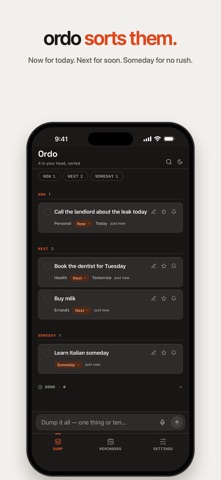
Type or say everything on your mind, in any order, all at once. Ordo turns it into a clean list, sorted into three places:
NOW — for today
NEXT — for soon
SOMEDAY — for no rush
Most apps want you to get organized before you can start. Ordo works the other way: dump it as messy as it is, and get back a list that makes sense. No folders, no projects, no setup.
DUMP IT
• One box for everything. Type it, or tap the mic and say it as it comes.
• One thing or ten: “call the landlord today, book the dentist for Tuesday, buy milk” becomes three cards, each in its place.
• Add from anywhere: share text from another app, or ask Siri to “Dump to Ordo”.
MAKE IT YOURS
• Move any card between Now, Next and Someday with a tap.
• Rename it, add notes, star what matters.
• Swipe to delete. Deleted things wait 30 days in case you change your mind.
• Tick things off. Keep them where they are, or send them to Done: everything you finished, in one place. Your choice in Settings.
WHEN IT MATTERS
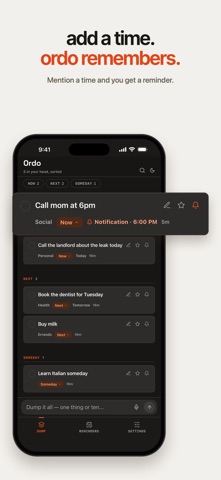
• Say a time, like “call the dentist at 4” or “wake me up at 7”, and Ordo sets a reminder.
• Choose how each one reaches you: a notification, or an alarm that rings like the Clock app (iOS 26).
• See your reminders in Apple Reminders too, if you like. Alerts come from Ordo, so you never get two.
• A home screen widget shows what’s Now. Tick things off right there.
MADE FOR
• The end of a long day, when everything is still in your head.
• Leaving a meeting or a class with five new things to do.
• Ideas that show up at the wrong moment.
• Anyone who has tried a planner and given up on the setup.
CALM BY DESIGN
• No account. No sign-up. Your list lives on your phone.
• Light or dark, each designed with care. Ordo follows your phone, or you pick one in Settings.
• Back up and restore anytime.
To sort a dump, its words go to Ordo’s sorting service, so sorting needs a connection. Offline? Ordo keeps your dump and sorts it when you’re back.