

Organize.me
Organize.me is made and published by Sukhjinder Singh. AppBrain is an independent app data site and isn't affiliated with Sukhjinder Singh. The app name, icon, screenshots and description belong to Sukhjinder Singh and are shown as published on the App Store.
AppBrain's verdict
- Last updated
- July 7, 2026
Rankings
App Store top chartsApp Store Rankings for Organize.me
Competitors
Similar apps and more from Sukhjinder SinghMore from Sukhjinder Singh


Releases
Updates seen on the App Store- Version
- 1.2
- Launched
- June 2026
No changelog data
User feedback
Ratings and reviews on the App StoreComments on Organize.me for iOS
We don't have enough comments to show example comments. Please check back later.
Technology
Found in the app by AppBrain- Price
- $2.99
- App size
- 7.00 MB
- Content rating
- Everyone
Technologies used by Organize.me
About the app and developer
About Organize.me
Organize.me is a productivity app developed by Sukhjinder Singh.
User Ratings
The app has no ratings yet.
App Information
Organize.me costs $2.99. The app size is 7.00 MB. The latest version available is 1.2. The last update was on July 7, 2026.
Technical Requirements
The app has a content rating of Everyone. The app has been available on the App Store since June 2026.
Developer information for Sukhjinder Singh
Address:
Frequently asked questions about Organize.me
Is Organize.me free?
No. Organize.me costs $2.99 on the App Store.
Is Organize.me still available?
Yes. Organize.me is on the App Store, and the last update we saw was on July 7, 2026.
How large is Organize.me?
Organize.me is 7.00 MB.
Is Organize.me suitable for children?
App Store rates the content of Organize.me as suitable for everyone.
Who made Organize.me?
Organize.me was developed by Sukhjinder Singh. It is listed in the productivity category on the App Store.
Store listing
By Sukhjinder Singh, from the App Store



Description by Sukhjinder Singh Written by the developer, not by AppBrain. Click to read.
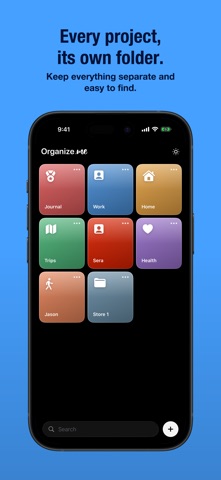
Create a folder for each project, person, or area of your life. Give it a colour and an icon that resonates with you. Every day, simply open it, and everything from that day—your notes, to-do lists, reminders, photos, and files—will be waiting for you, all in one place.
Folders
Each project gets its own folder. Colour-code them, choose an icon, and name them anything you like. Press and hold to drag and rearrange them in any order you prefer. Your home screen, your way.
Daily Entries
Each day within a folder is its own entry. Tap in and view everything you’ve captured—organized into neat sections. Drag sections up or down to prioritize what matters most. Each day retains its own layout.
Notes
Write notes with full formatting—bold, italic, highlights, and more. Pin a note to keep it at the top. Press and hold to copy or delete.
To-Do Lists
Create checklists with progress tracking. Tick items off inline. Add multiple lists per day. Pin the ones you want at the front and centre.
Reminders
Set reminders that trigger at precisely the right time. Choose daily, weekly, monthly, or yearly repeat. Overdue reminders stay visible to ensure nothing slips through.
Photos & Videos
Add photos and videos directly to any day. They’re stored privately on your device—no cloud required.
Files
Attach PDFs, documents, spreadsheets, and more. Everything is in one place, always easily findable.
Search
Search across every folder, day, note, to-do, reminder, and file—instantly.
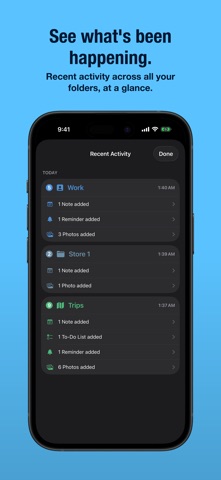
Recent Activity
View what you’ve been working on across all your folders, right from the home screen.
Mark Important
Press and hold any day card to mark it as important. It gets a star and a stronger border, making it stand out at a glance.
Pin Anything
Pin notes, to-dos, reminders, photos, or files to keep them at the top of any section.
Dark & Light Mode
Choose between dark and light mode to suit your preference.
Tap the sun icon to switch between dark and light modes with a smooth reveal animation.
This app is private by default. Everything is stored locally on your device or on your iCloud ,so nothing leaves your phone unless you choose to share it.