

OSCC Dashboard
OSCC Dashboard is made and published by Mitel Networks Corporation. AppBrain is an independent app data site and isn't affiliated with Mitel Networks Corporation. The app name, icon, screenshots and description belong to Mitel Networks Corporation and are shown as published on the App Store.
AppBrain's verdict
- Last updated
- January 22, 2024
- Size
- 5.25 MB
User feedback
Ratings and reviews on the App StoreComments on OSCC Dashboard for iOS
We don't have enough comments to show example comments. Please check back later.
Store listing
By Mitel Networks Corporation, from the App Store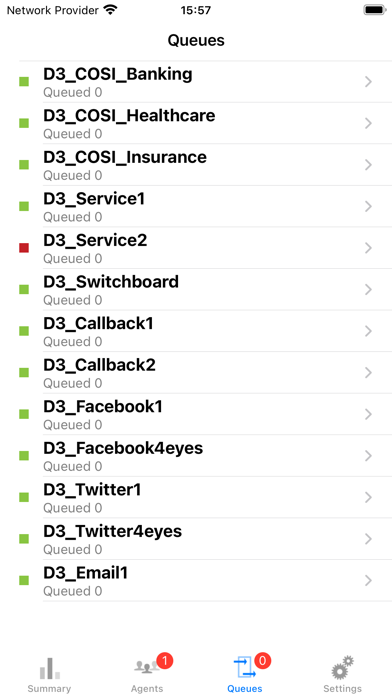


Description by Mitel Networks Corporation Written by the developer, not by AppBrain. Click to read.
Enter OpenScape Contact Center Dashboard.
OpenScape Contact Center Dashboard provides real-time monitoring and management of OpenScape Contact Center agents, skills, and more on your iPhone or iPad. It allows you to monitor the current state of your OpenScape Contact Center and to make the changes necessary to keep your operations running smoothly.
It’s simply the better way to manage your contact center.
What you can do:
Monitor and control all of the important aspects of your contact center, including:
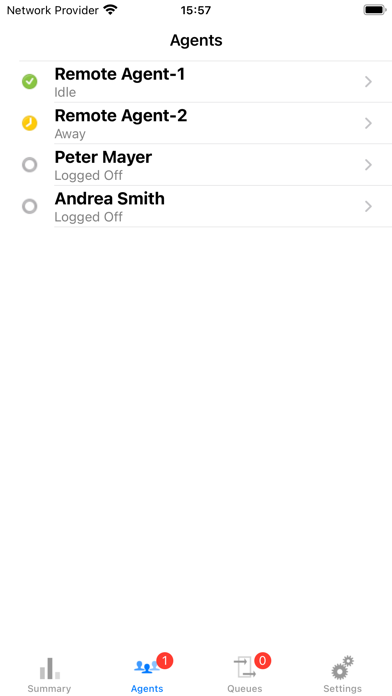
- Agent Summary: Number of agents logged on, logged off, idle, away, busy, active
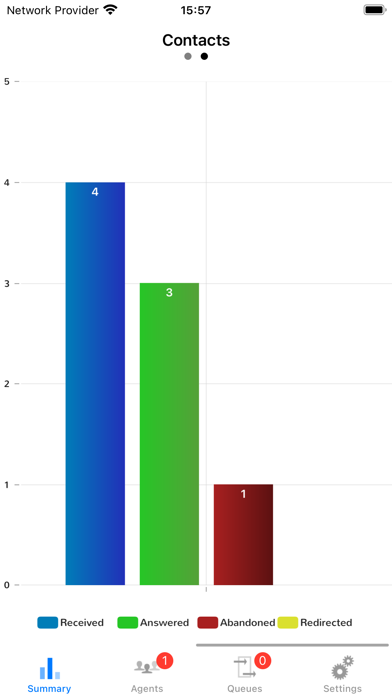
- Queue Summary: Number of waiting calls, oldest call, number of received, answered, abandoned and redirected calls
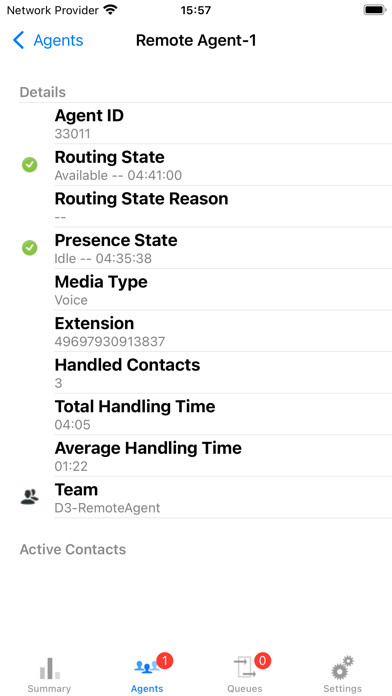
- Agent Status: View the real-time status of all agents including their routing status, presence status, registered media, etc.
- Queue Status: View all waiting contacts for all available media like voice, callback, email, Twitter and Facebook as well as queue availability, service level, abandon rate and more
- Change the routing state of an agent (e.g. from unavailable to logged off)
- Configure which agents you want to be included in the view
- View all available skills for each agent and remove skills from an agent or assign new skills to the agent
- Change queue parameters on the fly: activate emergency announcements, adjust the maximum queue length, and more
Note: This App is designed to work with OpenScape Contact Center Solution Kit and requires additional software to enable. For further information on enabling the app, please contact your local Unify Account Manager
Safety and technology
Found in the app by AppBrain- Price
- Free
- App size
- 5.25 MB
- Content rating
- Everyone
Technologies used by OSCC Dashboard
Releases
Updates seen on the App Store- Version
- 2.2.12
- Launched
- August 2013
No changelog data
Alternatives
Similar apps and more from Mitel Networks CorporationAlternatives to OSCC Dashboard







More from Mitel Networks Corporation







Rankings
App Store top chartsApp Store Rankings for OSCC Dashboard
About the app and developer
About OSCC Dashboard
OSCC Dashboard is a business app developed by Mitel Networks Corporation.
What is the rating of OSCC Dashboard?
OSCC Dashboard has no ratings yet.
Is OSCC Dashboard free?
OSCC Dashboard is free. The app size is 5.25 MB. The latest version available is 2.2.12. The last update was on January 22, 2024.
What are the requirements for OSCC Dashboard?
The app has a content rating of Everyone. The app has been available on the App Store since August 2013.
Developer information for Mitel Networks Corporation
Address: