

Oscillo: Watch Accuracy Meter
Oscillo: Watch Accuracy Meter is made and published by Attila Halasz. AppBrain is an independent app data site and isn't affiliated with Attila Halasz. The app name, icon, screenshots and description belong to Attila Halasz and are shown as published on the App Store.
AppBrain's verdict
- Rating on App Store
- 4.84
- 25 ratings
- Last updated
- September 30, 2026
It doesn't have enough ratings yet to judge what users think.
Rankings
App Store top chartsApp Store Rankings for Oscillo: Watch Accuracy Meter
Releases
Updates seen on the App Store- Version
- 1.7.3
- Launched
- April 2026
No changelog data
User feedback
Ratings and reviews on the App StoreComments on Oscillo: Watch Accuracy Meter for iOS
We don't have enough comments to show example comments. Please check back later.
Technology
Found in the app by AppBrain- Price
- Free
- App size
- 62.5 MB
- Content rating
- Everyone
Technologies used by Oscillo: Watch Accuracy Meter
About the app and developer
About Oscillo: Watch Accuracy Meter
Oscillo: Watch Accuracy Meter is an utilities app developed by Attila Halasz.
User Ratings
Oscillo: Watch Accuracy Meter is rated 4.84 out of 5 stars. The rating is based on 25 ratings.
App Information
Oscillo: Watch Accuracy Meter is freely available from the App Store. The app size is 62.53 MB. The latest version available is 1.7.3. The last update was on September 30, 2026.
Technical Requirements
The app has a content rating of Everyone. The app has been available on the App Store since April 2026.
Developer information for Attila Halasz
Address:
Store listing
By Attila Halasz, from the App Store


Description by Attila Halasz Written by the developer, not by AppBrain. Click to read.
HOW TO MEASURE
1. Place the iPhone microphone flat against the watch crystal or case back.
2. Start recording the tick sounds and wait for the measurement to finish.
3. Review your rate, beat error, and amplitude.
KEY FEATURES
• Watch Rate Checker — Measure rate (seconds/day), beat error (ms), and amplitude (degrees). Supports the beat rates listed below.
• AI Watch Identification — Snap a photo and let AI detect the brand, model, and reference number automatically.
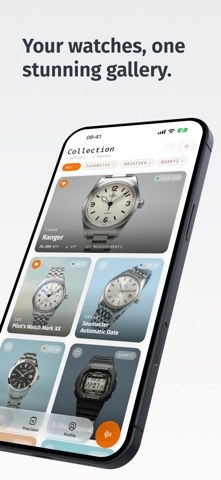
• AI-Generated Portraits — Oscillo turns your watch photos into magazine-style cards for your collection.
• Collection Management — Browse your watches in grid, full, or list views. Mark watches as favorites, archive them, change their order, and organize your collection.
• Measurement History — Detailed charts and trends for every watch, with health badges that help you interpret your measurements.
• Precision Tracking — Record manual readings from the dial and follow your watch’s drift over days. Compare observations before and after a regulation or service.
• Guided Measurement Cycles — Record timegrapher readings in different watch positions. With Oscillo Pro, complete all six positions and compare results with a saved reference cycle.
• Weekly Watch Report — A seven-day summary of your collection: average rate, most-worn watch, best reading, and suggested next actions.
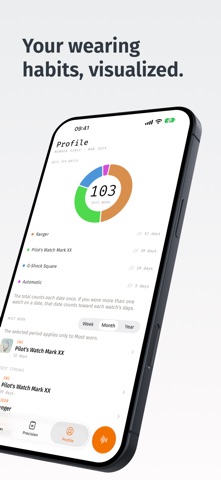
• Profile and Wearing Habits — A personal calendar of activity, collection milestones, timing performance, and a heatmap that shows which watches you wear and when.
• Reminders — Optional local notifications remind you to log which watch you wore, capture the next precision reading, or open your weekly report.
• Offline Access — Your saved collection and measurements are available on your device. Cloud sync and AI features require an internet connection.
ACCURACY & ENVIRONMENT
• Best results in a quiet room — background noise can affect readings.
• Place the case back flat against the microphone for a strong, consistent signal.
• If readings seem unstable, move to a quieter space or adjust mic position.
• Supported beat rates: 12,000 / 14,400 / 17,280 / 18,000 / 19,800 / 21,600 / 25,200 / 28,800 / 36,000 / 43,200 / 72,000 BPH.
DESIGNED FOR COLLECTORS
Whether you own one watch or fifty, Oscillo helps you follow changes in each movement’s timing performance over time.
Payments and Renewal
Oscillo offers limited free use and optional Pro purchases, including subscriptions and a one-time purchase. Payment will be charged to your Apple Account at confirmation of purchase. Subscription automatically renews unless auto-renew is turned off at least 24 hours before the end of the current period. Your Apple Account will be charged for renewal within 24 hours prior to the end of the current period. You can manage or turn off auto-renew in your Account settings at any time after purchase.
Privacy Policy: https://oscillo.app/privacy
Terms of Service: https://oscillo.app/terms