

Osugata: Memorial Photo Maker
Osugata: Memorial Photo Maker is made and published by Yuya Tanaka. AppBrain is an independent app data site and isn't affiliated with Yuya Tanaka. The app name, icon, screenshots and description belong to Yuya Tanaka and are shown as published on the App Store.
AppBrain's verdict
- Last updated
- October 20, 2026
Rankings
App Store top chartsApp Store Rankings for Osugata: Memorial Photo Maker
Competitors
Similar apps and more from Yuya TanakaAlternatives to Osugata: Memorial Photo Maker


More from Yuya Tanaka


Releases
Updates seen on the App Store- Version
- 1.3.4
- Launched
- July 2026
No changelog data
User feedback
Ratings and reviews on the App StoreComments on Osugata: Memorial Photo Maker for iOS
We don't have enough comments to show example comments. Please check back later.
Technology
Found in the app by AppBrain- Price
- Free
- App size
- 3.89 MB
- Content rating
- Everyone
Technologies used by Osugata: Memorial Photo Maker
About the app and developer
About Osugata: Memorial Photo Maker
Osugata: Memorial Photo Maker is a photo & video app developed by Yuya Tanaka.
What is the rating of Osugata: Memorial Photo Maker?
Osugata: Memorial Photo Maker has no ratings yet.
Is Osugata: Memorial Photo Maker free?
Osugata: Memorial Photo Maker is free. The app size is 3.89 MB. The latest version available is 1.3.4. The last update was on October 20, 2026.
What are the requirements for Osugata: Memorial Photo Maker?
The app has a content rating of Everyone. The app has been available on the App Store since July 2026.
Developer information for Yuya Tanaka
Address:
Store listing
By Yuya Tanaka, from the App Store



Description by Yuya Tanaka Written by the developer, not by AppBrain. Click to read.
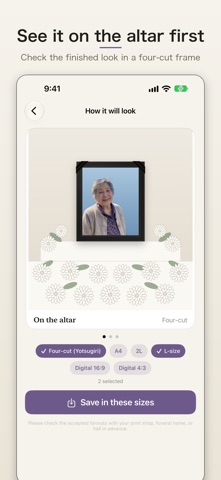
Osugata creates memorial portraits from photos you already have. It suggests a traditional bust-up composition around the face, replaces the background with a calm solid color, and exports print-ready 300dpi files in standard memorial sizes as well as digital formats.
■ Photos never leave this device
No upload, no account. Portraits of loved ones stay private, processed entirely on your iPhone.
■ Only what should be edited
Composition, background and brightness/contrast — nothing else. No face retouching, no generated clothing, no expression changes. The person stays exactly as they are.
■ Faithful to the tradition
- Composition: automatic framing suggestions based on memorial-portrait conventions, with manual adjustment
- Background: six calm solid colors, or keep the original background
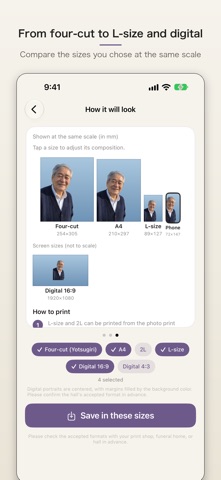
- Sizes: 254×305mm, A4, 2L, L, and digital 16:9 / 4:3 — each with its own final preview
- Printing: which print option fits each size (convenience store / online print / photo shop)
■ Memorial movie (for the monitor at the service)
Export the photos you arrange as a movie for the monitor at the service (1920×1080, MP4, no audio). Set the order, the seconds per photo, the margin color and an optional name-and-years card, and preview the movie before exporting. Save the exported movie to the Files app and move it to an external device from there.
- Two sizes: up to 40 photos, and up to 80 photos
- For 7 days after the first export, you can change the order or timing and export again (you can add or swap in up to 4 photos with up to 40, and up to 8 with up to 80)
■ For preparing in advance
Many people choose to prepare their own portrait while they are well. Osugata is made for that, too.
■ One-time payments for families
Adjusting and previewing is free, and so are arranging photos and previewing a memorial movie. Pay only when you export: one photo with all sizes, three photos with all sizes, or one memorial movie (up to 40 or up to 80 photos). These do not auto-renew. If you bought the Unlimited plan before, you keep unlimited exports.
■ For photo studios and funeral homes
Under Settings, "For photo studios & funeral homes" offers a monthly plan (auto-renewing) with unlimited photo and movie exports (available on the Japanese App Store only).
Note: Background replacement is for single-subject photos. Depending on the photo, keeping the original background may be recommended.
Note: Please confirm size requirements with your print shop, funeral home, or ceremony hall, and check that their equipment can play the movie, in advance.
Terms of Use (EULA): https://osugata-legal.vercel.app/terms.html#en
Privacy Policy: https://osugata-legal.vercel.app/privacy.html#en