

OTAMap Live TV
OTAMap Live TV is made and published by Arctic Surf Designs. AppBrain is an independent app data site and isn't affiliated with Arctic Surf Designs. The app name, icon, screenshots and description belong to Arctic Surf Designs and are shown as published on the App Store.
AppBrain's verdict
- Last updated
- May 26, 2026
Rankings
App Store top chartsApp Store Rankings for OTAMap Live TV
Competitors
Similar apps and more from Arctic Surf DesignsMore from Arctic Surf Designs




Releases
Updates seen on the App Store- Version
- 1.0
- Launched
- May 2026
No changelog data
User feedback
Ratings and reviews on the App StoreComments on OTAMap Live TV for iOS
We don't have enough comments to show example comments. Please check back later.
Technology
Found in the app by AppBrain- Price
- $7.99
- App size
- 92.7 MB
- Content rating
- Everyone
Technologies used by OTAMap Live TV
About the app and developer
About OTAMap Live TV
OTAMap Live TV is an entertainment app developed by Arctic Surf Designs.
What is the rating of OTAMap Live TV?
OTAMap Live TV has no ratings yet.
Is OTAMap Live TV free?
OTAMap Live TV costs $7.99. The app size is 92.71 MB. The latest version available is 1.0. The last update was on May 26, 2026.
What are the requirements for OTAMap Live TV?
The app has a content rating of Everyone. The app has been available on the App Store since May 2026.
Developer information for Arctic Surf Designs
Address:
Store listing
By Arctic Surf Designs, from the App Store





Description by Arctic Surf Designs Written by the developer, not by AppBrain. Click to read.
Full TV Guide. No subscription. No EPG service required. The guide is in the broadcast itself.
ZERO COST AFTER PURCHASE
• No subscriptions of any kind
• No in-app purchases — every feature is included
• No ads, no upsells, no "Pro" tier
• Pay once, own it forever
— LIVE TV —
• Auto-discovers every HDHomeRun on your Wi-Fi (QUATRO, FLEX, CONNECT, EXTEND, DUAL — including older HDHR3 models)
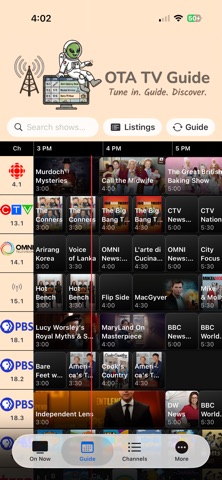
• Full TV Guide built from over-the-air PSIP data (no internet TV listing service required)
• On Now grid with current program titles and artwork
• iPad Multi-View mosaic — watch 1, 2, or 4 channels at the same time, depending on tuner count. Choose 1×1, 2×1, 1×2, or 2×2 layouts. Tap a tile to mute/unmute, hide its label, jump to full-screen, or close
• Per-tile live signal-strength readout (SS / SNQ) with a color-coded channel pill so you can see at a glance which sub-channels have strong reception
• Closed captions for CEA-608 broadcasts with adjustable text size
• Reload TV guide on demand
• Reception matrix view — every channel × every tuner, at a glance, to see which device gets which station best
• Channel scanning with live progress, per-tuner status, and a reset-tuners control
• Hide channels you don't care about; restore them from the Hidden Channels screen
• Last-viewed channel badge so you can jump back where you left off
• ATSC 3.0 badge on stations that broadcast in NextGen TV
• Per-device enable/disable toggle in case you only want some tuners active
• Per-device "Restart" button for the rare times an HDHomeRun needs a kick
• Demo Mode in Preferences — explore the app with sample channels and clips even when no HDHomeRun is on the network
• Mute, Station Info/Hiding of, Jump to single view from multi view (iPad), Adjustable Chanel tile size, filter channels by favourites or with listings.
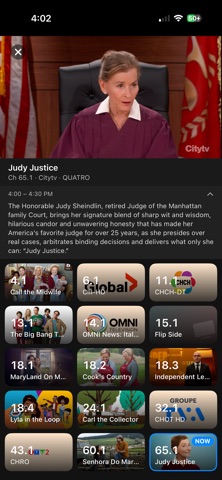
• Long push on channel tiles to get long listings. Click on TV guide tile to get long listings.
• Set notification for upcoming shows
— OTA MAP (BONUS) —
OTAMap Live TV bundles the full OTA Map atlas, the same data layer used by the OTAMap reference app:
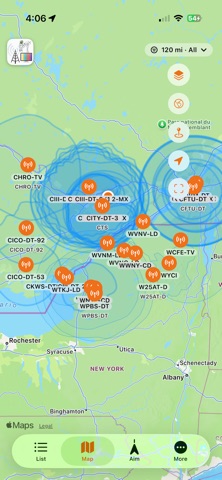
• 7,800+ North American TV transmitters with call sign, network, RF channel, power, and antenna height
• Distance and bearing from your location to every station (auto miles/kilometres based on your country, or set it manually)
• Tower detail view for every transmitter — full station card with everything the FCC and ISED databases publish about that facility
• Signal-path elevation profile — terrain cross-section from your location to the tower, so you can see what's between you and the signal
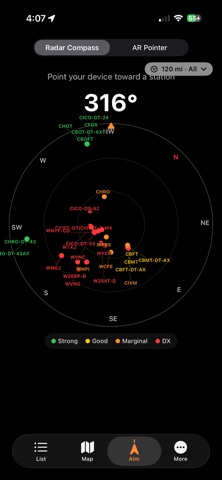
• Compass view — point your phone in any direction to see which towers are in that bearing
• AR view — raise the phone and the camera feed overlays bearings to nearby transmitters, so you can aim a yagi visually.
• Station contour view showing each transmitter's predicted service area
• Per-station tropospheric path view for DX enthusiasts watching for long-distance reception
• Live tropospheric propagation overlay (GFS-based forecast) showing where ducting conditions favour distant reception today
• Long-range scanning targets — log DX channels you have received.
— REQUIRES —
• HDHomeRun network tuner (any model from HDHR3-* through the latest QUATRO and FLEX)
• Antenna connected to that tuner
• iPhone or iPad on the same Wi-Fi network as the HDHomeRun