

OutVault: Private Camera
OutVault: Private Camera is made and published by Jaehoon Lee. AppBrain is an independent app data site and isn't affiliated with Jaehoon Lee. The app name, icon, screenshots and description belong to Jaehoon Lee and are shown as published on the App Store.
AppBrain's verdict
- Last updated
- October 7, 2026
Rankings
App Store top chartsApp Store Rankings for OutVault: Private Camera
Competitors
Similar apps and more from Jaehoon LeeMore from Jaehoon Lee


Releases
Updates seen on the App Store- Version
- 2.8.0
- Launched
- June 2026
No changelog data
User feedback
Ratings and reviews on the App StoreComments on OutVault: Private Camera for iOS
We don't have enough comments to show example comments. Please check back later.
Technology
Found in the app by AppBrain- Price
- Free
- App size
- 16.8 MB
- Content rating
- Everyone
Technologies used by OutVault: Private Camera
About the app and developer
About OutVault: Private Camera
OutVault: Private Camera is a photo & video app developed by Jaehoon Lee.
What is the rating of OutVault: Private Camera?
OutVault: Private Camera has no ratings yet.
Is OutVault: Private Camera free?
OutVault: Private Camera is free. The app size is 16.81 MB. The latest version available is 2.8.0. The last update was on October 7, 2026.
What are the requirements for OutVault: Private Camera?
The app has a content rating of Everyone. The app has been available on the App Store since June 2026.
Developer information for Jaehoon Lee
Address:
Store listing
By Jaehoon Lee, from the App Store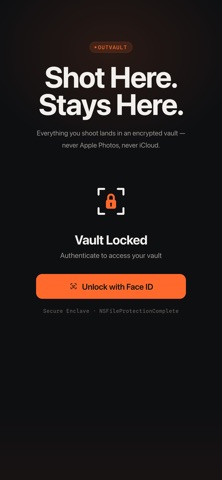


Description by Jaehoon Lee Written by the developer, not by AppBrain. Click to read.
OutVault is a professional-grade private camera that routes every photo
and video directly into an encrypted, Face ID-protected vault on your
device -- completely bypassing iOS Photos. The moment you press the
shutter, your media is gone from the camera pipeline and locked inside
your sandbox. Nothing ever touches your Camera Roll.
WHY OUTVAULT?
Most camera apps eventually save to iOS Photos. OutVault
doesn't. It never calls a single Photos library API. Your media lives
exclusively in a sandboxed vault, protected by NSFileProtectionComplete
-- the same encryption tier iOS uses for health records and banking data.
PRIVATE BY DESIGN
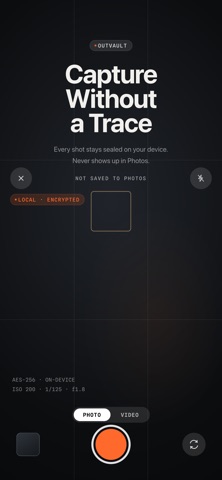
* Captures photos and videos directly into the app sandbox
* iOS Photos library is never touched -- not even for a millisecond
* Face ID / Passcode lock on every launch and after backgrounding
* NSFileProtectionComplete encryption -- files inaccessible while locked
* No account, no sign-in, no third-party cloud
* Disguise OutVault's Home Screen icon as Calculator, Notes, Weather,
or Calendar
* Share only when you choose -- via the standard iOS share sheet
* Bring existing media in -- import from your Photos library or Files,
or share directly from any app via the iOS share sheet
CLEAN, FOCUSED GALLERY
* Full-resolution photo and video capture with a custom camera UI --
tap to focus, pinch to zoom, exposure control, and an optional
horizon level
* Thumbnail grid with smooth fade-in previews
* Swipeable full-screen detail view with pinch-to-zoom and smooth
zoom transitions
* Long-press context menu for quick share or delete
* Drag or tap to select multiple photos or videos, then share or
delete them in bulk
* Recently Deleted -- optionally keep deleted items for 24 hours,
7 days, or 30 days so you can restore them
* Instant thumbnail generation -- no waiting
OUTVAULT PREMIUM
* Edit capture date, add a note and author to any photo or video,
and search your vault by note
* Strip EXIF metadata automatically before sharing
* Auto-delete photos and videos on a schedule you set
* Decoy Vault -- a second PIN opens a separate, harmless-looking
gallery while your real vault stays completely hidden
* Burn a tamper-evident timestamp into your photos, so the date
and time become part of the image itself
* Add your own watermark to the photos you share -- in a corner
or as a repeating pattern
* One-time lifetime purchase -- no subscription, ever
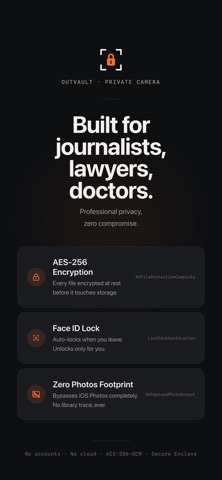
WHO IS OUTVAULT FOR?
Built for professionals who understand that the safest file is one that
never ends up where it shouldn't:
- Journalists documenting sensitive sources or scenes
- Attorneys photographing privileged case evidence
- Healthcare professionals capturing patient-related visuals
- Privacy-conscious users tired of Photos syncing everything to iCloud
SECURITY DETAILS
* Storage path: Application Support/assets/ (outside Photos.app reach)
* File protection: NSFileProtectionComplete on every asset
* Authentication: LocalAuthentication (Face ID / Passcode)
* Sharing: Standard UIActivityViewController -- you control what leaves
No ads. No tracking of your media. No surprises.