

OV Notes is made and published by HAKYUNG CHOI. AppBrain is an independent app data site and isn't affiliated with HAKYUNG CHOI. The app name, icon, screenshots and description belong to HAKYUNG CHOI and are shown as published on the App Store.
AppBrain's verdict
- Last updated
- June 24, 2026
Rankings
App Store top chartsApp Store Rankings for OV Notes
Competitors
Similar apps and more from HAKYUNG CHOIAlternatives to OV Notes


Releases
Updates seen on the App Store- Version
- 1.0
- Launched
- June 2026
No changelog data
User feedback
Ratings and reviews on the App StoreComments on OV Notes for iOS
We don't have enough comments to show example comments. Please check back later.
Technology
Found in the app by AppBrain- Price
- Free
- App size
- 16.4 MB
- Content rating
- Everyone
Technologies used by OV Notes
About the app and developer
About OV Notes
OV Notes is a productivity app developed by HAKYUNG CHOI.
User Ratings
The app has no ratings yet.
App Information
OV Notes is freely available from the App Store. The app size is 16.38 MB. The latest version available is 1.0. The last update was on June 24, 2026.
Technical Requirements
The app has a content rating of Everyone. The app has been available on the App Store since June 2026.
Developer information for HAKYUNG CHOI
Address:
Store listing
By HAKYUNG CHOI, from the App Store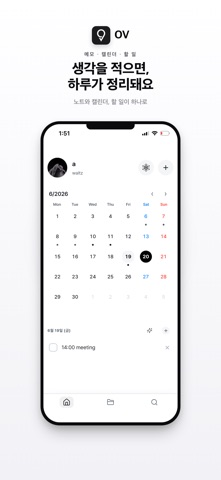




Description by HAKYUNG CHOI Written by the developer, not by AppBrain. Click to read.
OV Notes keeps everything simple and yours. No account, no sign-up, no ads. Just open it and write, on your iPhone, iPad, and Mac.
Write in Markdown
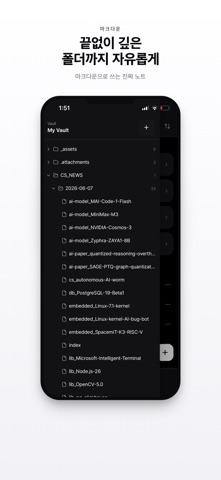
• Plain Markdown that stays simple, readable files you actually own
• A clean, focused editor that stays out of your way
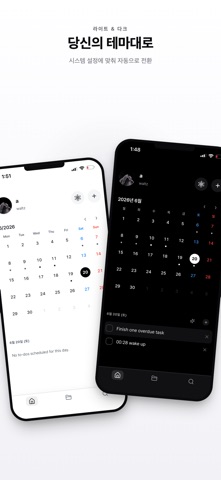
• Light and Dark themes that follow your system automatically
Calendar and to-dos
• A monthly calendar greets you on the home screen
• Add to-dos to any date and check them off
• See today's tasks at a glance
AI Copilot for your own notes
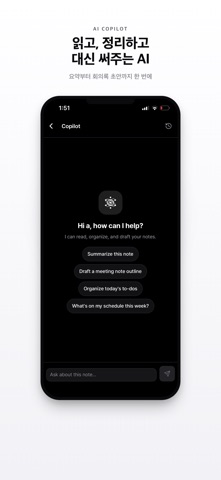
• Summarize a long note in seconds
• Draft a meeting-note outline to start from
• Organize today's to-dos so nothing slips
• Ask "what's on my schedule this week?" and get a clear answer
• It only ever works on your own notes, never anyone else's
Stay organized
• Folders and a nested file-tree vault keep everything in its place
• An "All notes" list puts every note one tap away, even as it grows
Widgets that keep up
• Home-screen and Lock-screen widgets show your to-dos without opening the app
Sync across your devices
• iCloud sync keeps notes current on iPhone, iPad, and the OV Mac app
• It uses your own iCloud, so your notes stay private to you
Private by design
• Local-first: your notes live on your device and in your own iCloud
• No account or sign-up needed
• No ads, no tracking, and nothing collected by us
Free to use, and fully bilingual in Korean and English.
Write a little, plan a little, and keep it all in one quiet place that's truly yours.