

Overhead Camera
Overhead Camera is made and published by Coyotiv GmbH. AppBrain is an independent app data site and isn't affiliated with Coyotiv GmbH. The app name, icon, screenshots and description belong to Coyotiv GmbH and are shown as published on the App Store.
AppBrain's verdict
- Last updated
- August 27, 2026
Rankings
App Store top chartsApp Store Rankings for Overhead Camera
Competitors
Similar apps and more from Coyotiv GmbHMore from Coyotiv GmbH


Releases
Updates seen on the App Store- Version
- 1.0
- Launched
- August 2026
No changelog data
User feedback
Ratings and reviews on the App StoreComments on Overhead Camera for iOS
We don't have enough comments to show example comments. Please check back later.
Technology
Found in the app by AppBrain- Price
- $9.99
- App size
- 24.2 MB
- Content rating
- Everyone
Technologies used by Overhead Camera
About the app and developer
About Overhead Camera
Overhead Camera is a photo & video app developed by Coyotiv GmbH.
User Ratings
The app has no ratings yet.
App Information
Overhead Camera costs $9.99. The app size is 24.20 MB. The latest version available is 1.0. The last update was on August 27, 2026.
Technical Requirements
The app has a content rating of Everyone. The app has been available on the App Store since August 2026.
Developer information for Coyotiv GmbH
Address:
Frequently asked questions about Overhead Camera
Is Overhead Camera free?
No. Overhead Camera costs $9.99 on the App Store.
Is Overhead Camera still available?
Yes. Overhead Camera is on the App Store, and the last update we saw was on August 27, 2026.
How large is Overhead Camera?
Overhead Camera is 24.20 MB.
Is Overhead Camera suitable for children?
App Store rates the content of Overhead Camera as suitable for everyone.
Who made Overhead Camera?
Overhead Camera was developed by Coyotiv GmbH. It is listed in the photo & video category on the App Store.
Store listing
By Coyotiv GmbH, from the App Store



Description by Coyotiv GmbH Written by the developer, not by AppBrain. Click to read.
Mount the iPhone above your workspace, connect it to a Mac, and capture its display in software such as Ecamm Live. Overhead keeps the camera preview front and center while giving you direct control over the image.
PRO CAMERA CONTROLS
• Switch between available ultra-wide, wide, and telephoto cameras
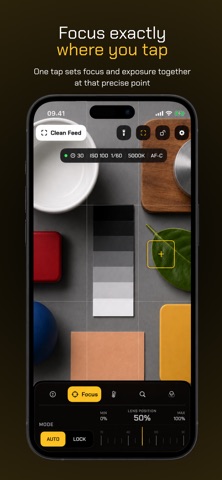
• Tap once to set one-shot focus and exposure at the same precise point
• Toggle automatic or locked focus, then adjust lens position directly
• Toggle automatic exposure or work with fixed ISO and shutter
• Set ISO, shutter duration, and exposure compensation
• Toggle automatic or locked white balance, then adjust temperature and tint directly
• Select supported frame rates and control the torch
• Apply 20 professional, built-in color looks at up to 200% intensity
• Import, name, and manage your own 3D .cube LUTs from Files
• Compare every look from a swipeable rail of color-preview thumbnails
• Check focus with GPU peaking in red, yellow, or green
• Protect exposure with adjustable zebras and false color
• Read the live image with a luma histogram and waveform
FLEXIBLE DIGITAL FRAMING
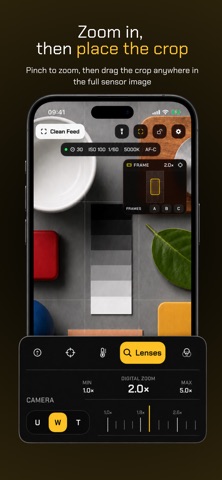
Pinch anywhere on the preview or use the precision rail to zoom. A dedicated framing map shows the visible crop and lets you reposition it anywhere within the full camera view.
Save A/B/C framing positions for instant crop changes. Complete shot presets remember the lens, crop, zoom, FPS, focus, exposure, white balance, light, guides, and color look.
ORGANIZED SETTINGS
Keep the camera uncluttered while a dedicated Settings screen manages named shot presets, imported LUT files, monitoring preferences, framing guides, lens information, and reset. Choose looks directly from the camera, recall a saved setup in a tap, or rename and delete items as your workflow evolves.
PRIVATE ICLOUD SYNC
Saved shots, imported LUTs, framing bookmarks, and every app preference stay in step across your iPhones through your private Apple iCloud account. LUTs remain cached locally for offline use. Live camera video never leaves the iPhone.
PRECISION SETUP
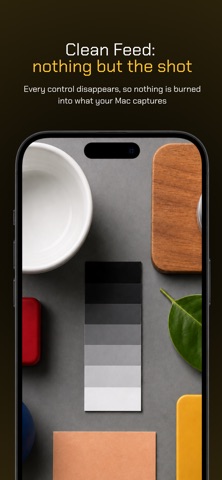
Add a center crosshair, bubble level, 1:1, 4:3 or 16:9 mask, title-safe guides, or a rule-of-thirds grid. Monitoring tools are grouped into one compact menu and disappear automatically in Clean Feed. Inspect the active lens capabilities, reset the entire shot in one tap, and lock the controls against accidental changes.
Setup always shows the complete native camera image, and in portrait it rests clear of the controls so nothing you frame sits behind a panel. Select 16:9, 4:3 or 1:1 to preview and position the future Clean Feed crop, or choose Screen to fill the iPhone display immediately.
CLEAN FEED
When the shot is ready, tap Clean Feed to hide every interface element, including persistent system overlays. Single-tap focus remains available without appearing in the output. Tap with two fingers to bring the controls back.
BUILT FOR LONG SESSIONS
Overhead keeps the iPhone awake while active, recovers automatically if iOS resets its camera service, and never records, uploads, or transmits camera frames. Optional looks are processed on device, and the on-device preview is the output, ready for the screen-capture workflow you choose.
Overhead contains no accounts, ads, analytics, tracking, subscriptions, or in-app purchases.