

Overpace - Workout Timer
Overpace - Workout Timer is made and published by Lennard Rieke. AppBrain is an independent app data site and isn't affiliated with Lennard Rieke. The app name, icon, screenshots and description belong to Lennard Rieke and are shown as published on the App Store.
AppBrain's verdict
- Last updated
- September 13, 2026
Rankings
App Store top chartsApp Store Rankings for Overpace - Workout Timer
Competitors
Similar apps and more from Lennard RiekeAlternatives to Overpace - Workout Timer


Releases
Updates seen on the App Store- Version
- 2.0
- Launched
- March 2026
No changelog data
User feedback
Ratings and reviews on the App StoreComments on Overpace - Workout Timer for iOS
We don't have enough comments to show example comments. Please check back later.
Technology
Found in the app by AppBrain- Price
- Free
- App size
- 11.6 MB
- Content rating
- Everyone
Technologies used by Overpace - Workout Timer
About the app and developer
About Overpace - Workout Timer
Overpace - Workout Timer is a health & fitness app developed by Lennard Rieke.
User Ratings
The app has no ratings yet.
App Information
Overpace - Workout Timer is freely available from the App Store. The app size is 11.61 MB. The latest version available is 2.0. The last update was on September 13, 2026.
Technical Requirements
The app has a content rating of Everyone. The app has been available on the App Store since March 2026.
Developer information for Lennard Rieke
Address:
Store listing
By Lennard Rieke, from the App Store




Description by Lennard Rieke Written by the developer, not by AppBrain. Click to read.
Start your next training session with Overpace – the workout timer for functional workouts, interval training, hybrid training and custom circuits. Use Overpace as a timer while preparing for events such as Hyrox or similar fitness competitions – at the gym, outdoors or at home.
The 60-Minute Loop also supports your training for races in the Backyard Ultra format and similar loop events. Plan your laps, keep track of running time, pace and recovery, and review your results in the training log.
YOUR WORKOUT. YOUR STATIONS.
Create custom workouts with individual stations and time targets – for functional fitness, hybrid training, HIIT, cross-training or circuit training. The interval timer always shows your current station and total workout time.
Save, edit and duplicate your workout plans or share them with other athletes. Adapt every workout to match your training.
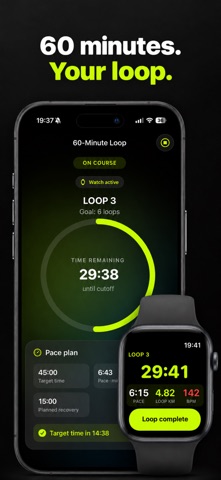
60-MINUTE LOOP FOR YOUR RUNS
Plan recurring running loops with a new start every 60 minutes – suitable for the Backyard Ultra format with approximately 6.7 kilometres per loop. Choose your own lap target or start without a fixed number of laps.
Set your own target time and pace, and add notes for fueling and recovery. After completing a loop, Overpace shows how much recovery time remains before the next start. The next loop begins automatically at the scheduled time.
TRAIN ON YOUR APPLE WATCH
Control your workout directly from your wrist. In Loop Mode, your Apple Watch displays:
• remaining time for the current loop
• distance covered
• current pace
• heart rate
• remaining recovery time
• time of the next start
Confirm completed loops directly on your Apple Watch and keep all essential information in view during your recovery.
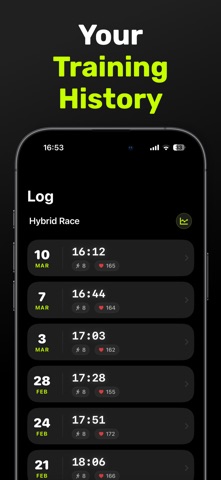
TRAINING LOG AND ANALYSIS
Track your progress and compare previous training sessions. For your 60-minute loops, the training log shows:
• completed loops
• total time and total distance
• individual loop times
• fastest and slowest loop
• average recovery time
• comparison with your target times
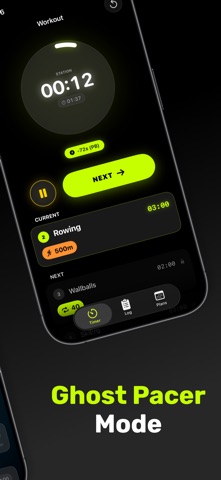
GHOST PACER
Compare your current workout with your previous best performance. During training, you can see whether you are ahead of or behind your personal comparison time.
SHARE WORKOUT PLANS
Share custom workouts using a QR code or file. Import workout plans from friends and adapt them for your next training session.
APPLE HEALTH AND GPS
Save your workouts to Apple Health with your permission. In Loop Mode, your Apple Watch also records your running distance and GPS route.
LOCK SCREEN TIMER
Follow your workout through Live Activities on the Lock Screen and, on supported iPhone models, in the Dynamic Island.
Whether you need a workout timer, interval training, a custom circuit or a 60-minute running loop, you decide how you train. Overpace keeps track of your times, laps and progress.
Privacy Policy:
https://overpaceapp.de/datenschutz.html
Terms of Use:
https://overpaceapp.de/nutzungsbedingungen.html