OverRun Timer is a productivity app developed by Stephen Zinn.
User Ratings
OverRun Timer is rated 5.00 out of 5 stars. The rating is based on one rating ratings.
App Information
OverRun Timer is FREE to download. The download size is 4.10 MB. The latest version available is 1.0.4. The last update was on June 19, 2026.
Technical Requirements
The app has a content rating of Everyone. The app has been available on the App Store since March 2026.
Description
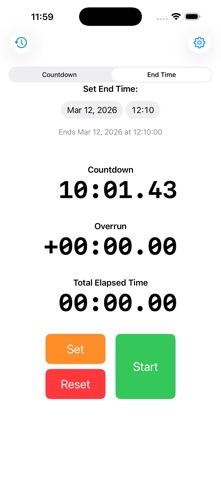
**OverRun Timer** is a precision timing app for anyone who must deliver on a fixed duration. Set a target, start your session, and track not only remaining time—but also exact **overrun**, the amount of time past your target.
Use it in **Countdown** mode (set a duration) or **End Time** mode (set a specific meeting or recording end time). OverRun keeps running after zero so you always know, clearly and immediately, how far over time you are.
OverRun is built to support real timing needs in everyday presentations and production workflows: - Keep talks and speeches within a target length - Run and monitor recording production segments that must fit a specific window - Stay on schedule during meetings, presentations, classes, debates, and similar timed sessions - Review timing patterns over time using saved session history
## Key Features - **Two timing modes** - **Countdown**: set a duration and run backward to zero - **End Time**: set a specific stop time and count down to that moment
- **Overrun tracking that matters** - Separate displays for countdown, overrun, and total elapsed - Continue tracking after zero so every second over target is visible
- **Cue system for better timing control** - Countdown cues with selectable cue packs, including **Fibonacci** - Overrun cues by every 15s, every 30s, every minute, or Fibonacci - Optional haptic alerts and sounds
- **Flexible session support** - Add lap markers during a session - Save sessions manually or with auto-save rules - Set session thresholds and completion requirements for auto-save
- **Notes and history** - Optional session notes and per-lap notes - Default note templates - Session history list with detail, edit, and delete options - Export sessions as text or CSV
- **Meeting and production friendly** - Clear Start/Pause/Reset controls - Persisted settings and state across launches - Local notifications when countdown reaches zero
## Extra - Optional one-time support purchase to remove support prompts (no subscription)
Great for timed speaking, live presentations, talks, classes, debate segments, and production workflows where **“how far over target”** is just as important as hitting the mark.
Each subscription will automatically renew 3 days before the expiration date for
the same time period. Subscriptions can be cancelled at any time before the renewal.