




AppBrain's verdict
- Last updated
- February 11, 2026
- Size
- 28.7 MB
User feedback
Ratings and reviews on the App StoreComments on Owloop - Focus Timer for iOS
We don't have enough comments to show example comments. Please check back later.
Store listing
By Dominik Gawel, from the App StoreDescription by Dominik Gawel Written by the developer, not by AppBrain. Click to read.
OwLoop is an app that helps you work in focus, observe your habits, and better understand how you use your time. Everything works locally on your device—no accounts, no cloud, no tracking.
KEY FEATURES
Simple Timer:
- Start work sessions with one tap
- Choose work duration: 25, 30, 45, 60 minutes (or custom)
- Optional break timer: 5, 10, 15, 20 minutes (or custom)
- Open-ended mode: no preset, just count up
Minimalist Clock:
- Large, readable display in portrait and landscape
- Landscape mode: full-screen StandBy-style clock
- Perfect for deep work—zero distractions
- Screen stays awake during active sessions
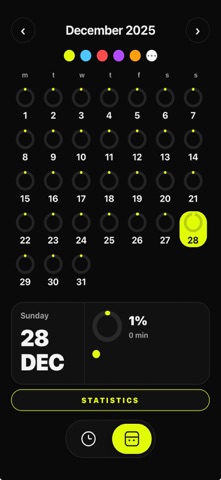
Visual Calendar:
- Monthly view with daily activity indicators
- See your work rhythm at a glance
- Color-coded activity categories
- Filter by activity type
Daily Details:
- Track work and break time
- Add descriptions and categories
- Edit or delete sessions
- View completion percentage
Statistics:
- Day, week, and month summaries
- Double donut charts (work + breaks)
- Export data as JSON (full control)
- No limits, no premium tiers
Light & Dark Mode:
- Automatic system theme support
- Manual toggle available
- High contrast, easy on the eyes
PRIVACY-FIRST DESIGN
- 100% offline—all data stored locally
- No user accounts or registration
- No cloud sync
- No analytics or tracking
- No ads, ever
- You own your data
WHO IS THIS FOR?
- Developers, designers, writers—anyone doing focused work
- People practicing Pomodoro or deep work techniques
- Anyone who wants to understand their time usage
- Users who value privacy and local-first software
WHAT OWLOOP IS NOT
- Not a task manager
- Not a to-do list
- Not a habit tracker with streaks
- Not a productivity gamification tool
OwLoop is a calm, minimalist tool for measuring time and building awareness. No pressure, no guilt—just data.
Safety and technology
Found in the app by AppBrain- Price
- Free
- App size
- 28.7 MB
- Content rating
- Everyone
Technologies used by Owloop - Focus Timer
Releases
Updates seen on the App Store- Version
- 1.0
- Launched
- February 2026
No changelog data
Alternatives
Similar apps and more from Dominik GawelAlternatives to Owloop - Focus Timer


More from Dominik Gawel

Rankings
App Store top chartsApp Store Rankings for Owloop - Focus Timer
About the app and developer
About Owloop - Focus Timer
Owloop - Focus Timer is a productivity app developed by Dominik Gawel.
User Ratings
The app has no ratings yet.
App Information
Owloop - Focus Timer is freely available from the App Store. The app size is 28.73 MB. The latest version available is 1.0. The last update was on February 11, 2026.
Technical Requirements
The app has a content rating of Everyone. The app has been available on the App Store since February 2026.
Owloop - Focus Timer is made and published by Dominik Gawel. AppBrain is an independent app data site and isn't affiliated with Dominik Gawel. The app name, icon, screenshots and description belong to Dominik Gawel and are shown as published on the App Store.
Developer information for Dominik Gawel
Address: