

Oye Convo Translate
Oye Convo Translate is made and published by FingersCrossed S.L. AppBrain is an independent app data site and isn't affiliated with FingersCrossed S.L. The app name, icon, screenshots and description belong to FingersCrossed S.L. and are shown as published on the App Store.
AppBrain's verdict
New- Rating on App Store
- 5.00
- 3 ratings
- Last updated
- October 26, 2026
Oye Convo Translate came out 76 days ago. It doesn't have enough ratings yet to judge what users think.
Rankings
App Store top chartsApp Store Rankings for Oye Convo Translate
Releases
Updates seen on the App Store- Version
- 1.5.4
- Launched
- August 2026
No changelog data
User feedback
Ratings and reviews on the App StoreComments on Oye Convo Translate for iOS
We don't have enough comments to show example comments. Please check back later.
Technology
Found in the app by AppBrain- Price
- Free
- App size
- 27.3 MB
- Content rating
- Everyone
Technologies used by Oye Convo Translate
About the app and developer
About Oye Convo Translate
Oye Convo Translate is a travel app developed by FingersCrossed S.L.
User Ratings
Oye Convo Translate is rated 5.00 out of 5 stars. The rating is based on 3 ratings.
App Information
Oye Convo Translate is freely available from the App Store. The app size is 27.33 MB. The latest version available is 1.5.4. The last update was on October 26, 2026.
Technical Requirements
The app has a content rating of Everyone. The app has been available on the App Store since August 2026.
Developer information for FingersCrossed S.L.
Address:
Frequently asked questions about Oye Convo Translate
Is Oye Convo Translate free?
Yes. Oye Convo Translate is free on the App Store.
Is Oye Convo Translate still available?
Yes. Oye Convo Translate is on the App Store, and the last update we saw was on October 26, 2026.
How large is Oye Convo Translate?
Oye Convo Translate is 27.33 MB.
Is Oye Convo Translate suitable for children?
App Store rates the content of Oye Convo Translate as suitable for everyone.
How do people rate Oye Convo Translate?
Oye Convo Translate scores 5.00 out of 5 stars, from 3 ratings on the App Store.
Who made Oye Convo Translate?
Oye Convo Translate was developed by FingersCrossed S.L. It is listed in the travel category on the App Store.
Store listing
By FingersCrossed S.L., from the App Store




Description by FingersCrossed S.L. Written by the developer, not by AppBrain. Click to read.
CONVO — TWO PEOPLE, TWO LANGUAGES
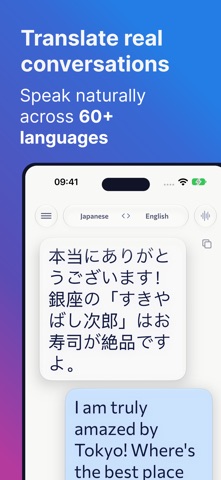
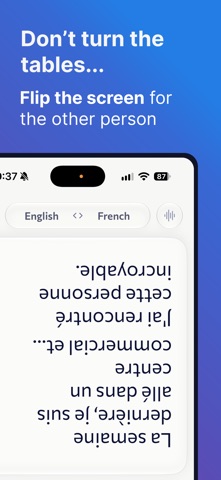
Use Convo when two people speak different languages. Choose both languages and speak naturally. Follow the exchange in a familiar chat view, or split the screen so each person has a dedicated side. Flip the upper screen so the person across from you can read comfortably.
LISTEN — EVERYTHING INTO YOUR LANGUAGE
Use Listen for meetings, classes, tours, announcements, or any time you want everything translated into one language. Choose only your language—oye automatically detects the language being spoken.
READ IT OR HEAR IT
Read translations live or let oye speak them aloud. Choose a male or female voice for each language.
FAST TO START, EASY TO KEEP TALKING
• Live text and spoken translations
• More than 60 supported languages
• Automatic spoken-language detection in Listen
• Chat and split-screen layouts in Convo
• Face-to-face screen flip
• Adjustable text size
Start with a one-time 15-minute trial, including text, audio and transcripts. Then buy 1–10 hours once, with no expiry, or choose a monthly plan: ChitChat includes 2 hours, YapYap 5 hours, and Convo 10 hours. Time is measured by the second. Monthly hours reset at renewal and do not roll over. Subscriptions renew automatically; manage or cancel them in your Apple account's Subscriptions settings. Local prices appear before purchase. Saved conversations remain accessible without a plan. Existing purchases keep their original allowances and billing terms.
A network connection is required. Translation can be incomplete or inaccurate; do not rely on oye for emergencies or safety-critical decisions.
Terms of Use (EULA): https://www.apple.com/legal/internet-services/itunes/dev/stdeula/