

Padcaster Producer
Padcaster Producer is made and published by The Padcaster, LLC. AppBrain is an independent app data site and isn't affiliated with The Padcaster, LLC. The app name, icon, screenshots and description belong to The Padcaster, LLC and are shown as published on the App Store.
AppBrain's verdict
Established- Rating on App Store
- 4.41
- 32 ratings
- Last updated
- November 1, 2025
It doesn't have enough ratings yet to judge what users think.
Rankings
App Store top chartsApp Store Rankings for Padcaster Producer
Competitors
Similar apps and more from The Padcaster, LLCAlternatives to Padcaster Producer








More from The Padcaster, LLC

Releases
Updates seen on the App Store- Version
- 2.2.2
- Launched
- April 2021
No changelog data
User feedback
Ratings and reviews on the App StoreComments on Padcaster Producer for iOS
We don't have enough comments to show example comments. Please check back later.
Technology
Found in the app by AppBrain- Price
- Free
- App size
- 25.5 MB
- Content rating
- Everyone
Technologies used by Padcaster Producer
About the app and developer
About Padcaster Producer
Padcaster Producer is a photo & video app developed by The Padcaster, LLC.
What is the rating of Padcaster Producer?
Padcaster Producer is rated 4.41 out of 5 stars, based on 32 ratings.
Is Padcaster Producer free?
Padcaster Producer is free. The app size is 25.45 MB. The latest version available is 2.2.2. The last update was on November 1, 2025.
What are the requirements for Padcaster Producer?
The app has a content rating of Everyone. The app has been available on the App Store since April 2021.
Developer information for The Padcaster, LLC
Address:
Store listing
By The Padcaster, LLC, from the App Store


Description by The Padcaster, LLC Written by the developer, not by AppBrain. Click to read.
Padcaster Portal, included with Producer, is a completely secure and compliant content management system for transferring footage over Wi-Fi or data to a private database for file sharing and collaboration.
Combine it with our award-winning turnkey hardware solutions for an incredibly powerful end-to-end content creation tool.
CAMERA FEATURES
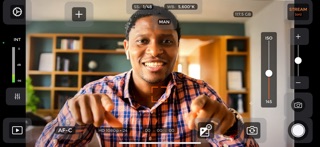
• Automatic or Full Manual Camera Control
• Manual Focus Control
• Shutter Speed Control
• White Balance Control
• ISO/Exposure Control
• Variable Speed Zoom
• Manual Audio Control
• External Microphone & Bluetooth Microphone capable
• Live Audio Monitoring with headphones
• Multiple resolutions including 4K
• Multiple frame rates
• Shoots with front or rear cameras
• Compatible with multiple-lens iPhones & iPads
• Captures stills while recording
• Record to App Media Library or Save to Camera Roll,
• Upload to YouTube, Dropbox, Google Drive or any connected storage App
• AirDrop through Files App
LIVESTREAMING
• Stream live to YouTube, Facebook or any Custom RMTP Server
• Optimize bitrate and keyframe duration options for livestreaming
• Simultaneous stream and record to your device
GREENSCREEN
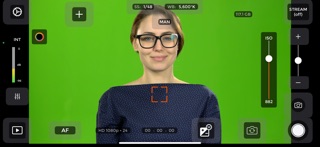
• Built-in, easy to use Chroma Key/Greenscreen feature
• Select key color and fine-tune with multiple color-picker tools
• Add still photos or video backgrounds
LOWER THIRDS
• Lower Thirds Tool with multiple font styles and text sizes
• Two lines of text for name and title, with independent controls for each
• Add date and time stamp overlay for legal recordings
MEDIA OVERLAY
• Create Picture-in-Picture with an on-screen still image or video
• Scale and position anywhere on screen
• Cut to a full screen “highlight” video during a recording
• Add an on-screen logo for your company or school
FOLLOW ME
• Automatically crop and pan with a subject without needing to operate the camera
• Optimize tracking speed and video quality
• Easily integrates with livestreaming
ONSCREEN TELEPROMPTER
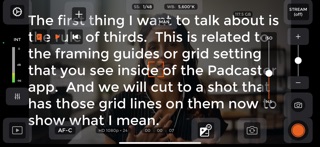
• Easy to use editor for live teleprompter overlay while using front-facing camera
• Edit scroll speed, text size, orientation and text color
PADCASTER PORTAL:
• A library of over one million royalty-free still image and video backgrounds for use in your video or live stream project.
• Hardware and software tutorial videos
• Growing Knowledge base articles for lighting, audio, framing and other useful tips to help improve your video production and live streaming.
• Premium support contact
CONTACT US
softwaresupport@padcaster.com