

PadLink Remote
PadLink Remote is made and published by Socheat Rath. AppBrain is an independent app data site and isn't affiliated with Socheat Rath. The app name, icon, screenshots and description belong to Socheat Rath and are shown as published on the App Store.
AppBrain's verdict
New- Rating on App Store
- 1.00
- 1 ratings
- Last updated
- September 22, 2026
PadLink Remote came out 61 days ago. It doesn't have enough ratings yet to judge what users think.
Rankings
App Store top chartsApp Store Rankings for PadLink Remote
Competitors
Similar apps and more from Socheat RathAlternatives to PadLink Remote


More from Socheat Rath

Releases
Updates seen on the App Store- Version
- 1.0.0
- Launched
- September 2026
No changelog data
User feedback
Ratings and reviews on the App StoreComments on PadLink Remote for iOS
We don't have enough comments to show example comments. Please check back later.
Technology
Found in the app by AppBrain- Price
- Free
- App size
- 15.8 MB
- Content rating
- Everyone
Technologies used by PadLink Remote
About the app and developer
About PadLink Remote
PadLink Remote is an utilities app developed by Socheat Rath.
User Ratings
PadLink Remote is rated 1.00 out of 5 stars. The rating is based on one rating ratings.
App Information
PadLink Remote is freely available from the App Store. The app size is 15.75 MB. The latest version available is 1.0.0. The last update was on September 22, 2026.
Technical Requirements
The app has a content rating of Everyone. The app has been available on the App Store since September 2026.
Developer information for Socheat Rath
Address:
Frequently asked questions about PadLink Remote
Is PadLink Remote free?
Yes. PadLink Remote is free on the App Store.
Is PadLink Remote still available?
Yes. PadLink Remote is on the App Store, and the last update we saw was on September 22, 2026.
How large is PadLink Remote?
PadLink Remote is 15.75 MB.
Is PadLink Remote suitable for children?
App Store rates the content of PadLink Remote as suitable for everyone.
How do people rate PadLink Remote?
PadLink Remote has one rating of 1.00 stars on the App Store.
Who made PadLink Remote?
PadLink Remote was developed by Socheat Rath. It is listed in the utilities category on the App Store.
What are the best alternatives to PadLink Remote?
People looking at PadLink Remote also look at these utilities apps: TouchNow Remote, V-Pad: Virtual Gamepad, Gamepad Pro – Remote for PC, OONE Click App v2.0, Oone Click - PPWSA.
Store listing
By Socheat Rath, from the App Store



Description by Socheat Rath Written by the developer, not by AppBrain. Click to read.
HOW IT WORKS
1. Install the free PadLink desktop app on your computer.
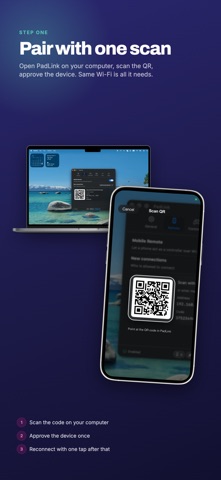
2. Open PadLink Remote and pair in seconds — scan the QR code or type the pairing code.
3. Start playing. PadLink presents your phone as a standard gamepad your games already recognize (or as keyboard & mouse).
CONTROL SURFACES
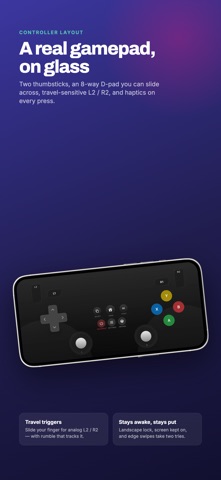
• Gamepad — dual thumbsticks, D-pad, face buttons, shoulder buttons, analog triggers, and menu buttons, laid out like a real controller.
• Car Driving cockpit — a steering wheel with tilt (gyro) steering, gas and brake pedals with cruise-lock, a sequential gear shifter, and a handbrake. Built for racing games.
• Touchpad mouse — use your phone as a trackpad whenever you need a pointer.
FEATURES
• Low-latency input over your local network — no internet connection needed for gameplay.
• Easy pairing by QR code, manual code, or one-tap reconnect to a known computer.
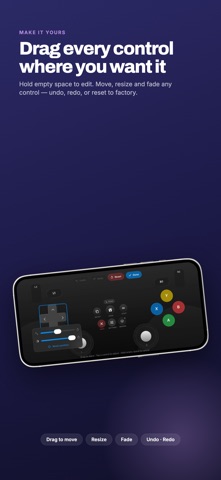
• Customizable layout — move, resize, and set the opacity of every control to fit your hands and your screen. Free for everyone.
• Haptic feedback on button presses and triggers.
• Automatic reconnect if your Wi-Fi drops mid-session.
• Designed for landscape play.
REQUIREMENTS
• The free PadLink desktop app, available for Windows and macOS.
• Your phone and computer on the same Wi-Fi / local network.
• No sign-in and no account — your controller input goes only to your own computer.
FREE & PRO
PadLink Remote is free to download and play. The Car Driving cockpit becomes available when the computer you connect to is running PadLink Pro or its free trial — it is a capability of the desktop app. While connected to a computer on the free plan, a small banner ad appears during play.
PRIVACY
Your controller input is sent only to your own computer over your local network. The camera is used solely to scan the pairing QR code, on your device.
Turn the phone in your pocket into the controller your games have been waiting for.