

Padme - Custom keypad for Mac
Padme - Custom keypad for Mac is made and published by Giuseppe Bertolini. AppBrain is an independent app data site and isn't affiliated with Giuseppe Bertolini. The app name, icon, screenshots and description belong to Giuseppe Bertolini and are shown as published on the App Store.
AppBrain's verdict
- Last updated
- July 28, 2026
Rankings
App Store top chartsApp Store Rankings for Padme - Custom keypad for Mac
Competitors
Similar apps and more from Giuseppe BertoliniAlternatives to Padme - Custom keypad for Mac


More from Giuseppe Bertolini


Releases
Updates seen on the App Store- Version
- 1.1.4
- Launched
- July 2026
No changelog data
User feedback
Ratings and reviews on the App StoreComments on Padme - Custom keypad for Mac for iOS
We don't have enough comments to show example comments. Please check back later.
Technology
Found in the app by AppBrain- Price
- Free
- App size
- 2.75 MB
- Content rating
- Everyone
Technologies used by Padme - Custom keypad for Mac
About the app and developer
About Padme - Custom keypad for Mac
Padme - Custom keypad for Mac is an utilities app developed by Giuseppe Bertolini.
User Ratings
The app has no ratings yet.
App Information
Padme - Custom keypad for Mac is freely available from the App Store. The app size is 2.75 MB. The latest version available is 1.1.4. The last update was on July 28, 2026.
Technical Requirements
The app has a content rating of Everyone. The app has been available on the App Store since July 2026.
Developer information for Giuseppe Bertolini
Address:
Store listing
By Giuseppe Bertolini, from the App Store


Description by Giuseppe Bertolini Written by the developer, not by AppBrain. Click to read.
Designed to feel right at home next to Apple hardware, it brings a clean, refined keypad experience inspired by the Magic Keyboard, with responsive key presses and a polished look that fits naturally into your Mac setup.
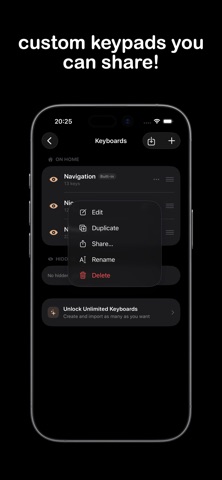
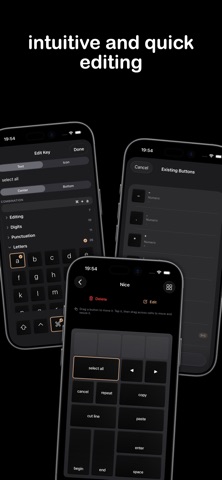
More than a standard number pad, Mac Numeric Pad lets you create custom keypads that fit your workflow. Build layouts for shortcuts, navigation, function keys, editing controls, or everyday tasks, and keep them ready on your iPhone whenever you need them. You can also share your custom keypads with others, making it easy to reuse your favorite layouts across devices or send them to friends and teammates!
Features:
All the features are free, but limited to one custom keypad, perfect for a light user and to demonstrate Padme's promises :)
An in-app purchase will be required to have multiple custom keypads and to support the project!
- Create custom keypads for shortcuts, workflows, and everyday tasks
- Share keypad layouts easily with anyone
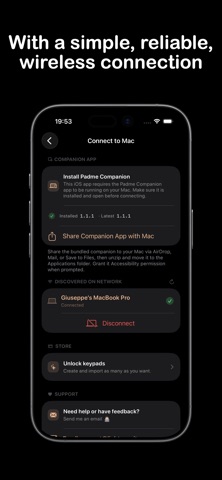
- Full wireless and easy connection
- Access navigation, arrow, function, and editing keys
- Enjoy smooth, responsive key presses with auto-repeat support
- Swipe between keypad layouts quickly
- Connect to your Mac over your local network, with no accounts or sign-ups!
- Automatically sync and backup your keypads on iCloud
Pair the app with the free Mac Numeric Pad Companion on your Mac and start typing in seconds!
For any suggestion or issue, do not hesitate to contact me at support@lightme.site