

Page2Play is made and published by Joseph Griffin. AppBrain is an independent app data site and isn't affiliated with Joseph Griffin. The app name, icon, screenshots and description belong to Joseph Griffin and are shown as published on the App Store.
AppBrain's verdict
- Last updated
- September 30, 2026
Rankings
App Store top chartsApp Store Rankings for Page2Play
Competitors
Similar apps and more from Joseph GriffinAlternatives to Page2Play



Also available on Google Play

Releases
Updates seen on the App Store- Version
- 1.2.3
- Launched
- May 2026
No changelog data
User feedback
Ratings and reviews on the App StoreComments on Page2Play for iOS
We don't have enough comments to show example comments. Please check back later.
Technology
Found in the app by AppBrain- Price
- Free
- App size
- 135.7 MB
- Content rating
- Everyone
Technologies used by Page2Play
About the app and developer
About Page2Play
Page2Play is a music app developed by Joseph Griffin.
What is the rating of Page2Play?
Page2Play has no ratings yet.
Is Page2Play free?
Page2Play is free. The app size is 135.69 MB. The latest version available is 1.2.3. The last update was on September 30, 2026.
What are the requirements for Page2Play?
The app has a content rating of Everyone. The app has been available on the App Store since May 2026.
Developer information for Joseph Griffin
Address:
Frequently asked questions about Page2Play
Is Page2Play free?
Yes. Page2Play is free on the App Store.
Is Page2Play still available?
Yes. Page2Play is on the App Store, and the last update we saw was on September 30, 2026.
How large is Page2Play?
Page2Play is 135.69 MB.
Is Page2Play suitable for children?
App Store rates the content of Page2Play as suitable for everyone.
Who made Page2Play?
Page2Play was developed by Joseph Griffin. It is listed in the music category on the App Store.
What are the best alternatives to Page2Play?
People looking at Page2Play also look at these music apps: Pianora: Piano & Falling Notes, SnapNotes: Falling Notes, PlayScan: Sheet Music Scanner, Opuscan: Score Scanner, Keys - Play Any Song on Piano.
Store listing
By Joseph Griffin, from the App Store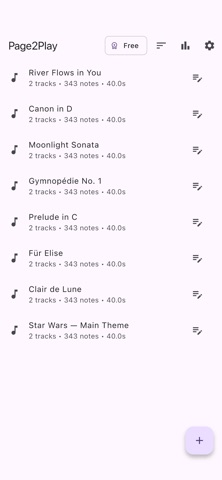


Description by Joseph Griffin Written by the developer, not by AppBrain. Click to read.
Everything runs on your device. No account, no sign-in, no internet required for the core flow. Your scans, MIDI, and practice settings never leave your phone.
CAPTURE
• Import a scanned page (PNG, JPG, or pages exported from a PDF). Flat, evenly lit scans give the cleanest recognition.
• Phone photos also work when scans aren't available; expect more cleanup in the editor on noisy phone shots.
• Or skip recognition entirely and import existing MIDI or MusicXML.
A REAL EDITOR, NOT JUST A VIEWER
Recognition is rarely perfect, so Page2Play ships with the tools to fix anything the recognizer missed, right on the phone, with no desktop round-trip:
• Tap a note and change its pitch.
• Change the key signature when the recognizer guessed wrong.
• Change the time signature per measure.
• Insert or delete measures anywhere in the score.
• Wrap notes into tuplets (triplets and other 3:2 groupings).
• Multi-page navigation with per-page editing.
• Undo and redo across the whole session.
• Export to MusicXML (round-trip with desktop notation software), MIDI, or PDF, either a single page or the entire score.
PRACTICE WITHOUT READING
• Falling bars: notes drop onto a piano keyboard at the speed you choose. Watch the bars, press the matching keys on your piano. That's it.
• Mute either hand to focus on the other.
• A/B loop any passage until it clicks.
• Slow it down or speed it up while keeping the pitch intact.
• No MIDI cable? Play along on any acoustic or digital piano and Page2Play listens through the microphone. A Bluetooth or USB MIDI keyboard also connects, for the tightest timing.
• Listen back with a built-in upright-piano sound.
• Score mode: play a song on your MIDI keyboard or through the microphone for a graded run, with accuracy, combo, and a full-combo goal, plus your best score saved per song.
• Practice stats: daily practice time, a running streak, and per-song totals for plays, time, and best score.
RECOGNITION PIPELINE
Page2Play uses an on-device optical music recognition pipeline trained on printed scores. It handles multi-staff piano music, key and time signatures, rests, ties, accidentals, and clef changes. Recognition takes roughly a minute or two per page depending on your device and whether GPU acceleration is enabled (Settings, then GPU acceleration).
PRIVACY BY DESIGN
• No analytics, no advertising, no tracking.
• Optional crash reporting (Sentry) sends only stack traces, with no images, no MIDI, and no titles.
• No data is uploaded for model training or any other purpose.
Full privacy policy: https://page2play.app/privacy
WHO IT'S FOR
• Anyone with a keyboard at home and a song they want to play, who never got around to learning to read music, or got rusty.
• Self-taught players who learn by watching, not by reading.
• People with a stack of sheet music collecting dust.
WHAT YOU NEED
• A mobile phone.
• A piano or keyboard to play along on (any acoustic, digital, or MIDI controller works; Page2Play tells you what to press, you press it).
• A clean scan (PNG, JPG, or PDF page export) works best for recognition.
• Optional: a Bluetooth or USB MIDI keyboard for the most responsive play-along. The microphone works fine without one.