

PageScribble for Safari
PageScribble for Safari is made and published by Joao Pedro Oliveira Silva. AppBrain is an independent app data site and isn't affiliated with Joao Pedro Oliveira Silva. The app name, icon, screenshots and description belong to Joao Pedro Oliveira Silva and are shown as published on the App Store.
AppBrain's verdict
- Best rank
- #23
- Top Paid, Brazil
- Rating on App Store
- 3.67
- 3 ratings
- Last updated
- September 21, 2026
It doesn't have enough ratings yet to judge what users think. Its best ranking is #23 in Top Paid, Utilities in Brazil.
Rankings
App Store top charts- Highest rank
- #23
- Chart
- Top Paid
- Utilities
- Country
- Brazil
App Store Rankings for PageScribble for Safari
Top rankings
| Rank | Country | Category | List |
|---|---|---|---|
| 23 | Brazil | Utilities | Top Paid |
Ranking history in Brazil
Competitors
Similar apps and more from Joao Pedro Oliveira SilvaAlternatives to PageScribble for Safari


More from Joao Pedro Oliveira Silva


Releases
Updates seen on the App Store- Version
- 1.4.1
- Launched
- April 2026
No changelog data
User feedback
Ratings and reviews on the App StoreComments on PageScribble for Safari for iOS
We don't have enough comments to show example comments. Please check back later.
Technology
Found in the app by AppBrain- Price
- $4.99
- App size
- 3.08 MB
- Content rating
- Everyone
Technologies used by PageScribble for Safari
About the app and developer
About PageScribble for Safari
PageScribble for Safari is an utilities app developed by Joao Pedro Oliveira Silva.
User Ratings
PageScribble for Safari is rated 3.67 out of 5 stars. The rating is based on 3 ratings.
App Information
PageScribble for Safari costs $4.99. The app size is 3.08 MB. The latest version available is 1.4.1. The last update was on September 21, 2026.
Technical Requirements
The app has a content rating of Everyone. The app has been available on the App Store since April 2026.
Developer information for Joao Pedro Oliveira Silva
Address:
Store listing
By Joao Pedro Oliveira Silva, from the App Store

Description by Joao Pedro Oliveira Silva Written by the developer, not by AppBrain. Click to read.
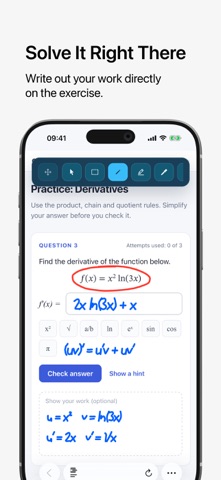
DRAW AND MARK UP
Pen, marker, eraser, text, lines, arrows, rectangles, ellipses, triangles, and stars. Set the stroke width, pick any color, or sample one from the page with the eyedropper.
PRESENT AND TEACH
Point with a laser that leaves a fading trail, spotlight one area while the rest of the page dims, write in ink that fades on its own, or switch to a blank board. Show your mouse clicks for recordings and calls.
GESTURES THAT KEEP YOU DRAWING
Use gestures like scribbling over a drawing to erase it, or pausing at the end of a stroke to turn it into a clean shape. Turn them on whenever you like.
ANY INPUT
Mouse, trackpad, finger, or Apple Pencil on compatible iPads. Choose whether your finger draws or scrolls. With a keyboard, a single key switches tools.
EDIT ANYTHING
Select, move, and resize drawings. Undo, redo, delete one element, or clear the page.
CAPTURE AND SHARE
Screenshot the visible page or just one area, drawings included. It goes to your clipboard, or to Downloads if you prefer.
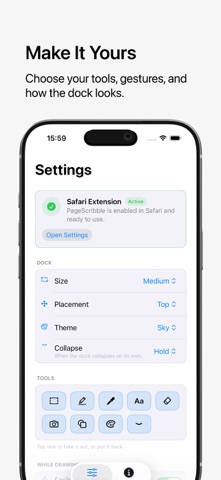
A DOCK THAT STAYS OUT OF YOUR WAY
Place it on any edge in one of three sizes, fixed or free to drag. Keep only the tools you use, pick Sky, Graphite, or Sand, and let it collapse while you draw.
REMEMBERS YOUR WORK
Drawings are saved per page and come back when you return. Your tools and settings stay as you left them.
No account. No cloud. Your drawings stay on your device.