

PaintLapse: Art Timelapse
PaintLapse: Art Timelapse is made and published by KOJI HARA. AppBrain is an independent app data site and isn't affiliated with KOJI HARA. The app name, icon, screenshots and description belong to KOJI HARA and are shown as published on the App Store.
AppBrain's verdict
- Last updated
- September 22, 2026
Rankings
App Store top chartsApp Store Rankings for PaintLapse: Art Timelapse
Competitors
Similar apps and more from KOJI HARAMore from KOJI HARA


Releases
Updates seen on the App Store- Version
- 1
- Launched
- September 2026
No changelog data
User feedback
Ratings and reviews on the App StoreComments on PaintLapse: Art Timelapse for iOS
We don't have enough comments to show example comments. Please check back later.
Technology
Found in the app by AppBrain- Price
- $9.99
- App size
- 1.83 MB
- Content rating
- Everyone
Technologies used by PaintLapse: Art Timelapse
About the app and developer
About PaintLapse: Art Timelapse
PaintLapse: Art Timelapse is a photo & video app developed by KOJI HARA.
User Ratings
The app has no ratings yet.
App Information
PaintLapse: Art Timelapse costs $9.99. The app size is 1.83 MB. The latest version available is 1. The last update was on September 22, 2026.
Technical Requirements
The app has a content rating of Everyone. The app has been available on the App Store since September 2026.
Developer information for KOJI HARA
Address:
Frequently asked questions about PaintLapse: Art Timelapse
Is PaintLapse: Art Timelapse free?
No. PaintLapse: Art Timelapse costs $9.99 on the App Store.
Is PaintLapse: Art Timelapse still available?
Yes. PaintLapse: Art Timelapse is on the App Store, and the last update we saw was on September 22, 2026.
How large is PaintLapse: Art Timelapse?
PaintLapse: Art Timelapse is 1.83 MB.
Is PaintLapse: Art Timelapse suitable for children?
App Store rates the content of PaintLapse: Art Timelapse as suitable for everyone.
Who made PaintLapse: Art Timelapse?
PaintLapse: Art Timelapse was developed by KOJI HARA. It is listed in the photo & video category on the App Store.
Store listing
By KOJI HARA, from the App Store
Description by KOJI HARA Written by the developer, not by AppBrain. Click to read.
◆ The painting process becomes the video
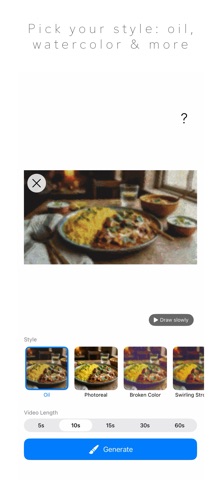
Large brushes lay down the big shapes first, then finer and finer brushes add the details. Every stroke is recorded along with the moving brush.
◆ Twenty-two styles
Oil, Photoreal, Broken Color, Swirling Strokes, Pointillism, Watercolor, Ink Wash, Pastel, Colored Pencil, Pop, CMYK Layers, 16-Color Pixel Art, Spray Paint, Sand Art, Splatter, Light Painting, Light Dots, Fine Pencil, Pen & Ink, Black & Pink, Cables, Toy Bricks
◆ Fully on-device, privacy first
Your photos are never uploaded to any server. Everything happens inside your own iPhone or iPad.
- Never used to train AI
- No ads
- No notifications
- No sign-up: open it and start
◆ Choose the length
Anything from 5 to 60 seconds. You can make short clips for social media or longer videos that show the whole process.
◆ Check how a style turns out before you choose
Each style thumbnail is a small painting of your own photo in that style.
◆ How to use
1. Choose a photo with the "Choose photo" button
2. Pick a style from the row of thumbnails of your own photo
3. Choose a length (5, 10, 15, 30 or 60 seconds)
4. Tap Generate
5. Check the finished video and save it
◆ Please note
The painting order in the video is inferred from the finished look of the image you choose. Even with a real drawing or illustration, it does not reproduce how that picture was actually made.
Please use photos and images in line with the laws of your country, including copyright and the right of publicity. If you use someone else's work or photo, get permission from the rights holder.
◆ Great for
- Turning travel or pet photos into painting videos for social media
- Watching your favorite scenery appear as a painting
Before purchasing, please try the free Lite version first to make sure the app works well on your device.