

Palette Colors is made and published by 晓航 郑. AppBrain is an independent app data site and isn't affiliated with 晓航 郑. The app name, icon, screenshots and description belong to 晓航 郑 and are shown as published on the App Store.
AppBrain's verdict
- Last updated
- June 6, 2026
Rankings
App Store top chartsApp Store Rankings for Palette Colors
This app is not ranked
Competitors
Similar apps and more from 晓航 郑Alternatives to Palette Colors






More from 晓航 郑


Releases
Updates seen on the App Store- Version
- 2.1.0
- Launched
- June 2023
No changelog data
User feedback
Ratings and reviews on the App StoreComments on Palette Colors for iOS
We don't have enough comments to show example comments. Please check back later.
Technology
Found in the app by AppBrain- Price
- $0.99
- App size
- 6.22 MB
- Content rating
- Everyone
Technologies used by Palette Colors
About the app and developer
About Palette Colors
Palette Colors is a graphics & design app developed by 晓航 郑.
What is the rating of Palette Colors?
Palette Colors has no ratings yet.
Is Palette Colors free?
Palette Colors costs $0.99. The app size is 6.22 MB. The latest version available is 2.1.0. The last update was on June 6, 2026.
What are the requirements for Palette Colors?
The app has a content rating of Everyone. The app has been available on the App Store since June 2023.
Developer information for 晓航 郑
Address:
Store listing
By 晓航 郑, from the App Store

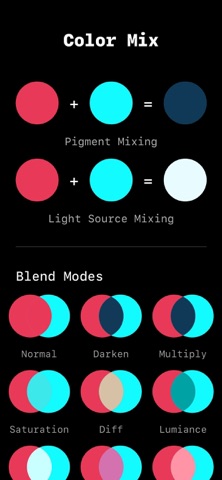
Screenshots by 晓航 郑, from the the App Store listing
Description by 晓航 郑 Written by the developer, not by AppBrain. Click to read.
Palette Colors is an auxiliary tool for color management and color extraction designed for UI designers and programmers. With it, you can easily manage your color cards, extract colors from photos, copy and export your colors.
Product features:
- Built-in library of commonly used color cards
- You can create your own color card groups and add your favorite colors to them
- You can choose a photo and let it automatically extract the main color theme of the photo or manually extract pixel colors, and you can save these colors to the color card
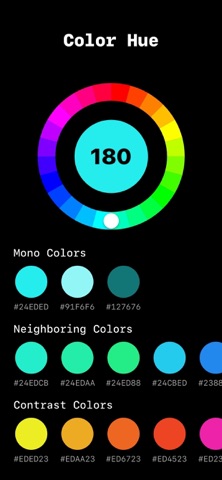
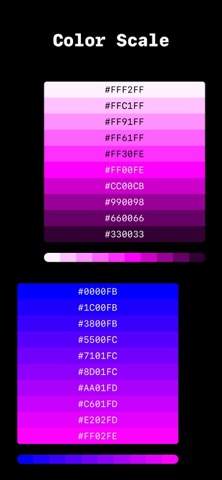
- You can also choose a color theme and let it automatically generate various color schemes (such as monochrome, adjacent color, contrast color, complementary color, etc.)
- Built-in common color blending mode preview, which can be used to replace colors and view the effect
- Built-in color value conversion tool, you can easily switch different data displays (such as hexadecimal strings, RGB, HSB, CMYK, etc.)
- Built-in screen color detection tool, check whether your device has bad points and whether the device color display is normal
Download it now to improve your productivity.
Privacy Policy :https://note.youdao.com/s/E5AXtqMd
Terms of Service: https://note.youdao.com/s/b68DbWk0
Product features:
- Built-in library of commonly used color cards
- You can create your own color card groups and add your favorite colors to them
- You can choose a photo and let it automatically extract the main color theme of the photo or manually extract pixel colors, and you can save these colors to the color card
- You can also choose a color theme and let it automatically generate various color schemes (such as monochrome, adjacent color, contrast color, complementary color, etc.)
- Built-in common color blending mode preview, which can be used to replace colors and view the effect
- Built-in color value conversion tool, you can easily switch different data displays (such as hexadecimal strings, RGB, HSB, CMYK, etc.)
- Built-in screen color detection tool, check whether your device has bad points and whether the device color display is normal
Download it now to improve your productivity.
Privacy Policy :https://note.youdao.com/s/E5AXtqMd
Terms of Service: https://note.youdao.com/s/b68DbWk0