

PalmCards: Speech Cue Cards
PalmCards: Speech Cue Cards is made and published by Paul Gawman. AppBrain is an independent app data site and isn't affiliated with Paul Gawman. The app name, icon, screenshots and description belong to Paul Gawman and are shown as published on the App Store.
AppBrain's verdict
- Rating on App Store
- 5.00
- 1 ratings
- Last updated
- October 1, 2026
It doesn't have enough ratings yet to judge what users think.
Rankings
App Store top chartsApp Store Rankings for PalmCards: Speech Cue Cards
Competitors
Similar apps and more from Paul GawmanAlternatives to PalmCards: Speech Cue Cards


Releases
Updates seen on the App Store- Version
- 1.3.6
- Launched
- July 2026
No changelog data
User feedback
Ratings and reviews on the App StoreComments on PalmCards: Speech Cue Cards for iOS
We don't have enough comments to show example comments. Please check back later.
Technology
Found in the app by AppBrain- Price
- Free
- App size
- 49.6 MB
- Content rating
- Everyone
Technologies used by PalmCards: Speech Cue Cards
About the app and developer
About PalmCards: Speech Cue Cards
PalmCards: Speech Cue Cards is a productivity app developed by Paul Gawman.
User Ratings
PalmCards: Speech Cue Cards is rated 5.00 out of 5 stars. The rating is based on one rating ratings.
App Information
PalmCards: Speech Cue Cards is freely available from the App Store. The app size is 49.62 MB. The latest version available is 1.3.6. The last update was on October 1, 2026.
Technical Requirements
The app has a content rating of Everyone. The app has been available on the App Store since July 2026.
Developer information for Paul Gawman
Address:
Frequently asked questions about PalmCards: Speech Cue Cards
Is PalmCards: Speech Cue Cards free?
Yes. PalmCards: Speech Cue Cards is free on the App Store.
Is PalmCards: Speech Cue Cards still available?
Yes. PalmCards: Speech Cue Cards is on the App Store, and the last update we saw was on October 1, 2026.
How large is PalmCards: Speech Cue Cards?
PalmCards: Speech Cue Cards is 49.62 MB.
Is PalmCards: Speech Cue Cards suitable for children?
App Store rates the content of PalmCards: Speech Cue Cards as suitable for everyone.
How do people rate PalmCards: Speech Cue Cards?
PalmCards: Speech Cue Cards has one rating of 5.00 stars on the App Store.
Who made PalmCards: Speech Cue Cards?
PalmCards: Speech Cue Cards was developed by Paul Gawman. It is listed in the productivity category on the App Store.
What are the best alternatives to PalmCards: Speech Cue Cards?
People looking at PalmCards: Speech Cue Cards also look at these productivity apps: Speaker Notes: Cue Cards, JCue, StageCue: Event Host Assistant, Wireless Presenter, Cue Cards: AI Speech Notes.
Store listing
By Paul Gawman, from the App Store


Description by Paul Gawman Written by the developer, not by AppBrain. Click to read.
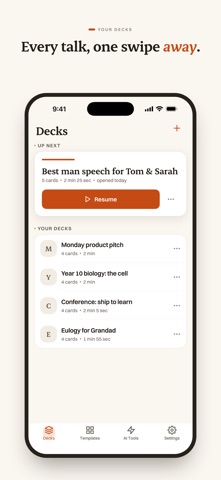
PalmCards is the whole job, not just the cards. Getting the words down, practising them against the clock, and standing up on the day without losing your place. The best man speech, the eulogy, the wedding toast, the big pitch, the lesson, the conference talk.
WRITE IT
Start from a rough idea and get a first draft to react to, in your own words. Already written it? Paste the whole speech in, or import a Word document, and it comes back as clean cards with cue lines. Templates for the occasion: a wedding toast for the best man or maid of honour, a eulogy, a birthday, a graduation, a retirement, plus sales pitches, lessons and conference talks. Tighten a line that rambles, without rewriting the card around it. Or just ask. Tell the AI what you want changed on a card, in your own words, and it rewrites the cue lines. Undo if you preferred them as they were.
REHEARSE IT
Run it as often as you like. PalmCards times every card, not just the whole talk. See exactly which section ran long, so you know what to trim before the day. Every run is kept, so you can watch the timing settle. Prepare the Q&A too: Likely questions reads your deck and gives you the questions it invites, hardest first, each one a card with cues for the answer.
DELIVER IT
One card at a time, large and easy to glance at, so your eyes stay on the room and not on a wall of text. Quiet pacing shows you when you are running over, without a loud timer dragging your attention off the room. Swipe or tap to move. Turn on volume-button advance in Settings and a clicker that works as volume keys will move the cards too. The screen stays awake and nothing breaks your flow. Pinch to size the text mid-talk if the light is bad or the lectern is low. Export to PDF for a paper backup, or to print your cards for the day. Yours, on your device. No account needed. Your speeches stay private.
PALMCARDS PRO Go further with unlimited AI, Likely questions, every template, and a clean PDF with no PalmCards footer. The annual plan starts with a 7-day free trial, then AU$39.99/year. Or go monthly at AU$6.99.
Payment is charged to your Apple ID at confirmation of purchase. Subscriptions auto-renew unless canceled at least 24 hours before the end of the period. Manage or cancel anytime in your App Store account settings. Terms: https://palmcards.app/terms Privacy: https://palmcards.app/privacy
Whether it is the speech of your life or just Monday's presentation, PalmCards keeps it calm, clear, and right where your thumb expects it.