




AppBrain's verdict
- Last updated
- November 3, 2026
- Size
- 153.1 MB
User feedback
Ratings and reviews on the App StoreComments on Panda Zhuyin for iOS
We don't have enough comments to show example comments. Please check back later.
Store listing
By TZUYUAN YIN, from the App StoreDescription by TZUYUAN YIN Written by the developer, not by AppBrain. Click to read.
Mandarin and Taiwanese are both written in Zhuyin. Panda Zhuyin packs the symbols into a few large keys you won't miss: tap for the center symbol, flick for the ones around it, and every tap or flick gives one definite result. Impossible combinations are grayed out.
Two keyboard layouts, switch any time
· Rime Bars: flick for initials; rimes sit in three bars, one per cell, following the Bopomofo chart
· 10-Key: every key flicks, like native 10-key keyboards in Japanese and Korean; the tone key sits at the upper right, as on Rime Bars. An experimental Feature Phone arrangement is included
Two typing styles, your habit
· Continuous: keep typing, tones optional, even initials only; the keyboard works out where each character ends
· Auto-Add Medials: find words even when you skip a medial
· Tone Ends the Syllable: a character ends when you type its tone; keys that cannot follow turn gray
Taiwanese (Taigi) keyboard
· Bopomofo Extended with all seven tones, checked tones, and nasal rimes; a Checked-Tone key, and a Transform Key for voiced and nasal variants
· Lexicon cross-checked from four public sources, including the Ministry of Education dictionary
· Romanization lookup between Bopomofo Extended, Tai-lo, and POJ; key labels can show the romanization as you type
Editing and the toolbar
· Hold Space and the whole keyboard becomes a trackpad, moving left, right, and between lines
· Edit Tools: move the cursor and select one step at a time, then cut, copy, or paste; a Paste button sits on the toolbar
· Pull the candidate bar down for more candidates and the toolbar
English, numbers, symbols, and emoji
· Emoji key: a full panel with categories, Recents, color filters, and skin tones
· Selecting a symbol shows its Unicode code point
· English: QWERTY on Rime Bars; two letters per key on 10-Key, or a Japanese-style Phone Keypad
· Calculator panel; press = for the result
· Full-width symbols with halfwidth too; brackets open and close on one key
Help and Setup Assistant
· Every feature shown on a real keyboard, plus Find a Symbol, a setup checklist, and quick start; the FAQ and full manual are on the website
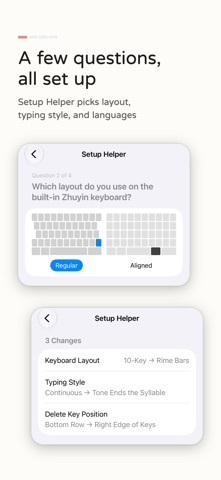
· Setup Assistant in Settings picks your layout, typing style, and languages from a few questions
Make the keyboard yours
· Theme editor: colors, corners, borders, and backgrounds (solid, gradient, or photo); basic editing is always free
· Text size for keys and candidates is set once in Settings and applies to every theme
· Five built-in fonts; glass finish tuned for light and dark
Features
· Open-source Homa composer that takes the previous word into account
· Custom Vocabulary and learning from what you pick; hold a candidate to forget it
· Separate learning data for Mandarin and Taiwanese; opt-in iCloud Sync to your own iCloud only
· Candidate tabs, emoji suggestions, Chinese numerals and dates, one-handed mode, landscape, and VoiceOver
Privacy
· The keyboard never connects to the internet; your input and learning data stay on your device
· "Allow Full Access" is used for haptics and sounds, the clipboard (paste, cut, copy), and opening the app (an Apple requirement); all of it stays on your device
· Anonymous Product Survey: opt-in, off by default, with nothing you type and no identifiers
About the subscription (Panda Supporter)
Core typing is free forever, with three featured themes. Supporter is an auto-renewable subscription for appearance extras: featured theme packs, font switching, glass finish effects, background gradients, and more custom punctuation slots. Cancel anytime in Manage Subscriptions; what you made stays.
Terms: https://panda-zhuyin.erikyin.net/terms.html
Privacy: https://panda-zhuyin.erikyin.net/privacy.html
Who this is not for (honestly)
· You type comfortably on the built-in Zhuyin keyboard
· You want cloud AI prediction; Gboard or SwiftKey fits better
· You don't type Zhuyin or Taiwanese
Requires iOS 18 or later.
Safety and technology
Found in the app by AppBrain- Price
- Free
- App size
- 153.1 MB
- Content rating
- Everyone
Technologies used by Panda Zhuyin
Releases
Updates seen on the App Store- Version
- 3.3.1
- Launched
- April 2026
No changelog data
Alternatives
Similar apps and more from TZUYUAN YINAlternatives to Panda Zhuyin


More from TZUYUAN YIN

Rankings
App Store top chartsApp Store Rankings for Panda Zhuyin
About the app and developer
About Panda Zhuyin
Panda Zhuyin is an utilities app developed by TZUYUAN YIN.
User Ratings
The app has no ratings yet.
App Information
Panda Zhuyin is freely available from the App Store. The app size is 153.11 MB. The latest version available is 3.3.1. The last update was on November 3, 2026.
Technical Requirements
The app has a content rating of Everyone. The app has been available on the App Store since April 2026.
Panda Zhuyin is made and published by TZUYUAN YIN. AppBrain is an independent app data site and isn't affiliated with TZUYUAN YIN. The app name, icon, screenshots and description belong to TZUYUAN YIN and are shown as published on the App Store.
Developer information for TZUYUAN YIN
Address: