

Paperforge:Scanning and Edit
Paperforge:Scanning and Edit is made and published by 鑫宇 王. AppBrain is an independent app data site and isn't affiliated with 鑫宇 王. The app name, icon, screenshots and description belong to 鑫宇 王 and are shown as published on the App Store.
AppBrain's verdict
- Last updated
- August 11, 2026
- Size
- 33.2 MB
User feedback
Ratings and reviews on the App StoreComments on Paperforge:Scanning and Edit for iOS
We don't have enough comments to show example comments. Please check back later.
Store listing
By 鑫宇 王, from the App Store

Description by 鑫宇 王 Written by the developer, not by AppBrain. Click to read.
Whether it's contracts, invoices, certificates, notes, or lecture handouts, Paperforge can quickly capture, automatically optimize, and organize them into clear PDF documents.
Paperforge can scan single pages or multiple pages continuously, automatically detect document edges, remove unwanted backgrounds, and offers multiple color modes: original, enhanced, black and white, and grayscale. Paperforge also supports both camera capture and album import.
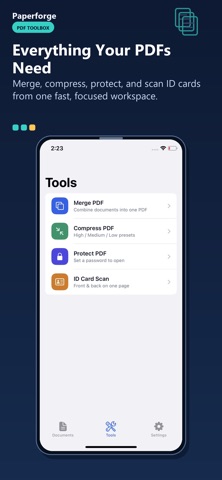
Paperforge can merge multiple documents into a single PDF, making document organization more efficient.
You can manage pages, freely adding, deleting, rotating, and dragging to sort them. You can also categorize and organize folders, quickly locate documents, and use keyword search to find target documents in seconds.
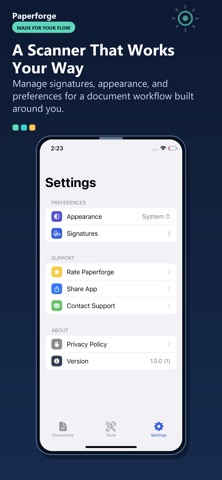
Paperforge can edit and sign documents, with a built-in signature tool for one-click insertion of handwritten signatures. You can add your own text and image watermarks to indicate document ownership. You can also try the document scanning mode to generate PDF files. Paperforge also includes a lightweight image editor, allowing you to blur, vignette, adjust brightness and contrast, and use filters.
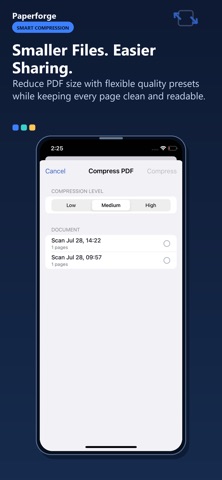
Paperforge offers password-protected PDFs for encrypted storage of important documents. It also provides PDF compression for large files, reducing file size for easier sharing. You can export to a file or save to your photo album.
Paperforge is suitable for students, office workers, freelancers, and anyone who needs to handle paper documents.
Safety and technology
Found in the app by AppBrain- Price
- Free
- App size
- 33.2 MB
- Content rating
- Everyone
Technologies used by Paperforge:Scanning and Edit
Releases
Updates seen on the App Store- Version
- 1.0.1
- Launched
- August 2026
No changelog data
Alternatives
Similar apps and more from 鑫宇 王Alternatives to Paperforge:Scanning and Edit


More from 鑫宇 王



Rankings
App Store top chartsApp Store Rankings for Paperforge:Scanning and Edit
About the app and developer
About Paperforge:Scanning and Edit
Paperforge:Scanning and Edit is an utilities app developed by 鑫宇 王.
User Ratings
The app has no ratings yet.
App Information
Paperforge:Scanning and Edit is freely available from the App Store. The app size is 33.21 MB. The latest version available is 1.0.1. The last update was on August 11, 2026.
Technical Requirements
The app has a content rating of Everyone. The app has been available on the App Store since August 2026.
Developer information for 鑫宇 王
Address:
Frequently asked questions about Paperforge:Scanning and Edit
Is Paperforge:Scanning and Edit free?
Yes. Paperforge:Scanning and Edit is free on the App Store.
Is Paperforge:Scanning and Edit still available?
Yes. Paperforge:Scanning and Edit is on the App Store, and the last update we saw was on August 11, 2026.
How large is Paperforge:Scanning and Edit?
Paperforge:Scanning and Edit is 33.21 MB.
Is Paperforge:Scanning and Edit suitable for children?
App Store rates the content of Paperforge:Scanning and Edit as suitable for everyone.
Who made Paperforge:Scanning and Edit?
Paperforge:Scanning and Edit was developed by 鑫宇 王. It is listed in the utilities category on the App Store.
What are the best alternatives to Paperforge:Scanning and Edit?
People looking at Paperforge:Scanning and Edit also look at these utilities apps: GridGrabber, Photo to PDF + Doc Scanner, GNM (1ea81b), Scanner PDF Docs & Images, Aspose.PDF – Converter, Viewer.