AppBrain
AppBrain
  • Apps
  • Apps being viewed right now Trending apps today Most popular apps All-time most installed apps Top rated apps iPhone and iPad apps
  • Intelligence ▾
    Intelligence overview → Track any Android app or your whole market
    Track & analyze
    Keyword Tracker & OptimizerTrack & improve Play rankings App Performance ReportOne-off PDF for any app StatisticsFree Android & Play market stats
    Promote your app
    Featured Apps App Links
  • Intelligence
  • Pricing
  • Dashboard
  • Sign up
  • Log in
App Store Apps > Productivity > Paperlane: Scan to PDF
Paperlane: Scan to PDF icon

Paperlane: Scan to PDF

2.1.1
Levin David Schwab
5.00
2 reviews
Free

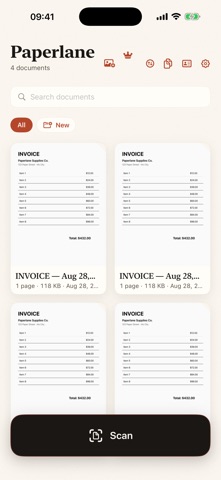
Paperlane: Scan to PDF Screenshot 1 of 4
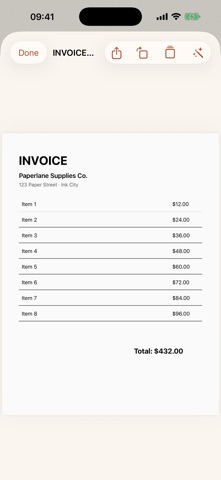
Paperlane: Scan to PDF Screenshot 2 of 4
Paperlane: Scan to PDF Screenshot 3 of 4
Paperlane: Scan to PDF Screenshot 4 of 4
Screenshots by Levin David Schwab, from the the App Store listing
View on the App Store

AppBrain's verdict

Rating on App Store
5.00
2 ratings
Last updated
October 12, 2026
Size
4.92 MB

It doesn't have enough ratings yet to judge what users think.

Official page on the App Store

Share Paperlane: Scan to PDF

User feedback

Ratings and reviews on the App Store

Comments on Paperlane: Scan to PDF for iOS

We don't have enough comments to show example comments. Please check back later.

Store listing

By Levin David Schwab, from the App Store
Description by Levin David Schwab Written by the developer, not by AppBrain. Click to read.
Paperlane is a free iPhone app that turns your phone into a document scanner and produces a clean, multi-page PDF in seconds. It automatically detects page edges and corrects perspective, keeps every scan on-device in a private library, and adds no watermark and no sign-up. A one-time Paperlane Pro purchase adds searchable OCR text, PDF merging, JPG/PNG export, password protection, and removes ads.

Point, scan, and get a clean PDF in seconds. No subscription, no watermark, no account.

FREE, FOREVER
• Unlimited scans with automatic edge detection and perspective correction
• Real, multi-page PDFs that open, print and share anywhere
• A tidy on-device library, and your documents never leave your iPhone
• No watermark. No scan limit. No sign-up.
• Supported by ads, which Paperlane Pro removes

PAPERLANE PRO, one-time purchase
• Searchable OCR text layer (find any word inside a scan)
• Combine pages into one PDF
• Export as JPG or PNG
• Password-protect sensitive PDFs
• Removes all ads

PRIVATE BY DESIGN
Scanning, text recognition and PDF creation all happen on your device. Your scans are never uploaded to our servers. The free version shows ads served by Google AdMob, which never receive your documents. You are asked for consent first, and can withdraw it at any time under Ad privacy in the settings.

Pay once, keep it forever. No monthly fees, ever.

Where available, you can explore recommendations for our other apps. They load online; views and taps are counted as daily totals without personal profiles or user/device identifiers. Our privacy policy explains this feature and existing advertising.
Privacy Policy: https://getpaperlane.vercel.app/privacy

Safety and technology

Found in the app by AppBrain
Price
Free
App size
4.92 MB
Content rating
Everyone

Technologies used by Paperlane: Scan to PDF

Releases

Updates seen on the App Store
Version
2.1.1
Launched
June 2026

No changelog data

Alternatives

Similar apps and more from Levin David Schwab

Alternatives to Paperlane: Scan to PDF

Scan & Sign: Document Scanner icon Scan & Sign: Document Scanner
Daniil Kabachuk
5.0
Free
2 ratings
ScanNest: PDF Scanner & OCR icon ScanNest: PDF Scanner & OCR
Disha Thummar
0.0
Free
MGEN Gamification by Objow icon MGEN Gamification by Objow
Fire Tiger
0.0
Free
Photo to PDF Converter-Scanner icon Photo to PDF Converter-Scanner
Amina Sehar
0.0
Free
TV Remote: Universal Control R icon TV Remote: Universal Control R
YANAPPS LAB LLC
0.0
Free
Flyra: D2D CRM & Home Service icon Flyra: D2D CRM & Home Service
Ignacio Aguilar
4.8
Free
139 ratings
Flex Call Manager icon Flex Call Manager
Gamma Communications GmbH
0.0
Free
Booking & Appointment Tracker icon Booking & Appointment Tracker
Leonid Shulga
0.0
Free

More from Levin David Schwab

Sip Water: Drink Reminder icon Sip Water: Drink Reminder
Levin David Schwab
5.0
Free
6 ratings
Nixly: Clean Storage icon Nixly: Clean Storage
Levin David Schwab
5.0
Free
5 ratings
Titi & Bina: Pixel Run icon Titi & Bina: Pixel Run
Levin David Schwab
5.0
Free
5 ratings
NetGuard: WiFi Scanner icon NetGuard: WiFi Scanner
Levin David Schwab
4.8
Free
5 ratings
PulseCheck: Heart Rate Pulse icon PulseCheck: Heart Rate Pulse
Levin David Schwab
3.2
Free
4 ratings
Sawgrid: Cut List Optimizer icon Sawgrid: Cut List Optimizer
Levin David Schwab
5.0
Free
3 ratings
Agitate: Film Dev Timer icon Agitate: Film Dev Timer
Levin David Schwab
5.0
Free
3 ratings
Nixring: Spam Call Blocker icon Nixring: Spam Call Blocker
Levin David Schwab
5.0
Free
3 ratings

Rankings

App Store top charts

App Store Rankings for Paperlane: Scan to PDF

This app is not ranked

About the app and developer

About Paperlane: Scan to PDF

Paperlane: Scan to PDF is a productivity app developed by Levin David Schwab.

User Ratings

Paperlane: Scan to PDF is rated 5.00 out of 5 stars. The rating is based on 2 ratings.

App Information

Paperlane: Scan to PDF is freely available from the App Store. The app size is 4.92 MB. The latest version available is 2.1.1. The last update was on October 12, 2026.

Technical Requirements

The app has a content rating of Everyone. The app has been available on the App Store since June 2026.

Paperlane: Scan to PDF is made and published by Levin David Schwab. AppBrain is an independent app data site and isn't affiliated with Levin David Schwab. The app name, icon, screenshots and description belong to Levin David Schwab and are shown as published on the App Store.

Developer information for Levin David Schwab

Levin David Schwab

Address:

Price drops on Google Play Top new apps Popular Productivity Apps Today's trending apps Apps other people are watching
Scan & Sign: Document Scanner icon Scan & Sign: Document Scanner
ScanNest: PDF Scanner & OCR icon ScanNest: PDF Scanner & OCR
MGEN Gamification by Objow icon MGEN Gamification by Objow
Photo to PDF Converter-Scanner icon Photo to PDF Converter-Scanner
TV Remote: Universal Control R icon TV Remote: Universal Control R
Flyra: D2D CRM & Home Service icon Flyra: D2D CRM & Home Service
Flex Call Manager icon Flex Call Manager
Booking & Appointment Tracker icon Booking & Appointment Tracker
Overview Alternatives Reviews Rankings Technology
AppBrain Intelligence premium content

Subscribe now to get full and unlimited access to AppBrain Intelligence. You'll have access to:

  • App Intelligence dashboard (performance timeline, competitor comparison, country rankings, insight cards)
  • Detailed ranking data per app
  • Full timeline per developer
  • Device market shares data per country
  • Unlimited keyword tracking
  • AI assistant access via MCP (Claude, Cursor or any MCP client)
1 Month

$75/mo
(billed every month)

SAVE 0%
Subscribe
3 Months

$65/mo
($195 billed every 3 months)

SAVE 13%
Subscribe
1 Year

$57.50/mo
($690 billed every year)

SAVE 23%
Subscribe
Each subscription will automatically renew 3 days before the expiration date for the same time period. Subscriptions can be cancelled at any time before the renewal.

AppBrain is an app data site, we track rankings, ratings, installs for all apps and games on Google Play and the App Store. AppBrain doesn't host app files or APKs, all install links go directly to the official store. All trademarks are owned by their respective owners.

More apps

  • Top Android apps being viewed
  • View Chess
  • Texas Hunt & Fish
  • Tinker Mahjong

App statistics

  • Android statistics
  • Google Play Developer stats
  • Trending Android Apps
  • Trending iOS apps
  • Top popular Apps
  • Buy the best Android phone
  • Buy & sell app businesses

About AppBrain

  • Contact
  • Privacy
  • Documentation
  • DMCA takedowns
  • Blog
  • Monetization tips: Understanding your eCPM
© 2010-2026 - AppBrain