

Paperless Music is made and published by Agilstream. AppBrain is an independent app data site and isn't affiliated with Agilstream. The app name, icon, screenshots and description belong to Agilstream and are shown as published on the App Store.
AppBrain's verdict
EstablishedLoved by users- Rating on App Store
- 4.77
- 902 ratings
- Last updated
- July 31, 2025
- Size
- 7.09 MB
Users love it: 4.8 stars from 902 ratings.
User feedback
Ratings and reviews on the App StoreComments on Paperless Music for iOS
We don't have enough comments to show example comments. Please check back later.
Store listing
By Agilstream, from the App Store



Description by Agilstream Written by the developer, not by AppBrain. Click to read.
Add your sheet music, guitar tabs, fake books, and scores, and leave your paper behind. Organize, annotate, practice, and perform with the most powerful yet easy-to-use music viewer and manager.
Whether you’re a student or teacher, whether you play in a band, sing in a choir, or gig on the weekends, and no matter what your style of music is, you can count on the app’s reliability for live performances and go paperless with confidence.
Build Your Library
• Import PDF files from the Files app, a web browser, or from many other apps and sources.
• Scan your music with the camera-based document scanner.
• Import images from the Photos app.
Organize Your Music
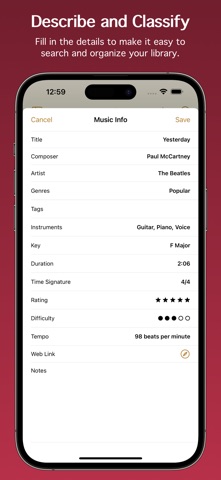
• Describe and classify your music in great detail with information like title, composer, artist, genres, tags, instruments, key, duration, time signature, rating, difficulty, tempo, web link, and notes.
• Add scores with multiple movements or books with multiple songs, then organize them into sections.
• Create collections to make groups of music, such as setlists, virtual binders, or books.
• Easily find the music and collections you’re looking for with filters. With a few taps, for example, you can see all music that’s in a major key with a 4/4 or 6/8 time signature, having a tempo between 120 - 135 beats per minute.
• Create smart folders to automatically keep your music and collections organized.
Add Audio Tracks
• Add tracks from the Music app.
• Record your own audio.
• Import audio files.
• Adjust pitch and playback speed.
• Turn pages automatically while audio plays.
Stay In Tune
• Tune your instrument using the device microphone.
• Generate a tone using a variety of instruments and sounds.
• Adjust the A4 frequency.
• Select from 10 temperaments to customize the tuning.
Practice and Perform
• View music in portrait or landscape mode.
• Scroll music horizontally or vertically.
• Turn pages by swiping, moving the slider, using a Bluetooth page turner, tapping the edge of the screen, following a link, making a facial gesture, or playing audio that has automatic page turning enabled. (Facial gestures require a device with a TrueDepth camera.)
• Create links to jump or scroll to another page. Links are great for music with repeats or codas. They also allow music to be automatically scrolled with precise timing.
• Use the pencil and highlighter tools to write on music with your finger or with the Apple Pencil. All Apple Pencil settings are supported.
• Add text with options for size, rotation, color, font, and justification.
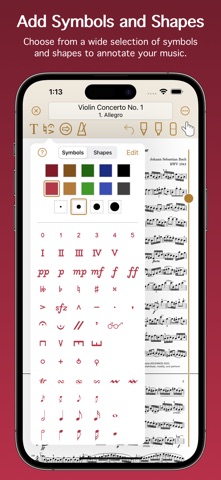
• Choose from a wide selection of symbols and shapes to add fingerings, dynamics, accidentals, and more.
• Use the low-latency metronome with options for sound, visuals, accent, and count off.
See More with Second Screen
• Connect two devices and see more of your music.
• When viewing music on the main device, it will extend onto the other device’s screen.
Share and Back Up
• Share your music and collections with other Paperless Music users, with or without your annotations or audio tracks.
• Share music in native format to preserve all information, or share in PDF format for general sharing and printing.
• Create a backup of your library to keep your data extra safe and to easily transfer everything to other devices.
And Much More
• Set the page color of your music.
• Undo changes made to any page while the viewer is open.
• Choose from six library view modes for music and three modes for collections.
• Batch edit genres, tags, and instruments.
• Adjust the text size in the Settings app to boost or shrink the size of text throughout Paperless Music.
• Search using Spotlight. Find and launch right into your music even when the app isn’t running.
Learn more by reading the integrated, searchable user guide, accessible from the app’s home screen and from the website.
Paperless Music has no ads and no subscriptions. There is no sign-in and there are no accounts.
www.paperlessmusic.com
Safety and technology
Found in the app by AppBrain- Price
- Free
- App size
- 7.09 MB
- Content rating
- Everyone
Technologies used by Paperless Music
Releases
Updates seen on the App Store- Version
- 7.0.1
- Launched
- January 2015
No changelog data
Alternatives
Similar apps and more from AgilstreamAlternatives to Paperless Music





Rankings
App Store top chartsApp Store Rankings for Paperless Music
About the app and developer
About Paperless Music
Paperless Music is a music app developed by Agilstream.
User Ratings
Paperless Music is rated 4.77 out of 5 stars. The rating is based on 900 ratings.
App Information
Paperless Music is freely available from the App Store. The app size is 7.09 MB. The latest version available is 7.0.1. The last update was on July 31, 2025.
Technical Requirements
The app has a content rating of Everyone. The app has been available on the App Store since January 2015.
Developer information for Agilstream
Address: