

Paperman - Paper Calculator
Paperman - Paper Calculator is made and published by Guho Choi. AppBrain is an independent app data site and isn't affiliated with Guho Choi. The app name, icon, screenshots and description belong to Guho Choi and are shown as published on the App Store.
AppBrain's verdict
Established- Rating on App Store
- 4.82
- 33 ratings
- Last updated
- October 18, 2026
It doesn't have enough ratings yet to judge what users think.
Rankings
App Store top chartsApp Store Rankings for Paperman - Paper Calculator
Competitors
Similar apps and more from Guho ChoiAlternatives to Paperman - Paper Calculator





More from Guho Choi


Releases
Updates seen on the App Store- Version
- 6.6.13
- Launched
- September 2014
No changelog data
User feedback
Ratings and reviews on the App StoreComments on Paperman - Paper Calculator for iOS
We don't have enough comments to show example comments. Please check back later.
Technology
Found in the app by AppBrain- Price
- Free
- App size
- 41.7 MB
- Content rating
- Everyone
Technologies used by Paperman - Paper Calculator
About the app and developer
About Paperman - Paper Calculator
Paperman - Paper Calculator is an utilities app developed by Guho Choi.
User Ratings
Paperman - Paper Calculator is rated 4.82 out of 5 stars. The rating is based on 33 ratings.
App Information
Paperman - Paper Calculator is freely available from the App Store. The app size is 41.66 MB. The latest version available is 6.6.13. The last update was on October 18, 2026.
Technical Requirements
The app has a content rating of Everyone. The app has been available on the App Store since September 2014.
Developer information for Guho Choi
Address:
Store listing
By Guho Choi, from the App Store





Description by Guho Choi Written by the developer, not by AppBrain. Click to read.
Paperman is an app which calculates the number of reams of paper needed to produce your book.
It's a great companion that helps to design and publish books.
[Search]
Swipe left on the main screen to search for papers. You may browse or calculate the price.
[Xray]
If you want to know the type of paper used in a book, you can scan the ISBN barcode. Paperman will then provide you with information about the paper. (Paperman supports Ahn Graphics, Sojanggak, Workroom Press and Workroom Specter books, and supported titles are constantly being added with updates.)
[Price]
Check price information and tap to calculate. You can change the discount rate. Price can be viewed with or without VAT.
[Spine Width]
You can find out the thickness of the book’s spine in mm. You can see the actual size after calculate the spine width. If you use several different papers in a book, Try 'History’ and 'Total' function.
[Interior Pages]
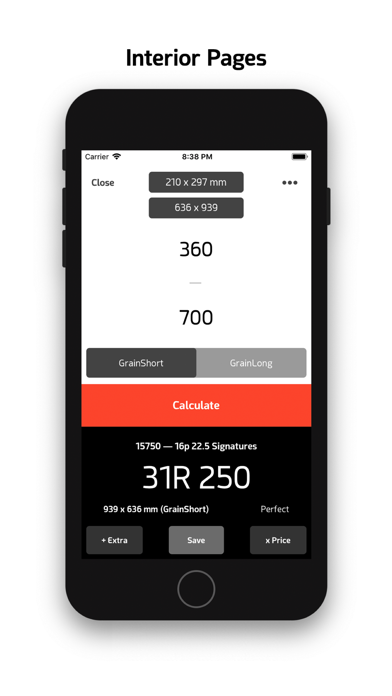
Easily calculate the Reams of paper needed for the interior pages. Select the book size of your choice, then input the number of pages and copies. Also, calculations can be done for any sizes of your choice.
[Book Cover]
Easily calculate the Reams of paper needed for the book cover. You can import the recent calculation of the spine.
[Sheet Calculation]
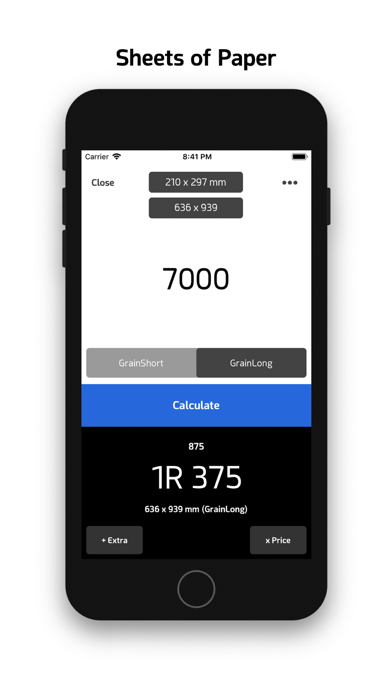
Do you create products like posters made from a single sheet of paper? You just need to input the number of production and select the size on the menu. It’s that simple.
[Notes + Price Quotation]
You can save the final calculation in the notes, from which you can make a price quotation. If you are a designer or publisher, you can check the estimated quotation. If you are a printer, you can produce a price quotation with Paperman and send it your client.
[Paperman PRO]
Printed matter. Easier than ever.
• Selected Total Spine Width
• Set Target Spine Width
• Spine Comparison
• Sheet Calculation+ : Custom Format/Paper/Grain, Save Result
• Paperman Xray+ : Unlimited History, Search immediately after scanning, Books using this paper
• Price Quotation+ : Calculate processing fees
• Share Quotation text, Input Supplier
• Recalculate : Spine, Interior, Cover, Sheets
• Custom Size History : Interior, Cover, Sheets
• Undo : Spine, Interior, Cover, Sheets
• Tap Price to calculate : Interior, Cover, Sheets
• Book Cover: Automatic Paper Recommendation
• Continuous Calculation
• Set Bleed value
• Copy Price of Paper
• US Size Format Preset
• Sort by Grammage
[Paperman PDF]
Generate a Quotation PDF on your phone.
• Generate PDF Quotation
• Share PDF Quotation
• AirPrint PDF Quotation
-
* Paperman PRO and PDF : In-App Purchase services
* Price info only supports Korean Won.
* Red Dot Award: Communication Design 2016 winner *
Published by Guho Choi, Seoul
Designed and developed by Guho Choi
guhochoi.com