



AppBrain's verdict
- Last updated
- November 12, 2026
- Size
- 23.5 MB
User feedback
Ratings and reviews on the App StoreComments on PaperSnips: Photo Print Layout for iOS
We don't have enough comments to show example comments. Please check back later.
Store listing
By 桥 王, from the App StoreDescription by 桥 王 Written by the developer, not by AppBrain. Click to read.
PaperSnips brings photo layouts and image notes together on your iPhone and iPad, for journals, travel memories, reference sheets and everyday records.
MORE WAYS TO CREATE
Start with a print template and preview it on your chosen paper, or turn photos and captions into travel notes, growth stories and comparisons. Reusable photo slots make the next story easier; Max adds premium scene exports and personal templates. You can also edit ID-photo presets, mix two photo sizes on one sheet, or change a portrait background to white, blue or red on your device. Direct JPEG exports of background-edited photos use no project or version allowance and include a watermark on Free; Pro and Max remove it. Check official photo requirements before using an edited image.
PHOTO LAYOUTS
Import from Photos or Files. Choose paper and photo sizes, adjust margins and spacing, and keep the whole image or crop it to fill the frame. Arrange multiple photos with automatic pagination. Export all pages as PDF or the current page as JPEG, or use system printing with a compatible printer.
ONE PHOTO, SEVERAL COPIES
Choose a fixed photo size, a number of copies or a full sheet. Adjust the crop, preview the layout and add optional cutting guides. Save the draft and return to it from History. Size presets help with layout; they do not certify a photo for official documents.
IMAGES AND WORDS
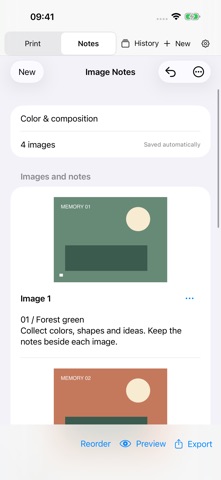
Combine multiple images, captions and independent text paragraphs, or create a text-only document. Reorder the content and choose a stacked, side-by-side or two-column gallery layout. Preview the pages, then export a PDF or long JPEG images. Long output may be split into several images.
YOUR WORK, ON YOUR DEVICE
Keep drafts, history and finished image-notes versions locally. No PaperSnips account is needed. Restore Purchases restores eligible purchase access, not your photos, drafts or history. The interface supports 10 languages.
EXPORT ALLOWANCES
• Free: 3 different photo-print projects and 1 image-notes project.
• Pro: unlimited photo-print projects and 3 image-notes projects in total, including the free project.
• Free and Pro: up to 10 successfully exported, distinct content versions per image-notes project.
• Max: no project or finished-version allowance limit. Document and image size limits still apply.
Editing, saving drafts and previewing do not use export allowance. Cancelled or failed exports do not count. Re-exporting the same print project does not use another project; identical image-notes content reuses its version, including across output formats. Deleting a project does not return used allowance.
Pro and Max are optional one-time in-app purchases, not subscriptions. Prices and availability are shown in the app. Eligible Pro owners can choose the Max upgrade.
For physical printing, use matching paper and Actual Size / 100%. Results depend on the printer and its settings.
Safety and technology
Found in the app by AppBrain- Price
- Free
- App size
- 23.5 MB
- Content rating
- Everyone
Technologies used by PaperSnips: Photo Print Layout
Releases
Updates seen on the App Store- Version
- 1.4
- Launched
- October 2026
No changelog data
Alternatives
Similar apps and more from 桥 王More from 桥 王


Rankings
App Store top chartsApp Store Rankings for PaperSnips: Photo Print Layout
About the app and developer
About PaperSnips: Photo Print Layout
PaperSnips: Photo Print Layout is a photo & video app developed by 桥 王.
User Ratings
The app has no ratings yet.
App Information
PaperSnips: Photo Print Layout is freely available from the App Store. The app size is 23.46 MB. The latest version available is 1.4. The last update was on November 12, 2026.
Technical Requirements
The app has a content rating of Everyone. The app has been available on the App Store since October 2026.
PaperSnips: Photo Print Layout is made and published by 桥 王. AppBrain is an independent app data site and isn't affiliated with 桥 王. The app name, icon, screenshots and description belong to 桥 王 and are shown as published on the App Store.
Developer information for 桥 王
Address: