

AppBrain's verdict
- Last updated
- August 26, 2026
- Size
- 68.2 MB
User feedback
Ratings and reviews on the App StoreComments on Papertuck: Document Vault for iOS
We don't have enough comments to show example comments. Please check back later.
Store listing
By Varun Adiyeri Parambath, from the App StoreDescription by Varun Adiyeri Parambath Written by the developer, not by AppBrain. Click to read.
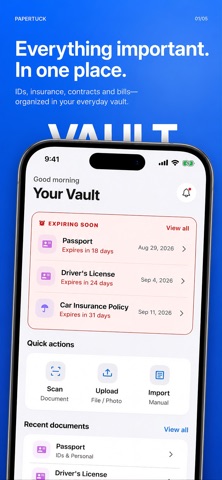
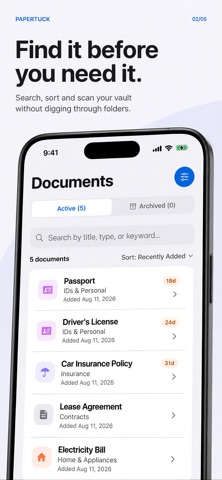
Papertuck keeps receipts, warranties, IDs, insurance papers, contracts, tax records, and other household documents ready for the moment you need them. Scan or import a paper, use on-device text extraction to make it searchable, and set reminders for expiries and renewals.
SCAN, ORGANIZE, FIND
• Scan with your camera or import photos and PDFs
• Keep multi-page documents together
• Extract text on device with OCR
• Search by title, category, merchant, or words in the document
• Automatically suggest practical categories from extracted text
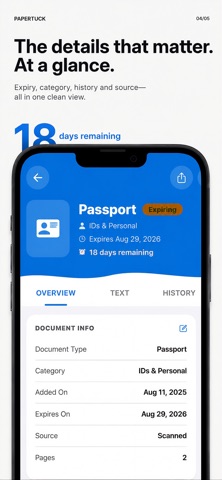
• Track dates, amounts, notes, and warranty details
• Archive or share a document when you need it
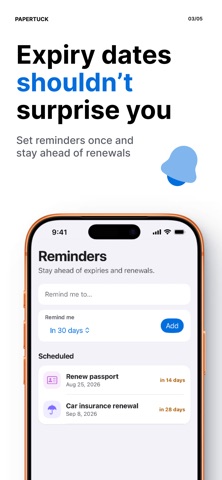
STAY AHEAD OF IMPORTANT DATES Add reminders for passport expiries, insurance renewals, warranty deadlines, return windows, and more. Local notifications help you act before a document becomes urgent.
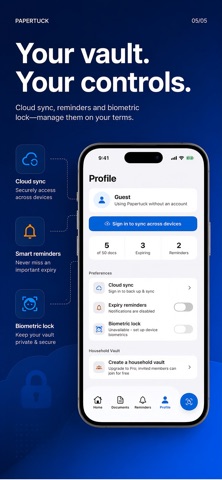
LOCAL FIRST Start free without creating an account. Your free vault supports up to 50 active documents and stays on your device. There are no ads and no cross-app tracking. On supported devices, you can protect the app with Face ID or Touch ID.
PAPERTUCK PRO Upgrade for unlimited documents, secure cloud backup, multi-device sync, and household vault sharing. Pro cloud sync is optional and requires an account. Synced documents are encrypted in transit and at rest, but cloud sync is not end-to-end encrypted.
Papertuck Pro is available as a monthly or annual auto-renewable subscription. Any free trial and your local price are shown before purchase. Payment is charged to your Apple Account when you confirm. Subscriptions automatically renew unless canceled at least 24 hours before the end of the current period. Manage or cancel your subscription in your App Store account settings.
Your papers, ready when life asks.
Privacy Policy: https://papertuck.com/privacy
Terms of Use (EULA): https://www.apple.com/legal/internet-services/itunes/dev/stdeula/
Additional Terms of Service: https://papertuck.com/terms
Support: support@papertuck.com
Safety and technology
Found in the app by AppBrain- Price
- Free
- App size
- 68.2 MB
- Content rating
- Everyone
Technologies used by Papertuck: Document Vault
Releases
Updates seen on the App Store- Version
- 1.1
- Launched
- August 2026
No changelog data
Alternatives
Similar apps and more from Varun Adiyeri ParambathAlternatives to Papertuck: Document Vault


More from Varun Adiyeri Parambath


Rankings
App Store top chartsApp Store Rankings for Papertuck: Document Vault
About the app and developer
About Papertuck: Document Vault
Papertuck: Document Vault is a productivity app developed by Varun Adiyeri Parambath.
User Ratings
The app has no ratings yet.
App Information
Papertuck: Document Vault is freely available from the App Store. The app size is 68.18 MB. The latest version available is 1.1. The last update was on August 26, 2026.
Technical Requirements
The app has a content rating of Everyone. The app has been available on the App Store since August 2026.
Papertuck: Document Vault is made and published by Varun Adiyeri Parambath. AppBrain is an independent app data site and isn't affiliated with Varun Adiyeri Parambath. The app name, icon, screenshots and description belong to Varun Adiyeri Parambath and are shown as published on the App Store.
Developer information for Varun Adiyeri Parambath
Address:
Frequently asked questions about Papertuck: Document Vault
Is Papertuck: Document Vault free?
Yes. Papertuck: Document Vault is free on the App Store.
Is Papertuck: Document Vault still available?
Yes. Papertuck: Document Vault is on the App Store, and the last update we saw was on August 26, 2026.
How large is Papertuck: Document Vault?
Papertuck: Document Vault is 68.18 MB.
Is Papertuck: Document Vault suitable for children?
App Store rates the content of Papertuck: Document Vault as suitable for everyone.
Who made Papertuck: Document Vault?
Papertuck: Document Vault was developed by Varun Adiyeri Parambath. It is listed in the productivity category on the App Store.
What are the best alternatives to Papertuck: Document Vault?
People looking at Papertuck: Document Vault also look at these productivity apps: kioku - Secure Document Vault, Document Vault - Scanner PDF, Sorven: Home Asset Inventory, Marker: Podcast Notes, Nib - AI Notes & Translation.