AppBrain
AppBrain
  • Apps
  • Apps being viewed right now Trending apps today Most popular apps All-time most installed apps Top rated apps iPhone and iPad apps
  • Intelligence ▾
    Intelligence overview → Track any Android app or your whole market
    Track & analyze
    Keyword Tracker & OptimizerTrack & improve Play rankings App Performance ReportOne-off PDF for any app StatisticsFree Android & Play market stats
    Promote your app
    Featured Apps App Links
  • Intelligence
  • Pricing
  • Dashboard
  • Sign up
  • Log in
App Store Apps > Lifestyle > Parental Controls: TapGuardian
Parental Controls: TapGuardian icon

Parental Controls: TapGuardian

1.0.4
TAP GUARDIAN CORPORATION (CA)
5.00
1 reviews
Free

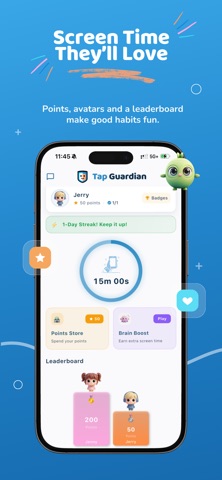
Parental Controls: TapGuardian Screenshot 1 of 5
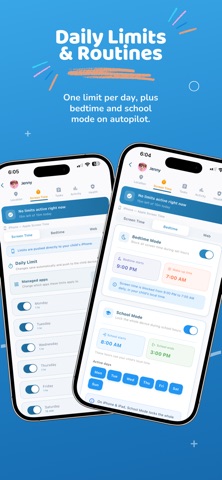
Parental Controls: TapGuardian Screenshot 2 of 5
Parental Controls: TapGuardian Screenshot 3 of 5
Parental Controls: TapGuardian Screenshot 4 of 5
Parental Controls: TapGuardian Screenshot 5 of 5
Screenshots by TAP GUARDIAN CORPORATION (CA), from the the App Store listing
View on the App Store

About Parental Controls: TapGuardian

Parental Controls: TapGuardian is a lifestyle app developed by TAP GUARDIAN CORPORATION (CA).

User Ratings

Parental Controls: TapGuardian is rated 5.00 out of 5 stars. The rating is based on one rating ratings.

App Information

Parental Controls: TapGuardian is freely available from the App Store. The app size is 74.10 MB. The latest version available is 1.0.4. The last update was on October 5, 2026.

Technical Requirements

The app has a content rating of Everyone. The app has been available on the App Store since August 2026.

Parental Controls: TapGuardian is made and published by TAP GUARDIAN CORPORATION (CA). AppBrain is an independent app data site and isn't affiliated with TAP GUARDIAN CORPORATION (CA). The app name, icon, screenshots and description belong to TAP GUARDIAN CORPORATION (CA) and are shown as published on the App Store.

Description by TAP GUARDIAN CORPORATION (CA) (from the App Store)
Screen time without the daily argument.

Set your rules once — daily limits, bedtime, school hours, app blocking — and Tap Guardian keeps them running on your child's device, even offline.

What you can do:

Daily screen time limits
Set a healthy amount of time for each day. Tap Guardian keeps track and steps in when the time is up.

App and category blocking
Pause a single app or a whole group like games, social, or video with one tap. Turn it back on just as easily.

Bedtime and school schedules
Set quiet hours for bedtime and focus hours for school once, and let them run on their own every week.

Tasks and rewards
Give your kids tasks to complete and reward them with extra time. Streaks and small wins make good habits feel earned.

Location and Safety Zones
See where your family members are, and get a notification when someone arrives at or leaves a place like home or school.

One simple dashboard
Manage every device from one clear view. Changes sync in the background, so what you set is what happens.

Why parents like Tap Guardian:
Quick to set up
Clean, calm design
Runs quietly in the background
Built for real family routines

New parents get a 7-day free trial. Cancel anytime in your App Store settings.

Questions? Reach us at support@tapguardian.io

Privacy Policy: https://tapguardian.io/privacy
Terms of Use: https://tapguardian.io/terms
Show more Show less

Alternatives to Parental Controls: TapGuardian

Family Guardian - Kids Safety icon Family Guardian - Kids Safety
Jewaro Ademo
0.0
Free
Ourlittlebird Parent Control icon Ourlittlebird Parent Control
Improvement funding llc
0.0
Free
Zentime: Parental Control App icon Zentime: Parental Control App
Aaryan Sinha
5.0
Free
3 ratings
Vettly Parental Controls icon Vettly Parental Controls
Next Aura Labs Inc.
0.0
Free
Quokka: Parental Control icon Quokka: Parental Control
Sofiia Stashkiv
5.0
Free
1 ratings
Parental Control App: Tic Lock icon Parental Control App: Tic Lock
i6 Development
0.0
Free
FawnGuard: Parental Control icon FawnGuard: Parental Control
Jan Daniel Naftanaila
0.0
Free
Kidoks - Parental Control App icon Kidoks - Parental Control App
Molham Alfakhri
0.0
Free

Changelog of Parental Controls: TapGuardian

No changelog data

Developer information for TAP GUARDIAN CORPORATION (CA)

TAP GUARDIAN CORPORATION (CA)

Address:

Share Parental Controls: TapGuardian

Comments on Parental Controls: TapGuardian for iOS

We don't have enough comments to show example comments. Please check back later.

App Store Rankings for Parental Controls: TapGuardian

This app is not ranked

Technologies used by Parental Controls: TapGuardian

Frequently asked questions about Parental Controls: TapGuardian

Is Parental Controls: TapGuardian free?

Yes. Parental Controls: TapGuardian is free on the App Store.

Is Parental Controls: TapGuardian still available?

Yes. Parental Controls: TapGuardian is on the App Store, and the last update we saw was on October 5, 2026.

How large is Parental Controls: TapGuardian?

Parental Controls: TapGuardian is 74.10 MB.

Is Parental Controls: TapGuardian suitable for children?

App Store rates the content of Parental Controls: TapGuardian as suitable for everyone.

How do people rate Parental Controls: TapGuardian?

Parental Controls: TapGuardian has one rating of 5.00 stars on the App Store.

Who made Parental Controls: TapGuardian?

Parental Controls: TapGuardian was developed by TAP GUARDIAN CORPORATION (CA). It is listed in the lifestyle category on the App Store.

What are the best alternatives to Parental Controls: TapGuardian?

People looking at Parental Controls: TapGuardian also look at these lifestyle apps: Family Guardian - Kids Safety, Ourlittlebird Parent Control, Zentime: Parental Control App, Vettly Parental Controls, Quokka: Parental Control.

Top new apps Price drops on Google Play Popular Lifestyle Apps Apps other people are watching Today's trending apps
Family Guardian - Kids Safety icon Family Guardian - Kids Safety
Ourlittlebird Parent Control icon Ourlittlebird Parent Control
Zentime: Parental Control App icon Zentime: Parental Control App
Vettly Parental Controls icon Vettly Parental Controls
Quokka: Parental Control icon Quokka: Parental Control
Parental Control App: Tic Lock icon Parental Control App: Tic Lock
FawnGuard: Parental Control icon FawnGuard: Parental Control
Kidoks - Parental Control App icon Kidoks - Parental Control App
AppBrain Intelligence premium content

Subscribe now to get full and unlimited access to AppBrain Intelligence. You'll have access to:

  • App Intelligence dashboard (performance timeline, competitor comparison, country rankings, insight cards)
  • Detailed ranking data per app
  • Full timeline per developer
  • Device market shares data per country
  • Unlimited keyword tracking
1 Month

$75/mo
(billed every month)

SAVE 0%
Subscribe
3 Months

$65/mo
($195 billed every 3 months)

SAVE 13%
Subscribe
1 Year

$57.50/mo
($690 billed every year)

SAVE 23%
Subscribe
Each subscription will automatically renew 3 days before the expiration date for the same time period. Subscriptions can be cancelled at any time before the renewal.

AppBrain is an app data site, we track rankings, ratings, installs for all apps and games on Google Play and the App Store. AppBrain doesn't host app files or APKs, all install links go directly to the official store. All trademarks are owned by their respective owners.

More apps

  • Top Android apps being viewed
  • View Micro Hurling
  • Moto Secure
  • ShuttR: Shutter Speed Tester

App statistics

  • Android statistics
  • Google Play Developer stats
  • Trending Android Apps
  • Trending iOS apps
  • Top popular Apps
  • Buy the best Android phone
  • Buy & sell app businesses

About AppBrain

  • Contact
  • Privacy
  • Documentation
  • DMCA takedowns
  • Blog
  • Free App-Ads.Txt Validation
© 2010-2026 - AppBrain