Parex Video Converter
Parex Video Converter is made and published by Parex. AppBrain is an independent app data site and isn't affiliated with Parex. The app name, icon, screenshots and description belong to Parex and are shown as published on the App Store.
AppBrain's verdict
- Last updated
- August 6, 2026
Rankings
App Store top chartsApp Store Rankings for Parex Video Converter
Competitors
Similar apps and more from ParexAlternatives to Parex Video Converter
More from Parex
Releases
Updates seen on the App Store- Version
- 1.2
- Launched
- July 2026
No changelog data
User feedback
Ratings and reviews on the App StoreComments on Parex Video Converter for iOS
We don't have enough comments to show example comments. Please check back later.
Technology
Found in the app by AppBrain- Price
- Free
- App size
- 13.2 MB
- Content rating
- Everyone
Technologies used by Parex Video Converter
About the app and developer
About Parex Video Converter
Parex Video Converter is a photo & video app developed by Parex.
User Ratings
The app has no ratings yet.
App Information
Parex Video Converter is freely available from the App Store. The app size is 13.18 MB. The latest version available is 1.2. The last update was on August 6, 2026.
Technical Requirements
The app has a content rating of Everyone. The app has been available on the App Store since July 2026.
Developer information for Parex
Address:
Store listing
By Parex, from the App StoreDescription by Parex Written by the developer, not by AppBrain. Click to read.
WHY PAREX VIDEO CONVERTER?
Your iPhone shoots gorgeous 4K video - and eats gigabytes doing it. Instead of deleting memories to free up space, compress them. Most videos shrink dramatically with no visible quality loss on a phone screen.
HOW IT WORKS
1. Pick videos from your library - sort by size to find the storage hogs first
2. Choose quality: adjust resolution, frame rate, and format
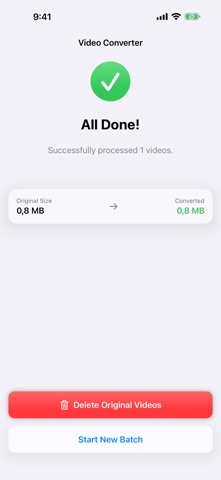
3. Convert - then delete the bulky originals with one tap
FEATURES
- Smart sorting: instantly surface your largest videos
- Resolution scaling: 4K to 1080p or 720p with a simple slider
- Frame rate control: 60fps to 30/24fps - half the size, same clarity
- Modern codecs: efficient HEVC (H.265) or compatible H.264
- Before/after size preview: know your savings before you convert
- One-tap cleanup: reclaim space by removing originals after conversion
- Home Screen widget: track your total space saved
PRO
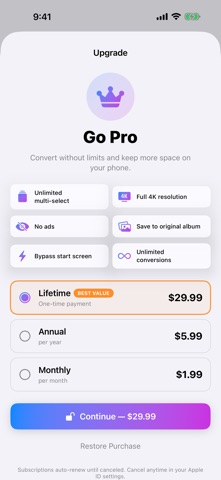
Go Pro to unlock unlimited batch conversion, full 4K output, no ads, and more. Subscriptions: monthly or annual. Prefer to pay once? Lifetime unlock available.
Terms of Use (EULA): https://www.apple.com/legal/internet-services/itunes/dev/stdeula/
Privacy Policy: https://nikepol.github.io/Parex/privacy-policy.html
Videos are processed entirely on your device - nothing is uploaded anywhere.