

Partial Color Photo
Partial Color Photo is made and published by Ryouhei Azuma. AppBrain is an independent app data site and isn't affiliated with Ryouhei Azuma. The app name, icon, screenshots and description belong to Ryouhei Azuma and are shown as published on the App Store.
AppBrain's verdict
- Last updated
- July 16, 2026
Rankings
App Store top chartsApp Store Rankings for Partial Color Photo
Competitors
Similar apps and more from Ryouhei AzumaAlternatives to Partial Color Photo


More from Ryouhei Azuma


Releases
Updates seen on the App Store- Version
- 1.4
- Launched
- October 2025
No changelog data
User feedback
Ratings and reviews on the App StoreComments on Partial Color Photo for iOS
We don't have enough comments to show example comments. Please check back later.
Technology
Found in the app by AppBrain- Price
- Free
- App size
- 14.4 MB
- Content rating
- Everyone
Technologies used by Partial Color Photo
About the app and developer
About Partial Color Photo
Partial Color Photo is a photo & video app developed by Ryouhei Azuma.
User Ratings
The app has no ratings yet.
App Information
Partial Color Photo is freely available from the App Store. The app size is 14.44 MB. The latest version available is 1.4. The last update was on July 16, 2026.
Technical Requirements
The app has a content rating of Everyone. The app has been available on the App Store since October 2025.
Developer information for Ryouhei Azuma
Address:
Store listing
By Ryouhei Azuma, from the App Store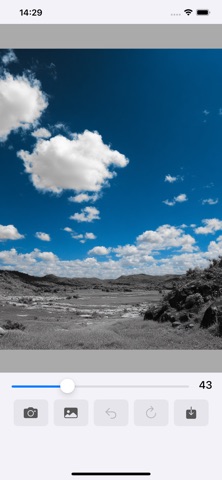


Description by Ryouhei Azuma Written by the developer, not by AppBrain. Click to read.
With just a finger touch, create partial color photos like a professional.
■ Photos you can create
・Black and white photo with a red rose in color
・Landscape with only the blue sky highlighted
・Photo with color only on important memories
■ Main features
【Simple partial color editing】
When you upload a photo, it's automatically converted to black and white. Touch the parts you want to colorize.
【Brush size adjustment】
Adjustable in 3 levels: S・M・L.
【Zoom and pan】
Zoom in and move to edit details precisely.
【Undo function】
Undo and Reset for peace of mind.
Recommended for those who want to create SNS-worthy photos and beginners in photo editing.