

PassSafe is made and published by ShedWorx. AppBrain is an independent app data site and isn't affiliated with ShedWorx. The app name, icon, screenshots and description belong to ShedWorx and are shown as published on the App Store.
AppBrain's verdict
- Last updated
- March 23, 2024
Rankings
App Store top chartsApp Store Rankings for PassSafe
This app is not ranked
Competitors
Similar apps and more from ShedWorxAlternatives to PassSafe





More from ShedWorx



Releases
Updates seen on the App Store- Version
- 1.4
- Launched
- January 2022
No changelog data
User feedback
Ratings and reviews on the App StoreComments on PassSafe for iOS
We don't have enough comments to show example comments. Please check back later.
Technology
Found in the app by AppBrain- Price
- $5.99
- App size
- 1.41 MB
- Content rating
- Everyone
Technologies used by PassSafe
About the app and developer
About PassSafe
PassSafe is an utilities app developed by ShedWorx.
What is the rating of PassSafe?
PassSafe has no ratings yet.
Is PassSafe free?
PassSafe costs $5.99. The app size is 1.41 MB. The latest version available is 1.4. The last update was on March 23, 2024.
What are the requirements for PassSafe?
The app has a content rating of Everyone. The app has been available on the App Store since January 2022.
Developer information for ShedWorx
Address:
Store listing
By ShedWorx, from the App Store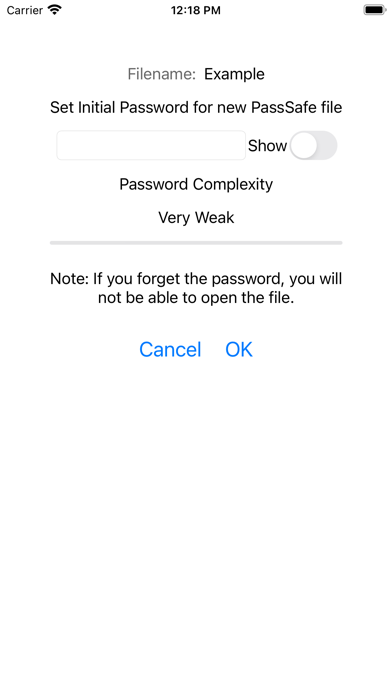

Screenshots by ShedWorx, from the the App Store listing
Description by ShedWorx Written by the developer, not by AppBrain. Click to read.
For your security, the recommended best practice is to always use a different password for the accounts at each site that you create an account. This is so if the password for one site has been comprised, they cannot access you other accounts. But how do you make up all those passwords and remember them?
PassSafe is a simple Password Manager. You can create an encrypted PassSafe file to save your passwords. The PassSafe file has a “Master Password” you use to open the file. You still need to remember this “Master Password”, but all the other passwords can be safely stored in the PassSafe file.
You can store your PassSafe file on you iPhone, iPad or Mac, or you can store this file on iCloud Drive to share between your devices. PassSafe does not store any details on any other server. You totally control where you password details are saved, and the details can only be displayed if you know the “Master Password”. PassSafe is available for a once off low price with no ongoing costs.
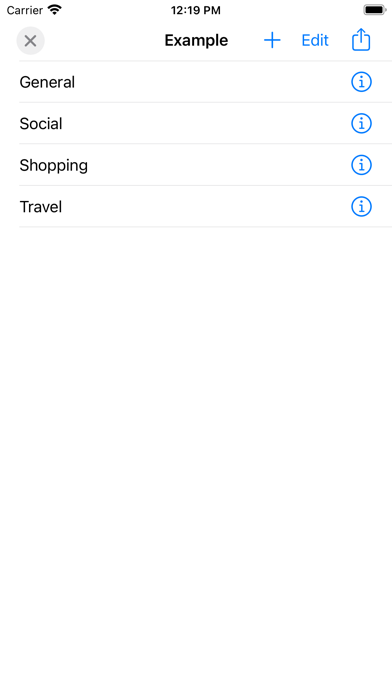
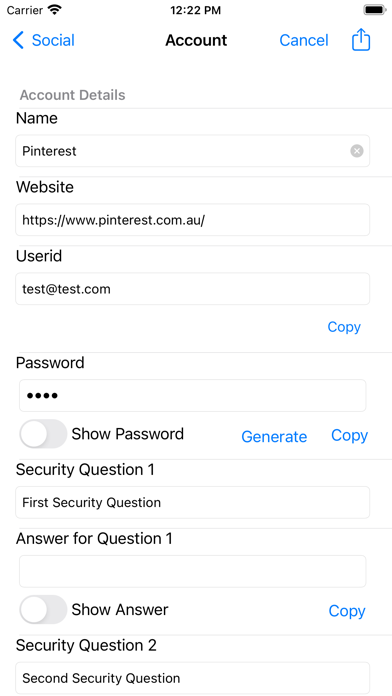
Within the PassSafe file, you create groups. Within these groups, you can add you account details. The account details includes the website, userid and password, security questions and answers, and any comments.
On you iPhone, iPad or on Safari on macOS, you can use the Password AutoFill to populate the userid and password for the site from PassSafe. For other browsers, you will need to copy the password from PassSafe into your browser. You can also generate a new complex password for each site.