

PassVault - Offline Vault
PassVault - Offline Vault is made and published by 情 唐. AppBrain is an independent app data site and isn't affiliated with 情 唐. The app name, icon, screenshots and description belong to 情 唐 and are shown as published on the App Store.
AppBrain's verdict
- Last updated
- October 20, 2026
Rankings
App Store top chartsApp Store Rankings for PassVault - Offline Vault
Competitors
Similar apps and more from 情 唐Alternatives to PassVault - Offline Vault


Releases
Updates seen on the App Store- Version
- 1.0.2
- Launched
- October 2026
No changelog data
User feedback
Ratings and reviews on the App StoreComments on PassVault - Offline Vault for iOS
We don't have enough comments to show example comments. Please check back later.
Technology
Found in the app by AppBrain- Price
- Free
- App size
- 13.0 MB
- Content rating
- Everyone
Technologies used by PassVault - Offline Vault
About the app and developer
About PassVault - Offline Vault
PassVault - Offline Vault is an utilities app developed by 情 唐.
What is the rating of PassVault - Offline Vault?
PassVault - Offline Vault has no ratings yet.
Is PassVault - Offline Vault free?
PassVault - Offline Vault is free. The app size is 12.99 MB. The latest version available is 1.0.2. The last update was on October 20, 2026.
What are the requirements for PassVault - Offline Vault?
The app has a content rating of Everyone. The app has been available on the App Store since October 2026.
Developer information for 情 唐
Address:
Store listing
By 情 唐, from the App Store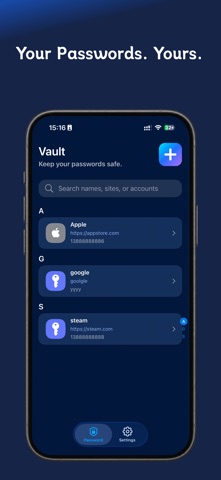


Description by 情 唐 Written by the developer, not by AppBrain. Click to read.
【Secure Password Protection】
Supports master password and Face ID / Touch ID protection. Passwords are encrypted and stored locally. View and copy passwords with peace of mind, keeping your important information safe.
【Efficient Account Management】
Store websites, accounts, passwords, and notes in one place. Supports pinning, search, and category browsing. Find frequently used accounts quickly and stop resetting forgotten passwords.
【One-Tap Strong Password Generator】
Customize password length, uppercase/lowercase letters, numbers, and special characters. Generate strong passwords in one tap to boost account security.
【TOTP Dynamic Verification Codes】
Save and generate two-factor authentication codes. Manage passwords and verification codes together for easier login verification.
【Encrypted Backup & Restore】
Encrypted data can be synced to iCloud. Restore backups when switching devices or using multiple devices. Both local data and cloud backups are under your control.
【Import, Export & Migration】
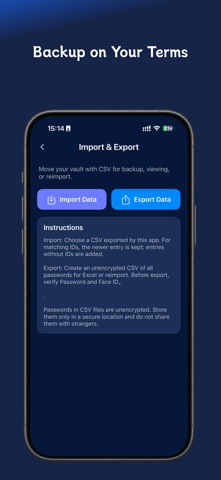
Supports CSV import and export, making it easy to migrate from other password tools or organize your vault. Exported files contain sensitive information — please keep them safe and never share them with others.
【Password Keeper Auto-Renewal VIP Service Statement】
Upon confirmation of purchase, payment will be charged to your Apple Account. Subscriptions automatically renew unless auto-renew is turned off at least 24 hours before the end of the current period. Renewal fees will be charged within 24 hours prior to the end of the current period.
To cancel auto-renewal, open your iPhone "Settings" → tap your Apple Account → "Subscriptions" → select "Password Keeper" to manage or cancel your subscription.
VIP service supports restore purchase. Once restored, valid membership benefits associated with your current Apple Account will be automatically restored.
Terms of Use: https://keychain.yinhjjw.cn/agreement/cn/index.html
Privacy Policy: https://keychain.yinhjjw.cn/policy/cn/index.html
Website: https://keychain.yinhjjw.cn