

PassVult: Passwords Manager
PassVult: Passwords Manager is made and published by Pleme PTY LTD. AppBrain is an independent app data site and isn't affiliated with Pleme PTY LTD. The app name, icon, screenshots and description belong to Pleme PTY LTD. and are shown as published on the App Store.
AppBrain's verdict
- Best rank
- #23
- Top Paid, Portugal
- Rating on App Store
- 4.60
- 20 ratings
- Last updated
- August 22, 2026
It doesn't have enough ratings yet to judge what users think. Its best ranking is #23 in Top Paid, Utilities in Portugal.
Rankings
App Store top charts- Highest rank
- #23
- Chart
- Top Paid
- Utilities
- Country
- Portugal
Competitors
Similar apps and more from Pleme PTY LTD.More from Pleme PTY LTD.


Also available on Google Play

Releases
Updates seen on the App Store- Version
- 1.36
- Launched
- November 2024
No changelog data
User feedback
Ratings and reviews on the App StoreComments on PassVult: Passwords Manager for iOS
We don't have enough comments to show example comments. Please check back later.
Technology
Found in the app by AppBrain- Price
- $2.99
- App size
- 88.9 MB
- Content rating
- High
Technologies used by PassVult: Passwords Manager
About the app and developer
About PassVult: Passwords Manager
PassVult: Passwords Manager is an utilities app developed by Pleme PTY LTD.
User Ratings
PassVult: Passwords Manager is rated 4.60 out of 5 stars. The rating is based on 20 ratings.
App Information
PassVult: Passwords Manager costs $2.99. The app size is 88.85 MB. The latest version available is 1.36. The last update was on August 22, 2026.
Technical Requirements
The app has a content rating of High Maturity. The app has been available on the App Store since November 2024.
Developer information for Pleme PTY LTD.
Address:
Frequently asked questions about PassVult: Passwords Manager
Is PassVult: Passwords Manager free?
No. PassVult: Passwords Manager costs $2.99 on the App Store.
Is PassVult: Passwords Manager still available?
Yes. PassVult: Passwords Manager is on the App Store, and the last update we saw was on August 22, 2026.
How large is PassVult: Passwords Manager?
PassVult: Passwords Manager is 88.85 MB.
Is PassVult: Passwords Manager suitable for children?
App Store gives PassVult: Passwords Manager a high maturity rating. It is meant for adults.
How do people rate PassVult: Passwords Manager?
PassVult: Passwords Manager scores 4.60 out of 5 stars, from 20 ratings on the App Store.
Who made PassVult: Passwords Manager?
PassVult: Passwords Manager was developed by Pleme PTY LTD. It is listed in the utilities category on the App Store.
Store listing
By Pleme PTY LTD., from the App Store
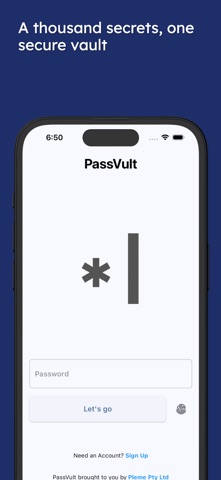
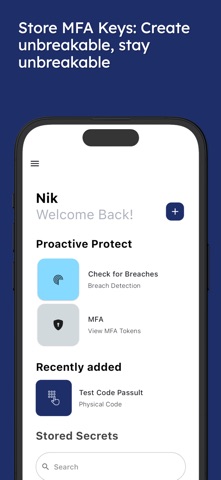
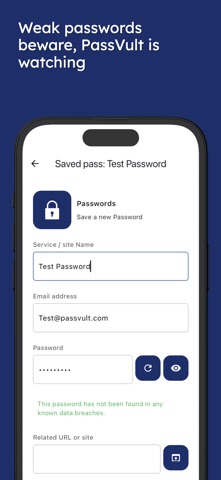


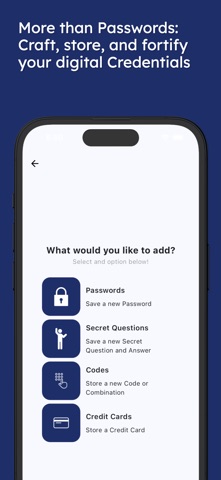
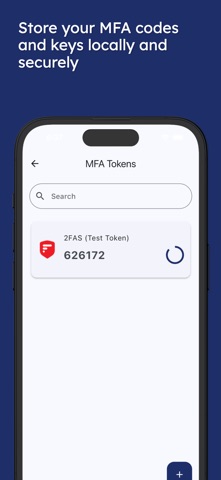


Description by Pleme PTY LTD. Written by the developer, not by AppBrain. Click to read.
Take full control of your digital security and privacy with PassVult, a comprehensive, anti-cloud password manager designed to empower users by localising all their sensitive data on their personal iPhone. Unlike traditional cloud-based password managers that leave your information vulnerable to potential breaches, PassVult puts you in complete control—your passwords, secret codes, and sensitive information are securely stored locally on your device, away from prying eyes and cloud vulnerabilities.
Why Choose PassVult?
PassVult is the perfect solution for users who prioritize data privacy, security, and control over their sensitive information. By keeping all your data localised on your iPhone, you are protected from external threats and vendor data breaches that plague cloud-based password managers. PassVult's anti-cloud philosophy means your passwords are never shared or uploaded to any server, giving you the ultimate peace of mind.
Features:
Password Manager: Securely store and manage all your passwords in one place, organized and protected by industry-leading AES encryption.
Sensitive Data Management: Keep secret questions, answers, physical codes, and credit card information safe from online threats.
Secure Password Generator: Generate complex, unique, and strong passwords to enhance the security of your online accounts.
Breach Check: Easily check if your email has been exposed in known data breaches, so you can take action before it's too late.
Local Data Storage: All data is stored locally on your iPhone—completely off the cloud and away from hackers or third-party vendors.
AES Encryption: Your sensitive information is protected by AES-256 encryption, the gold standard for securing passwords and data.
Master Key: Access to your data is safeguarded by a master password set by you, ensuring that even if someone gains access to your phone, your data remains locked.
MFA Key Storage: Store MFA and 2FA codes.
Travel Mode: Lock your vault while travelling keeping your credentials safe!
Erase code: enter your erase code at login to delete your vault in dangerous situations.
No Cloud sync: share data with other PassVult devices over Bluetooth.
Maximum Privacy with PassVult
Unlike cloud-based password managers that transfer sensitive data over the internet, PassVult ensures that your data stays completely local. This means there's no risk of third-party breaches, and your information will never be exposed in any cloud vulnerabilities or shared with any external service. Your passwords, secret questions, codes, and credit card information are only accessible to you, giving you full ownership over your data.
Frequently Asked Questions
Q: Can I reset my PassVult password if I forget it?
A: No, to maximise your security, PassVult does not allow password resets. You can change your master password while logged in, but if you forget it, your data remains locked forever.
Q: Will my PassVult data sync across devices?
A: PassVult is designed with privacy in mind, meaning your data is stored locally on your device and is not synced across multiple devices. This guarantees that your sensitive information stays contained within a single, secure environment.
Q: Will PassVult share my passwords or data with third parties?
A: Absolutely not. All your data stays securely on your device, and no information is ever shared or transmitted to third parties. With PassVult, you are the sole owner of your passwords and sensitive information.
The Power of Security in Your Hands
With PassVult, you can finally take control of your passwords and sensitive data. Say goodbye to the cloud and enjoy the benefits of an offline, secure password manager that prioritises privacy and safety. From secure password generation to encrypted storage, PassVult offers everything you need to safeguard your digital life.
Download PassVult today and experience a new level of data privacy and security.