



AppBrain's verdict
EstablishedLoved by users- Rating on App Store
- 4.64
- 754 ratings
- Last updated
- September 30, 2024
- Size
- 104.2 MB
Users love it: 4.6 stars from 754 ratings.
User feedback
Ratings and reviews on the App StoreComments on Password Manager - Secure for iOS
We don't have enough comments to show example comments. Please check back later.
Store listing
By RV AppStudios LLC, from the App StoreDescription by RV AppStudios LLC Written by the developer, not by AppBrain. Click to read.
Password Manager Vault and Secret Folder is the only app that lets you safeguard and store your data with complete privacy across all of your iOS devices. Login information is protected by AES 256-bit encryption. That means only you can access them, not your neighbor, not us, not even your best friend! Keep your files, passwords and photos safe with Secure!
Password Management
- Store passwords for your most frequently visited sites. Log in with a single tap, and then get back to browsing!
- Automatic form filling with just one tap. Never fill in another sign-up form again!
- Detects new logins and saves information so you don’t have to memorize anything.
- Powerful password generator to create un-guessable passwords.
- Secure protects everything with a master password that encrypts and decrypts your data on command.
Secret Folder Feature
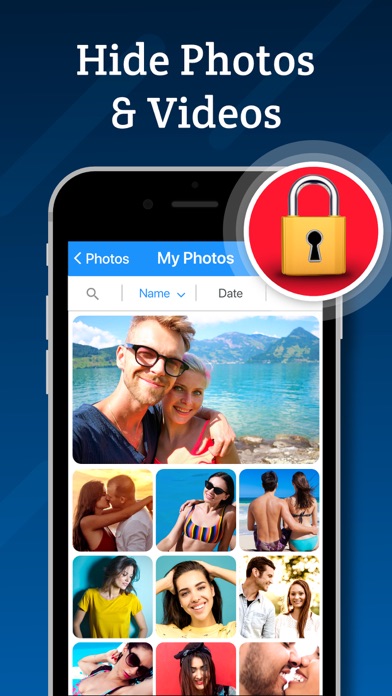
- Move images and videos into the photo vault to keep them private and secure.
- Hide your media from prying eyes. Only you can see your photos!
Browsing
- Secure web surfing with a built-in browser
- Multitab browsing keeps you more productive
- Connect Secure to Safari to quickly use stored passwords while you browse
- Autofill passwords on iOS 12
Media Storage
- Organize photos, videos and notes into albums for easy viewing.
- Powerful search and sort features let you find what you're looking for in an instant.
- Import and export from your camera, photo library or cloud storage service such as Dropbox or Google Drive.
- Innovative filters and effects to add a personal touch to your photos.
Privacy
- Your data, photos and files are accessible only by you!
- Change open applications by flipping the device. Instant privacy!
- Dummy screen to protect your privacy even when friends use your phone.
- Secure snaps photos and saves location information to log break-in attempts.
- Backup and restore device data via iTunes and iCloud.
- Compatible with Touch ID and Face ID.
New Features
- Use Picture-In-Picture to watch a video while using your iPad for other tasks.
- Use Spotlight Search to find things quickly on your iOS device.
Password Manager Vault and Secret Folder is built exclusively for iOS 10 and above.
VIP Subscription:
Password Manager Vault VIP subscription which is available on a weekly, monthly and yearly tier, auto-renewable. The yearly subscription is priced at 3.99 USD/week, 6.99 USD/month and 24.99 USD/year (or local equivalent). You will be able to use more cloud storage, photo filter effects and more for the duration of the subscription.
Payment will be charged to iTunes Account at confirmation of purchase. Subscription automatically renews for the same price and duration period as the original package unless auto-renew is turned off at least 24-hours before the end of the current period. Account will be charged for renewal within 24-hours prior to the end of the current period at the cost of the chosen package. Subscriptions may be managed by the user and auto-renewal may be turned off by going to the user's iTunes Account Settings after purchase. No cancellation of the current subscription is allowed during active subscription period. You may cancel a subscription during its free trial period via the subscription setting through your iTunes account. This must be done 24 hours before the end of the subscription period to avoid being charged. You may turn off the auto-renewal of your subscription via your iTunes Account Settings. However, you are not able to cancel the current subscription during its active period. Unused portions of free trials, if offered, will be forfeited upon purchase of a subscription.
Links to our Privacy Policy and Terms of Service:
Privacy Policy: http://www.rvappstudios.com/app-privacy-policy.html
Terms of Use: http://www.rvappstudios.com/app-privacy-policy.html#terms/
Safety and technology
Found in the app by AppBrain- Price
- Free
- App size
- 104.2 MB
- Content rating
- High
Technologies used by Password Manager - Secure
Releases
Updates seen on the App Store- Version
- 2.9.6
- Launched
- March 2017
No changelog data
Alternatives
Similar apps and more from RV AppStudios LLCAlternatives to Password Manager - Secure


More from RV AppStudios LLC


Rankings
App Store top chartsApp Store Rankings for Password Manager - Secure
About the app and developer
About Password Manager - Secure
Password Manager - Secure is an utilities app developed by RV AppStudios LLC.
User Ratings
Password Manager - Secure is rated 4.64 out of 5 stars. The rating is based on 750 ratings.
App Information
Password Manager - Secure is freely available from the App Store. The app size is 104.16 MB. The latest version available is 2.9.6. The last update was on September 30, 2024.
Technical Requirements
The app has a content rating of High Maturity. The app has been available on the App Store since March 2017.
Password Manager - Secure is made and published by RV AppStudios LLC. AppBrain is an independent app data site and isn't affiliated with RV AppStudios LLC. The app name, icon, screenshots and description belong to RV AppStudios LLC and are shown as published on the App Store.
Developer information for RV AppStudios LLC
Address: