Download Android Apps and Games
AppBrain
  • Apps
  • Apps being viewed right now Trending apps today Most popular apps All-time most downloaded apps Top rated apps
  • Intelligence ▾
    Intelligence overview → Track any Android app or your whole market
    Track & analyze
    Keyword Tracker & OptimizerTrack & improve Play rankings App Performance ReportOne-off PDF for any app StatisticsFree Android & Play market stats
    Promote your app
    Featured Apps App Links
  • Intelligence
  • Pricing
  • Dashboard
  • Sign up
  • Log in
Last updated on: 2026-06-25
App Store Apps > Productivity > Passwords-Manager
Passwords-Manager icon

Passwords-Manager

12.8
Taha Husain
0.00
0 reviews
Free

Passwords-Manager Screenshot 1 of 8
Passwords-Manager Screenshot 2 of 8
Passwords-Manager Screenshot 3 of 8
Passwords-Manager Screenshot 4 of 8
Passwords-Manager Screenshot 5 of 8
Passwords-Manager Screenshot 6 of 8
Passwords-Manager Screenshot 7 of 8
Passwords-Manager Screenshot 8 of 8
Download from the App Store

About Passwords-Manager

Passwords-Manager is an overall app developed by Taha Husain.

Download Statistics

User Ratings

The app has no ratings yet.

App Information

Passwords-Manager is FREE to download. The APK download size is 35.34 MB. The latest version available is 12.8. The last update was on June 2, 2026.

Technical Requirements

The app has a content rating of Everyone. The app has been available on Google Play June 2023.

Description
PM Lite: Password Manager is a 100% offline password management application that enables users to store, organize, and manage their passwords, notes and other sensitive information locally on their devices without relying on cloud-based services.

Highly Secure Offline Passwords Manager Application:
This application is 100% offline without even having the internet connection in this application. It stores data only on the user's device and encrypts it using AES-256 bit encryption, ensuring high security and privacy.

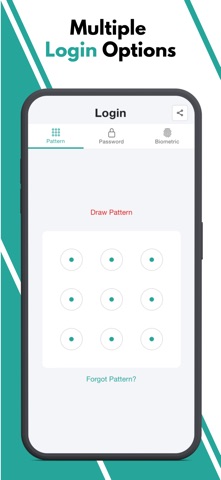
Multiple Login Types:
The application offers users the flexibility to choose from three different login types: Pattern, Passwords, and Biometric.

Malicious Login Detection:
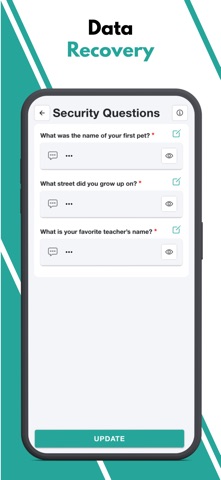
The app locks itself temporarily for a specified period of time after multiple failed login attempts, protecting against unauthorized access and brute-force attacks.

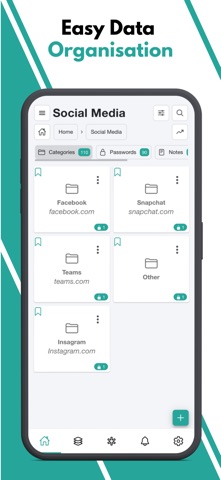
Category-wise Data Organization:
The application offers a hierarchical organization system, allowing users to categorize their data using multi-level categories. This means that users can create nested categories to structure their information effectively. Within these categories, users can store passwords, notes, and other relevant data.

Password Generator:
The application includes a Password Generator tool that assists users in creating highly secure passwords.

Weak & Repeated Passwords Alert:
To enhance password security and assist users in managing their passwords effectively, the application provides a dedicated feature that lists all repeated and weak passwords separately.

Multiple View Types:
The application incorporates a user interface (UI) and user experience (UX) feature that allows users to choose between two different views for displaying their data: tile view or list view.

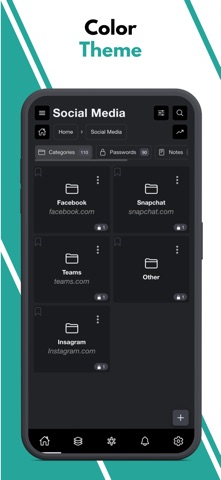
Multiple Color Themes:
At present, this application provides support for two distinct color themes: "Dark" and "Light." Users have the option to choose between these two themes based on their preference and visual comfort.

Multiple Language Support:
At present, the application provides support for a wide range of languages, surpassing 14 language options.

Export Data:
Since the Passwords Manager application operates entirely offline, transferring data to a new device requires a manual export of their data from the current device and securely stores it somewhere before uninstalling the application.

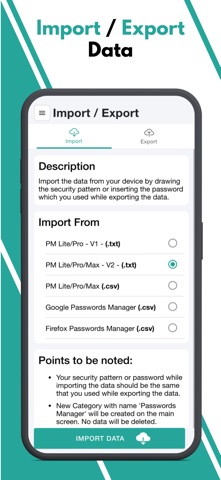
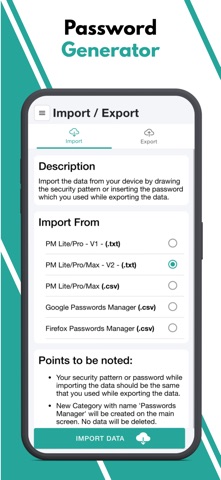
File Import Data:
Passwords Manager allows users to effortlessly import their passwords from various file formats. Whether it's a Google CSV file, a Passwords Manager (.txt) file, or a Passwords Manager (.csv) file, the application provides the flexibility to import data from other sources.

Bookmark:
The application provides users with the ability to bookmark their most frequently accessed data, enabling quick and convenient access whenever needed..

Auto Logout Application:
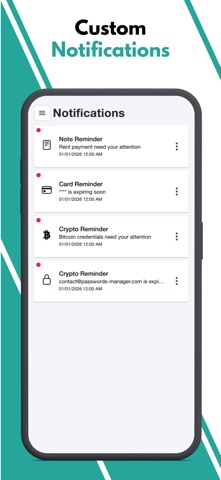
This functionality ensures that if the application is left unattended or unused for a specified period, it will automatically log out to protect sensitive information from unauthorized access.
Show more Show less

More data about Passwords-Manager

Price Free to download
Rating No ratings
Ranking Not ranked
Version 12.8
App download size 35.3 MB
Suitable for Everyone

Alternative downloads for the Passwords-Manager app

My Password Manager icon My Password Manager
Anish Mathew
0.0
Free
Keybox - Password Manager icon Keybox - Password Manager
ale farina
0.0
Free
Chat: Talk With Companies icon Chat: Talk With Companies
Text, Inc
5.0
Free
2 ratings
My Passwords Manager icon My Passwords Manager
Nikos Grammatikopoulos
4.7
Free
3.9K ratings
Go HWS Mobile icon Go HWS Mobile
HealthTrust Workforce Solutions
4.8
Free
3.7K ratings
My Tasks: Business Planner icon My Tasks: Business Planner
Ruslan Nasirov
4.9
Free
67 ratings
Password Manager' icon Password Manager'
广栋 莫
4.4
Free
16.8K ratings
FileBrowserGO: File Manager icon FileBrowserGO: File Manager
Stratospherix Ltd
4.4
Free
691 ratings

More from Taha Husain

PM Pro: Password Manager icon PM Pro: Password Manager
Taha Husain
5.0
$0.99
1 ratings

Changelog of Passwords-Manager

No changelog data

Developer information for Taha Husain

Taha Husain

Address:

Share Passwords-Manager

Comments on Passwords-Manager for iOS

We don't have enough comments to show example comments. Please check back later.

App Store Rankings for Passwords-Manager

This app is not ranked

Technologies used by Passwords-Manager

My Password Manager icon My Password Manager
Keybox - Password Manager icon Keybox - Password Manager
Chat: Talk With Companies icon Chat: Talk With Companies
My Passwords Manager icon My Passwords Manager
Go HWS Mobile icon Go HWS Mobile
My Tasks: Business Planner icon My Tasks: Business Planner
Password Manager' icon Password Manager'
FileBrowserGO: File Manager icon FileBrowserGO: File Manager

Back to top
AppBrain Intelligence premium content

Subscribe now to get full and unlimited access to AppBrain Intelligence. You'll have access to:

  • App Intelligence dashboard (performance timeline, competitor comparison, country rankings, insight cards)
  • Detailed ranking data per app
  • Full timeline per developer
  • Device market shares data per country
1 Month

$75/mo
(billed every month)

SAVE 0%
Subscribe
3 Months

$65/mo
($195 billed every 3 months)

SAVE 13%
Subscribe
1 Year

$57.50/mo
($690 billed every year)

SAVE 23%
Subscribe
Each subscription will automatically renew 3 days before the expiration date for the same time period. Subscriptions can be cancelled at any time before the renewal.

AppBrain is a directory focused on discovering great apps and games. We give statistics, rankings and search options that Google Play and the App Store don't have. All trademarks are owned by their respective owners. AppBrain doesn't offer APKs or binaries, and always lets users install the official version from Google Play or the App Store.

More apps

  • Top Android apps being viewed
  • Pix Launcher – Pixel Style UI
  • Leveling App: Habit Tracker XP
  • AI Finance Tracker & Budget

Android Statistics

  • Android statistics
  • Google Play Developer stats
  • Trending Android Apps
  • Top popular Apps
  • Buy the best Android phone

About AppBrain

  • Contact
  • Privacy
  • Documentation
  • DMCA takedowns
  • Articles
  • Blog
  • Free webpage for your Android app
© 2010-2026 - AppBrain