

Paste Keyboard | MagicBoard AI
Paste Keyboard | MagicBoard AI is made and published by Edouard Barbier. AppBrain is an independent app data site and isn't affiliated with Edouard Barbier. The app name, icon, screenshots and description belong to Edouard Barbier and are shown as published on the App Store.
AppBrain's verdict
Loved by users- Rating on App Store
- 4.61
- 252 ratings
- Last updated
- September 12, 2026
Users love it: 4.6 stars from 252 ratings.
Rankings
App Store top chartsApp Store Rankings for Paste Keyboard | MagicBoard AI
Competitors
Similar apps and more from Edouard BarbierAlternatives to Paste Keyboard | MagicBoard AI








More from Edouard Barbier





Releases
Updates seen on the App Store- Version
- 2026.10
- Launched
- September 2022
No changelog data
User feedback
Ratings and reviews on the App StoreComments on Paste Keyboard | MagicBoard AI for iOS
We don't have enough comments to show example comments. Please check back later.
Technology
Found in the app by AppBrain- Price
- Free
- App size
- 43.4 MB
- Content rating
- Everyone
Technologies used by Paste Keyboard | MagicBoard AI
About the app and developer
About Paste Keyboard | MagicBoard AI
Paste Keyboard | MagicBoard AI is a productivity app developed by Edouard Barbier.
User Ratings
Paste Keyboard | MagicBoard AI is rated 4.61 out of 5 stars. The rating is based on 250 ratings.
App Information
Paste Keyboard | MagicBoard AI is freely available from the App Store. The app size is 43.41 MB. The latest version available is 2026.10. The last update was on September 12, 2026.
Technical Requirements
The app has a content rating of Everyone. The app has been available on the App Store since September 2022.
Developer information for Edouard Barbier
Address:
Frequently asked questions about Paste Keyboard | MagicBoard AI
Is Paste Keyboard | MagicBoard AI free?
Yes. Paste Keyboard | MagicBoard AI is free on the App Store.
Is Paste Keyboard | MagicBoard AI still available?
Yes. Paste Keyboard | MagicBoard AI is on the App Store, and the last update we saw was on September 12, 2026.
How large is Paste Keyboard | MagicBoard AI?
Paste Keyboard | MagicBoard AI is 43.41 MB.
Is Paste Keyboard | MagicBoard AI suitable for children?
App Store rates the content of Paste Keyboard | MagicBoard AI as suitable for everyone.
How do people rate Paste Keyboard | MagicBoard AI?
Paste Keyboard | MagicBoard AI scores 4.61 out of 5 stars, from 252 ratings on the App Store.
Who made Paste Keyboard | MagicBoard AI?
Paste Keyboard | MagicBoard AI was developed by Edouard Barbier. It is listed in the productivity category on the App Store.
What are the best alternatives to Paste Keyboard | MagicBoard AI?
People looking at Paste Keyboard | MagicBoard AI also look at these productivity apps: Clipboard - Paste Keyboard, Lucid Markdown Keyboard notes, Auto Paste Keyboard: Autopaste, Prodvigate YouTube Promotion, Shortify: Summarize Anything.
Store listing
By Edouard Barbier, from the App Store




Description by Edouard Barbier Written by the developer, not by AppBrain. Click to read.
We all copy and paste the same things again and again. Email replies, links, forms, video titles, app links, you name it. MagicBoard saves you time by keeping your most used text, links, and snippets inside your keyboard so you can paste them anywhere with just one tap.
### Who it is for
- Anyone who types a lot: From filling forms to replying to DMs and emails, your saved snippets are always ready.
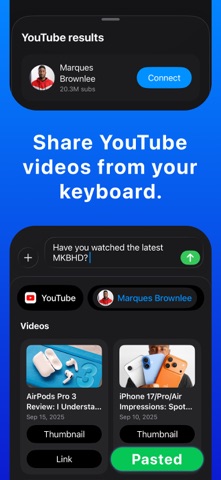
- Creators: Quickly share YouTube videos or channel links, even as stickers for Instagram.
- Developers: Connect your apps and instantly share links, ask for reviews, or send promo text.
### Why choose MagicBoard
- User experience first. Simple, fast and reliable.
- A design crafted with love, improved year after year.
- Privacy first. Your snippets stay private on your device.
- Time saved adds up. A few seconds saved each day becomes hours every year.
### Features
- Organize snippets into folders and access them from the keyboard.
- Auto paste or copy snippets with one tap.
- Translate snippets instantly with Apple Intelligence running on your device.
- Generate fresh variations of your snippets with AI so you never sound repetitive.
- Clipboard manager to import and reuse text faster.
- YouTube integration for creators. Share video links, thumbnails or stickers in seconds.
- App Store integration for developers. Share app links or request reviews right from the keyboard.
MagicBoard was first built for personal use. I relied on it every day long before it became public on the App Store.
Over the years it has saved me hundreds of hours. Now it can do the same for you.
T&Cs and privacy policy available here: https://www.edouardbarbier.com/apps/fast-paste/privacy/
TLDR: No data collected, besides a few Analytics events to understand how the features are being used so I can improve the app in the future.