

Paste2Pic: Markdown to Image
Paste2Pic: Markdown to Image is made and published by Han Zhu. AppBrain is an independent app data site and isn't affiliated with Han Zhu. The app name, icon, screenshots and description belong to Han Zhu and are shown as published on the App Store.
AppBrain's verdict
- Rating on App Store
- 5.00
- 2 ratings
- Last updated
- August 25, 2026
- Size
- 4.23 MB
It doesn't have enough ratings yet to judge what users think.
User feedback
Ratings and reviews on the App StoreComments on Paste2Pic: Markdown to Image for iOS
We don't have enough comments to show example comments. Please check back later.
Store listing
By Han Zhu, from the App Store


Description by Han Zhu Written by the developer, not by AppBrain. Click to read.
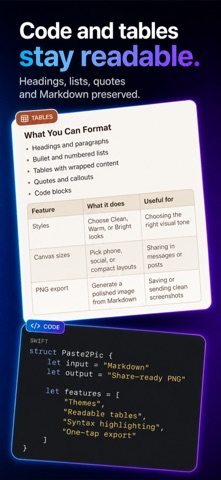
Paste2Pic turns copied Markdown and structured text into polished, share-ready PNG images on iPhone. Paste your content, preview it instantly, choose a reading style, and export one clean long image that keeps headings, lists, tables, quotes, and code easy to read.
KEEP THE FORMATTING
Copied content often loses its structure when moved into messages, email, notes, or social apps. Paste2Pic preserves the parts that make long answers readable:
• Headings and paragraphs
• Bold and inline formatting
• Ordered and unordered lists
• Quotes and dividers
• Markdown tables
• Fenced code blocks
• Common math and symbol notation
MADE FOR LONG CONTENT
Normal screenshots are not built for long, structured answers. Paste2Pic renders the full result as one continuous image, so you can share explanations, study notes, technical steps, comparisons, plans, and summaries without stitching multiple screenshots together.
PREVIEW BEFORE YOU EXPORT
Edit the pasted Markdown and see the rendered result before generating the image. Choose Clean, Warm, or Bright reading styles, then select a device-aware, compact, or social-friendly canvas width.
SHARE OR SAVE—YOUR CHOICE
Generate a PNG, then send it through the iOS share sheet or save it to Photos. Sharing does not automatically create an extra copy in your photo library.
BUILT FOR STRUCTURED CONTENT
Paste2Pic is made for students, writers, engineers, consultants, creators, and anyone who regularly shares long AI-generated content.
COPY. PASTE. SHARE.
No complicated editor. No screenshot stitching. Just one readable image, ready to send.
Safety and technology
Found in the app by AppBrain- Price
- Free
- App size
- 4.23 MB
- Content rating
- Everyone
Technologies used by Paste2Pic: Markdown to Image
Releases
Updates seen on the App Store- Version
- 1.04
- Launched
- July 2026
No changelog data
Alternatives
Similar apps and more from Han ZhuAlternatives to Paste2Pic: Markdown to Image


Rankings
App Store top chartsApp Store Rankings for Paste2Pic: Markdown to Image
About the app and developer
About Paste2Pic: Markdown to Image
Paste2Pic: Markdown to Image is an utilities app developed by Han Zhu.
User Ratings
Paste2Pic: Markdown to Image is rated 5.00 out of 5 stars. The rating is based on 2 ratings.
App Information
Paste2Pic: Markdown to Image is freely available from the App Store. The app size is 4.23 MB. The latest version available is 1.04. The last update was on August 25, 2026.
Technical Requirements
The app has a content rating of Everyone. The app has been available on the App Store since July 2026.
Developer information for Han Zhu
Address:
Frequently asked questions about Paste2Pic: Markdown to Image
Is Paste2Pic: Markdown to Image free?
Yes. Paste2Pic: Markdown to Image is free on the App Store.
Is Paste2Pic: Markdown to Image still available?
Yes. Paste2Pic: Markdown to Image is on the App Store, and the last update we saw was on August 25, 2026.
How large is Paste2Pic: Markdown to Image?
Paste2Pic: Markdown to Image is 4.23 MB.
Is Paste2Pic: Markdown to Image suitable for children?
App Store rates the content of Paste2Pic: Markdown to Image as suitable for everyone.
How do people rate Paste2Pic: Markdown to Image?
Paste2Pic: Markdown to Image scores 5.00 out of 5 stars, from 2 ratings on the App Store.
Who made Paste2Pic: Markdown to Image?
Paste2Pic: Markdown to Image was developed by Han Zhu. It is listed in the utilities category on the App Store.
What are the best alternatives to Paste2Pic: Markdown to Image?
People looking at Paste2Pic: Markdown to Image also look at these utilities apps: Markdown-IMG, Doable: Reach Big Goals, Markdown to Image Card- MDCard, Neighborhood Check, Metronome - Tempo & Rhythm.